


As of yesterday Outlook stopped opening in Firefox (it does open in Edge)
Firefox opens and click on Outlook link. Tab opens and progress bar works its way from left to right to almost end point and then stops. Message under the bar says "open your mailbox". Have used Outlook in Firefox for years, so this was a first for me. Tries opening Outlook in MS Edge and it opened fine so this seems to be a Firefox problem.
Did try the clear history procedure and it made no difference.
Know I can just reinstall Firefox but I would lose all customization.
Any good advice would be appreciated...
Toutes les réponses (1)

Hello,
Try Firefox Safe Mode to see if the problem goes away. Firefox Safe Mode is a troubleshooting mode that temporarily turns off hardware acceleration, resets some settings, and disables add-ons (extensions and themes).
If Firefox is open, you can restart in Firefox Safe Mode from the Help menu:
- Click the menu button
 , click Help
  and select Restart with Add-ons Disabled.
If Firefox is not running, you can start Firefox in Safe Mode as follows:
- On Windows: Hold the Shift key when you open the Firefox desktop or Start menu shortcut.
- On Mac: Hold the option key while starting Firefox.
- On Linux: Quit Firefox, go to your Terminal and run firefox -safe-mode
(you may need to specify the Firefox installation path e.g. /usr/lib/firefox)
When the Firefox Safe Mode window appears, select "Start in Safe Mode".
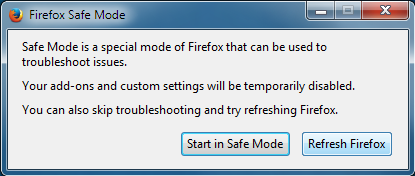
If the issue is not present in Firefox Safe Mode, your problem is probably caused by an extension, theme, or hardware acceleration. Please follow the steps in the Troubleshoot extensions, themes and hardware acceleration issues to solve common Firefox problems article to find the cause.
To exit Firefox Safe Mode, just close Firefox and wait a few seconds before opening Firefox for normal use again.
If Safe Mode didn't help, delete ALL references to Outlook, as shown under the heading 'How do I remove a single website from my history?' in this article - Delete browsing, search and download history on Firefox, then try the site (not from an old bookmark) again. Note: It may take a few minutes to complete the deletion.
When you figure out what's causing your issues, please let us know. It might help others with the same problem. Thank you!