


Since latest update, all my subfolders have disappeared and no messages showing as being in in box, help please

Since latest update of todays date, all my subfolders have disappeared and no messages showing as being in the in box or deleted. Any help appreciated, thanks
پاسخها (8)
This is too poor information to understand your problem. A screenshot of your Thunderbird folder pane might be helpful
ویرایش شده توسط Mapenzi
Help > Troubleshoot Mode better?

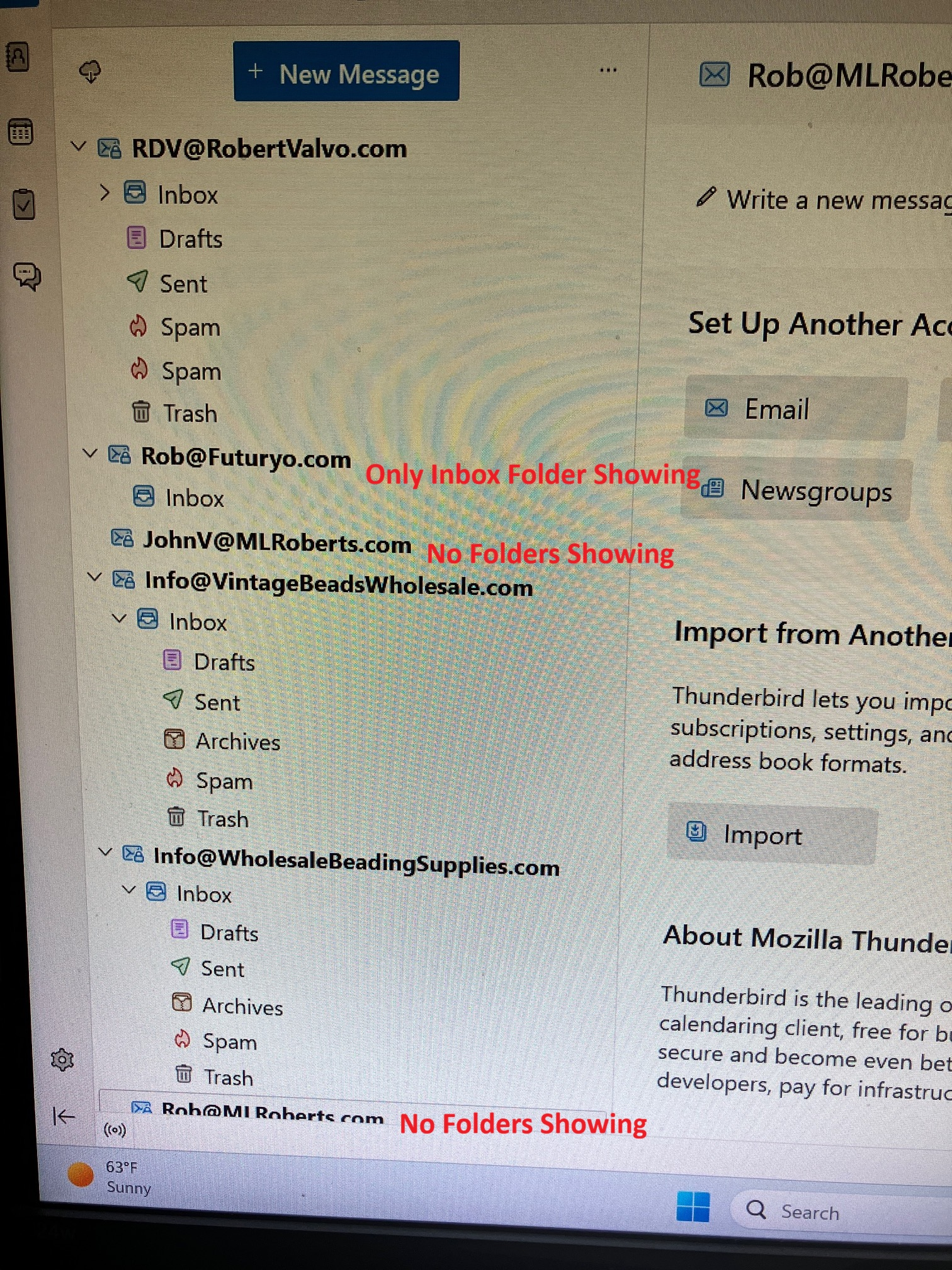
Hello: I am experiencing the same issue... Folders disappearing and reappearing or not appearing at all. Each time I open and close Thunderbird it changes with different email addresses and different folders appearing / disappearing and or being out of order. It started with one email address about a week ago (after a Thunderbird Update - Now using version X64 - 159.0) and now it is occurring with multiple email addresses.... (see attached screenshot) I use IMAP email settings and a Windows 11 Home computer operating system. Please let me know if you need any further information to troubleshoot or resolve this known issue... Thank you for attention to this matter. Rob
I have also tried Troubleshooting mode and the problems persist in trouble shooting mode. I also uninstalled and re-installed email accounts and Thunderbird in full and the problem still persists...

Same problem too.
RDV6, yes my screen looks like you screenshot. It dosnt make any sense, one minute the folders are all showing and then they arent. Im also running after an update yesterday the X64. IMAP and Windows 11 as well. Frustrating doesn't cover it. Be nice if Mozilla could help. Thanks for your reply.
Try the following solution (without guarantee for success): open Thunderbird, go to Help > Troubleshooting Information > Profile Folder > Open Folder, then quit Thunderbird. In the profile folder search for the file "folderCache.json" and delete it. Restart Thunderbird
Mapenzi, many thanks for your suggestion, unfortunately it hasn't worked other than I can now see my inbox contents. Many thanks for your efforts.
I have found a work around to bring the folders back into view... Right click on the account name in the left pane that has its folders missing. Subscribe. Click OK. The missing folders will reappear and FB will then resync. Not a solution and resyncing can take a while.
Also, while we are waiting for a fix...don't close FB, just minimise it. The problem only occurs when starting FB.