


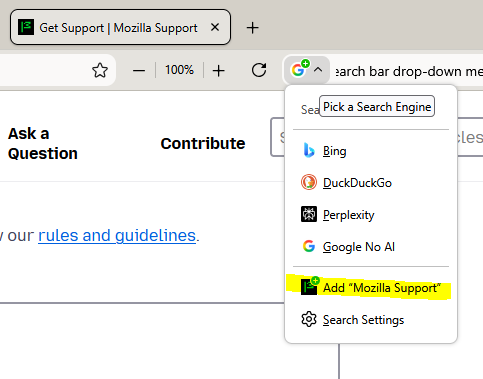
How do I remove "add sitename"* from Search bar drop-down menu?

How do I remove "add sitename"* from Search bar drop-down menu?
- sitename refers to whatever site you are on at the time
I have no use for this option and find it overly invasive. I have searched everywhere for solutions and have not found any that work. If it is not currently "removable", please make it so.
Thanks
پاسخها (2)
It is the way websites offer their functionality to be added as custom search providers, see How to search IMDB, Wikipedia and more from the address bar — I'm not aware of any preference to have them ignored, as it's part of the platform APIs: developer.mozilla.org/docs/Web/OpenSearch
I think you might need to ask around for some custom CSS to hide this in the UI.
بخشها
Thank you for taking a moment of your time to respond. I had a look at the links you provided and this is a bigger issue than I expected so I'll mark this problem as solved.