


Windows 10 reached EOS (end of support) on October 14, 2025. If you are on Windows 10, see this article.

جست‌وجوی پشتیبانی موزیلا

از کلاهبرداری‌های پشتیبانی اجتناب کنید. ما هرگز از شما نمی‌خواهیم که با شماره تلفن تماس بگیرید یا پیامک ارسال کنید یا اطلاعات شخصی خود را هم‌رسانی کنید. لطفاً فعالیت‌های مشکوک را با استفاده از گزینه «گزارش سوءاستفاده» گزارش دهید.

مانند نخ كشيده
حل شده

Firefox ignores css style for hamburger menu after updating from 150.0.3 to 151

Piterk

I have custom userChrome file that made my history and hamburger menu (application menu / settings) text and distances smaller since Firefox introduced this ugly feature, trying to be cool in windows 10 times. Nowadays even windows 11 brings back compact mode but firefox still uses huge spacing. I just fixed issue with custom CSS and forgot about it. Unfortunately, after updating to FF 151, my CSS is ignored and I am forced to new ugly context menu. What is weird, I still have good small pacing when right-clicking pages, UI elements and when I enter bookmarks. Only places that ignore my CSS are hamburger menu for settings and list under history view. I do not really understand this code, I just copied it from someone else. Can someone help me fix this issue?

menupopup > menu, menupopup > menuitem{ padding-block: 3px !important; min-height: 0px !important; }

root{

--arrowpanel-menuitem-padding: 0px !important; }
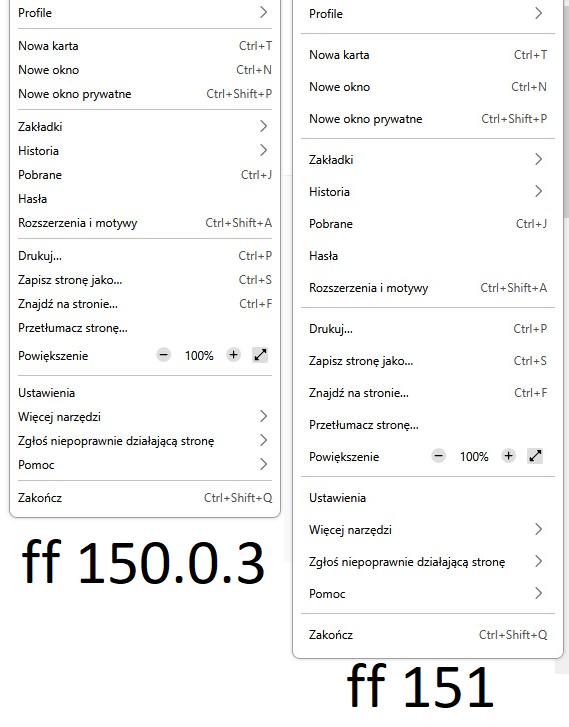
I have custom userChrome file that made my history and hamburger menu (application menu / settings) text and distances smaller since Firefox introduced this ugly feature, trying to be cool in windows 10 times. Nowadays even windows 11 brings back compact mode but firefox still uses huge spacing. I just fixed issue with custom CSS and forgot about it. Unfortunately, '''after updating to FF 151, my CSS is ignored and I am forced to new ugly context menu'''. What is weird, '''I still have good small pacing when right-clicking pages, UI elements and when I enter bookmarks. Only places that ignore my CSS are hamburger menu for settings and list under history view'''. I do not really understand this code, I just copied it from someone else. Can someone help me fix this issue? menupopup > menu, menupopup > menuitem{ padding-block: 3px !important; min-height: 0px !important; } :root{ --arrowpanel-menuitem-padding: 0px !important; }
تصاویر صفحه پیوست شده

ویرایش شده توسط Piterk

پاسخ‌ها (1)

بخش‌ها

nevermind, I found solution on reddit. Just replace --arrowpanel-menuitem-padding: 0px !important; with: --panel-menuitem-padding: 0px !important;

ویرایش شده توسط Piterk

یک سؤال بپرسید

شما باید برای پاسخ به پست‌ها وارد حسابتان شوید. اگر هنوز حسابی ندارید، لطفاًً یک سؤال جدید آغاز کنید.