این رشته بایگانی شد.
اگر به کمک نیاز دارید لطفاًً یک سؤال بپرسید.

بایگانی شده
Capturing Logs after Running Troublshooting Mode

I had an issue where my browser disappeared. Here are specifics for my installation.
Name Firefox Version 142.0.1 Build ID 20250827004350 Distribution ID raspberrypios User Agent Mozilla/5.0 (X11; Linux x86_64; rv:142.0) Gecko/20100101 Firefox/142.0 OS Linux 6.12.62+rpt-rpi-2712 #1 SMP PREEMPT Debian 1:6.12.62-1+rpt1~bookworm (2026-01-19)
I relaunched and then restored previous session. After that, I searched open tabs, but when I selected a tab that was reported to be opened, it was not restored. I went to troubleshooting mode and it worked fine suggesting some issue with an extension. What, if any logs could I capture to help debug? thanks
I had an issue where my browser disappeared. Here are specifics for my installation.
Name Firefox
Version 142.0.1
Build ID 20250827004350
Distribution ID raspberrypios
User Agent Mozilla/5.0 (X11; Linux x86_64; rv:142.0) Gecko/20100101 Firefox/142.0
OS Linux 6.12.62+rpt-rpi-2712 #1 SMP PREEMPT Debian 1:6.12.62-1+rpt1~bookworm (2026-01-19)
I relaunched and then restored previous session. After that, I searched open tabs, but when I selected a tab that was reported to be opened, it was not restored. I went to troubleshooting mode and it worked fine suggesting some issue with an extension. What, if any logs could I capture to help debug? thanks
پاسخها (1)

rmschaller said
I had an issue where my browser disappeared. Here are specifics for my installation. Name Firefox Version 142.0.1 Build ID 20250827004350 Distribution ID raspberrypios User Agent Mozilla/5.0 (X11; Linux x86_64; rv:142.0) Gecko/20100101 Firefox/142.0 OS Linux 6.12.62+rpt-rpi-2712 #1 SMP PREEMPT Debian 1:6.12.62-1+rpt1~bookworm (2026-01-19) I relaunched and then restored previous session. After that, I searched open tabs, but when I selected a tab that was reported to be opened, it was not restored. I went to troubleshooting mode and it worked fine suggesting some issue with an extension. What, if any logs could I capture to help debug? thanks
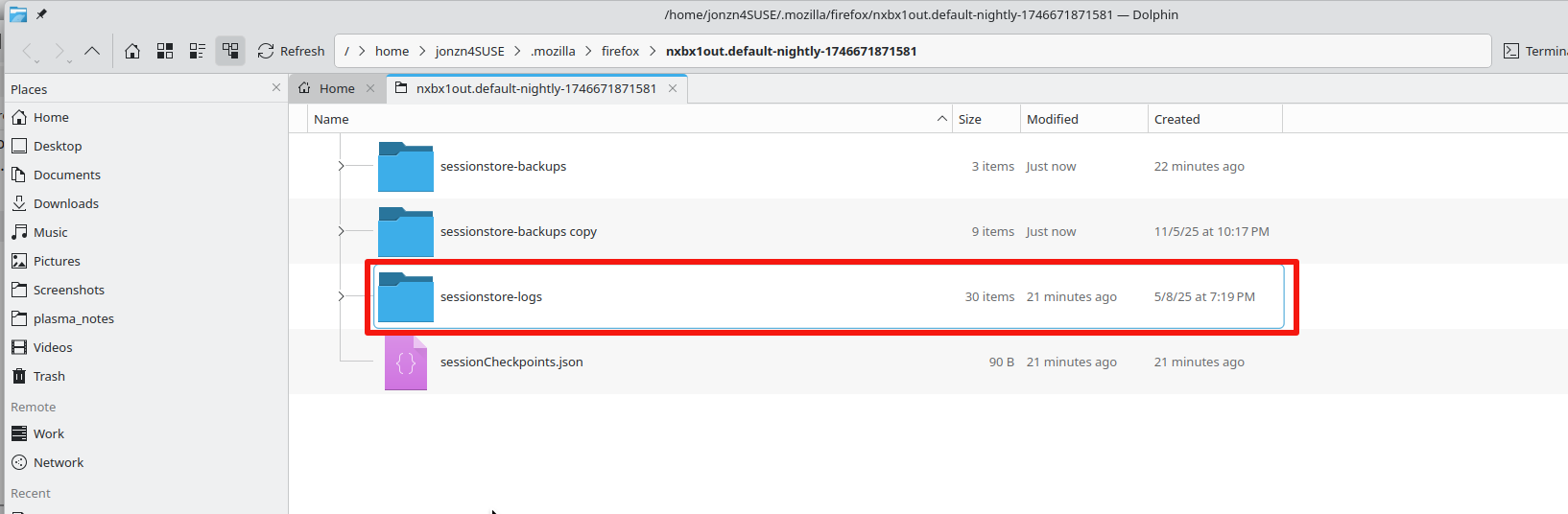
There are logs in your profile folder. see screenshot This link can help if you're trying to restore your session. https://support.mozilla.org/en-US/questions/1557927