


Can receive, but not send, emails in Thunderbird

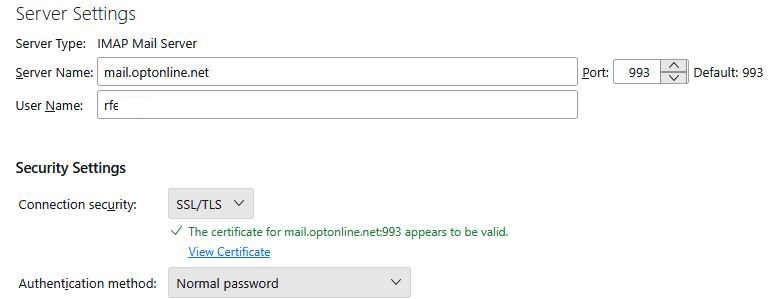
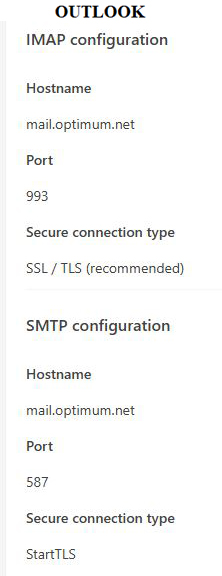
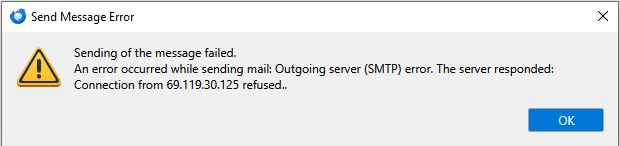
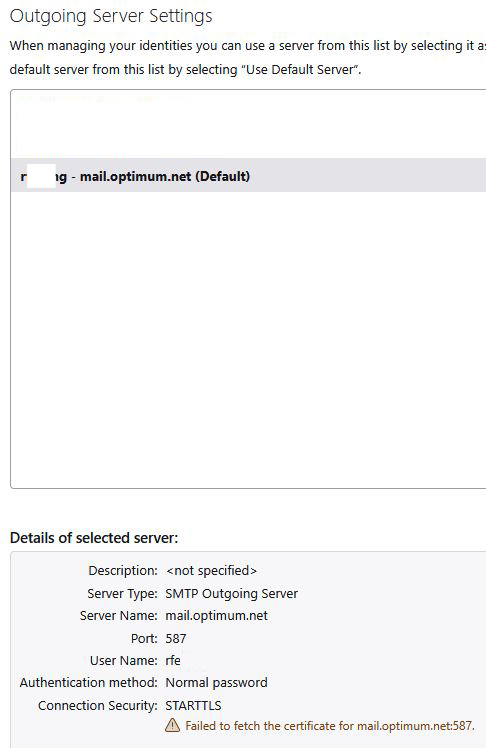
After about 20 years of using Thunderbird, since 11/24/25 I can longer send emails [see error message below] I can receive emails without a problem. [see server settings below] Since I can not resolve this problem, I have installed [new] Outlook and am able to receive & send mail with, seemingly, the same server settings. I don't understand the message about failing to find the 'certificate'. I did not update Thunderbird or Windows in the days before this problem started. After several hours of troubleshooting, my ISP has concluded that the problem is not on their end. Since Outlook works OK, I assume they are correct.
پاسخها (3)

The Outgoing server should be mail.optonline.net, not mail.optimum.net. Also, for 'Connection Security' use SSL/TLS, port 465, and 'Authentication method' is 'Normal password'.
Thanks for the response but: 1. Authentication method' is 'Normal password' already 2. The Outgoing server was mail.optonline.net for many years, Optimum support said it should be mail.optimum.net. That works on Outlook. 3. The Connection Security: all choices were tried during Optimum support effort to no avail. 4. Numerous Port values were also tried.
The 'working' Outlook settings seem to be the same as the non-working Thunderbird config
No one here really cares if it works on Outlook. One of the primary reasons things "just work" on Outlook is it opts for minimum security. Thunderbird opts for maximum, and the inconveniences that6 go along with that.
This error message you posted to this forum is clear. You can't use SSL/TLS with this server name because a valid certificate can not be obtained from the server to encrypt the connection. No amount of "it works with Outlook" will change that fact.
I looked at your providers web site but found exactly zero relevant details posted. Google offers settings on the support pages of just about every mail client, but the provider that determines what settings work does not publish them publicly. handy for the rest of us, good thing they have loyal paying customers to support their hubris.
What I do see from these settings you posted is you are connecting on Port 587. Port 587 is the standard, recommended port for sending email (SMTP submission) because it requires authentication and uses STARTTLS encryption to secure the connection. However a valid certificate can not be obtained from the server so by definition is can not work.
I tried testing the server on that port. https://www.immuniweb.com/ssl/optimum.net/ympAPJkt/ The test failed as the server was not accepting connections on that port, or port 465 which is an unencrypted connection. This usually means you live in the USA where providers routinely restrict you to sending mail only if you are connected using their service. My experience so far with this is this only happens in the USA. The recent explosion in the popularity of VPNs leads to issues where the mail server refuses to allow you to send mail as you are not connected with the ISP's service, but with the VPN. So I am guessing you have a shiny new VPN and your provider is refusing to play.