


It seems I can no longer set a link to open in same tab. There is a Government webskite that won't let me open a link in a new tab and I can no longer find a way to stop a link being opened in a new tab

It seems I can no longer set a link to open in same tab. There is a Government webskite that won't let me open a link in a new tab and I can no longer find a way to stop a link being opened in a new tab
Chosen Solution
Alright, so on that login page:
1. header
- government logo or "help" link open in same tab
2. sign in
- "back" links in same tab - "sign in with digital id" button is same tab - "passkeys" is new tab - "forgot" username/password is same tab - "create mygov account" is same tab - "sign in" button also triggers into the same tab
3. footer
- all links in footer ("terms", "privacy", "copy", "access"…) are new tabs.
If you see it differently, it was not as the page was coded, and might be something local to you (addon, keyboard/mouse tweak, potentially some blocked content).
Check if the same happens when you log in using a Private Window, and whether you see the same if you restart into Troubleshoot Mode (from Help menu).
All Replies (10)

cliff.letcher66, one workaround to prevent a link from opening in a new tab might be to right-click the link, select "Copy Link" then paste the copied URL into the current tab's address bar and press enter?
This has not worked for me. Can we not have the choice i n the setup as it was previously Cliff.
Hi not sure if you have tried this. I have spotted out the options I have enabled,
By the way what Gov site, maybe I can check if it not a 'logged in' link
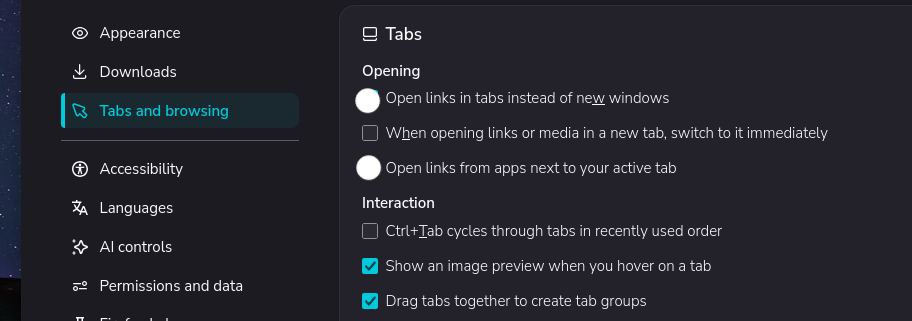
I'll Check them out. Sorry it a Logged in Gov. site so I can't provide that. Cliff.
Does it work on links on the site before you log in ??
The only link from the page where I login is the help link and it will open in new tabs. My understanding is that there is probably a security concern so the the site restricts opening links in new tabs. Cliff
Can you provide the url for the site please.
I don't use a Mac but the default HTML is that links open in the same tab unless otherwise directed to.
HTML Links - The target Attribute
By default, the linked page will be displayed in the current browser window. To change this, you must specify another target for the link.
https://w3schools.dev/html/html_links.asp
You may like to check your about:config settings
Modified by amoun
https://login.my.gov.au/las/mygov-login?execution=e1s1
Is this what you are looking for Cliff
Chosen Solution
Alright, so on that login page:
1. header
- government logo or "help" link open in same tab
2. sign in
- "back" links in same tab - "sign in with digital id" button is same tab - "passkeys" is new tab - "forgot" username/password is same tab - "create mygov account" is same tab - "sign in" button also triggers into the same tab
3. footer
- all links in footer ("terms", "privacy", "copy", "access"…) are new tabs.
If you see it differently, it was not as the page was coded, and might be something local to you (addon, keyboard/mouse tweak, potentially some blocked content).
Check if the same happens when you log in using a Private Window, and whether you see the same if you restart into Troubleshoot Mode (from Help menu).
I have no problem opening links in same tab in a private window. Thanks for your help. Cliff