


Abnormal App opening time

Hi , I am using the MacBook Pro M5 which is running with macOS Tahoe 26.5 . I have installed Thunderbird mail with version 150.0.2 . After the initial installation with only one account with few mails in the inbox I found the App opening time is abnormally high & is more than 1 minutes . I have removed the mail App few times & re installed it ( even I have re download the app from net again) , but the problem remain same .
I have removed the old folder & files from - ~/Library/Thunderbird/ , ~/Library/Application Support/Thunderbird/ , ~/Library/Caches/Thunderbird/ , org.mozilla.thunderbird from ~/Library/Preferences/. before the re installation & re started the laptop , but no improvement in results .
Also in mail setting references → Unchecked the option - Enable Global Search and Indexer Disable all Extensions and Themes under Tools → Add‑ons & Themes (No Extensions is installed) .
Just to inform that the apple mail is working fine in this laptop .
After all the above trails the results are same , the app once quit & re start - it takes around 1.5 minutes to open after which the app works normally with out any problem . Please suggest if any solution is available for this problem . Best Regards Gautam Banerjee
All Replies (9)
Did you test running Thunderbird in 'troubleshoot mode'? Press the Alt (Option) key and launch Thunderbird.... https://support.mozilla.org/en-US/kb/troubleshoot-mode-thunderbird
Tried in troubleshoot mode , but same situation , app takes long time to launch
I guess that you start Thunderbird from its icon in the Dock. Do you use any antivirus software? Next time before launching Thunderbird open the Activity Monitor app and watch the %CPU during the minute Thunderbird takes to open.
I don't use any antivirus software in my Laptop . The CPU is the start shows only 8 % then it turns to "not responding" for around a minute & then once App opens its shows 1% , refers to the enclosed screen shots
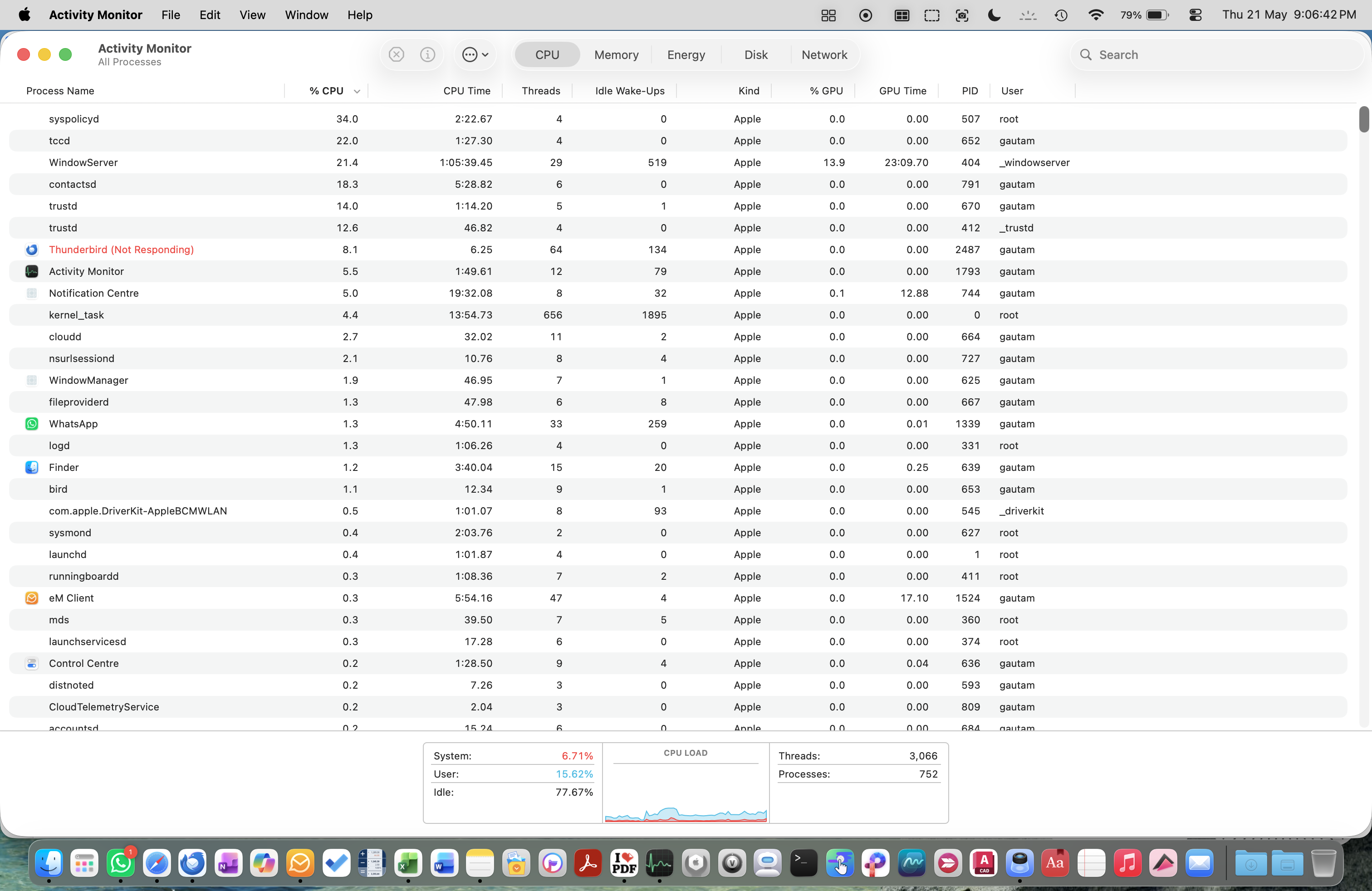
This is really odd and I have no ideas what is happening. From which site did you download your Thunderbird copy? Did you really quit the Thunderbird app before removing the entire "Thunderbird" folder from your user library so that Thunderbird on next start creates a new virgin profile without recycling any files from the old profile. Testing in a new profile is the "gold standard" when trying to eliminate the culprit. You should also have a look in Tools > Developer Tools > Error Console ... Maybe there is a hint concerning Thunderbird non responding. Also go to Settings > General > Network & Disk Space > Connection > Settings and choose "No Proxy"
Muudetud Mapenzi poolt
I have downloaded the Thunderbird directly from-https://www.thunderbird.net . Even I have repeated the downloads three different time & re installed them after removing all old installation files from below folders from "user library" the files removal details are as follows :
- Library/Thunderbird
- Library/Application Support/Thunderbird
- Library/Caches/Thunderbird
,* Library/Preferences/.-org.mozilla.thunderbird
Under - Tools > Developer Tools > Error Console .. The error message is - Window.fullScreen attribute is deprecated and will be removed in the future.
As advised by you changed the setting in > General > Network & Disk Space > Connection > Settings >changed to "No Proxy"
Tried after all these changes , but with same problem .
I am sorry that I can't find a solution for your issue. You still could make a test starting your Mac in 'safe mode' https://support.apple.com/en-euro/guide/mac-help/mh21245/mac I also recommend to read this article about "Testing Memory Usage Problems" https://wiki.mozilla.org/Thunderbird:Testing:Memory_Usage_Problems
All other applications on my laptop are working normally, and even Thunderbird functions perfectly after it has fully opened/ loaded . The only issue is during startup — the app takes a long time to open, and even if it opens immediately, the first email or any initial action takes more than a minute & during this time, Thunderbird stops responding or hangs, but after about a minute it recovers automatically and then works smoothly without any problems. This condition repeats every time . Please advise which folders may contain residual or leftover Thunderbird files that do not get removed during normal uninstallation. I would like to manually delete all related files and folders so that I can perform a completely fresh installation of the application, as After un Installation I always delete the below files / folder from "user library" , so please advise if apart from the below location , files or folders needs to be deleted from any other location ?
Library/Thunderbird Library/Application Support/Thunderbird Library/Caches/Thunderbird ,* Library/Preferences/.-org.mozilla.thunderbird
You don't need to make a fresh installation of the Thunderbird.app if you got your copy from the official website https://www.thunderbird.net Fairly 99% of all problems are located somewhere in the Thunderbird profile which contains the user data.
gbanerjee said
I would like to manually delete all related files and folders so that I can perform a completely fresh installation of the application, as After un Installation I always delete the below files / folder from "user library" , so please advise if apart from the below location , files or folders needs to be deleted from any other location ? Library/Thunderbird Library/Application Support/Thunderbird Library/Caches/Thunderbird ,* Library/Preferences/.-org.mozilla.thunderbird
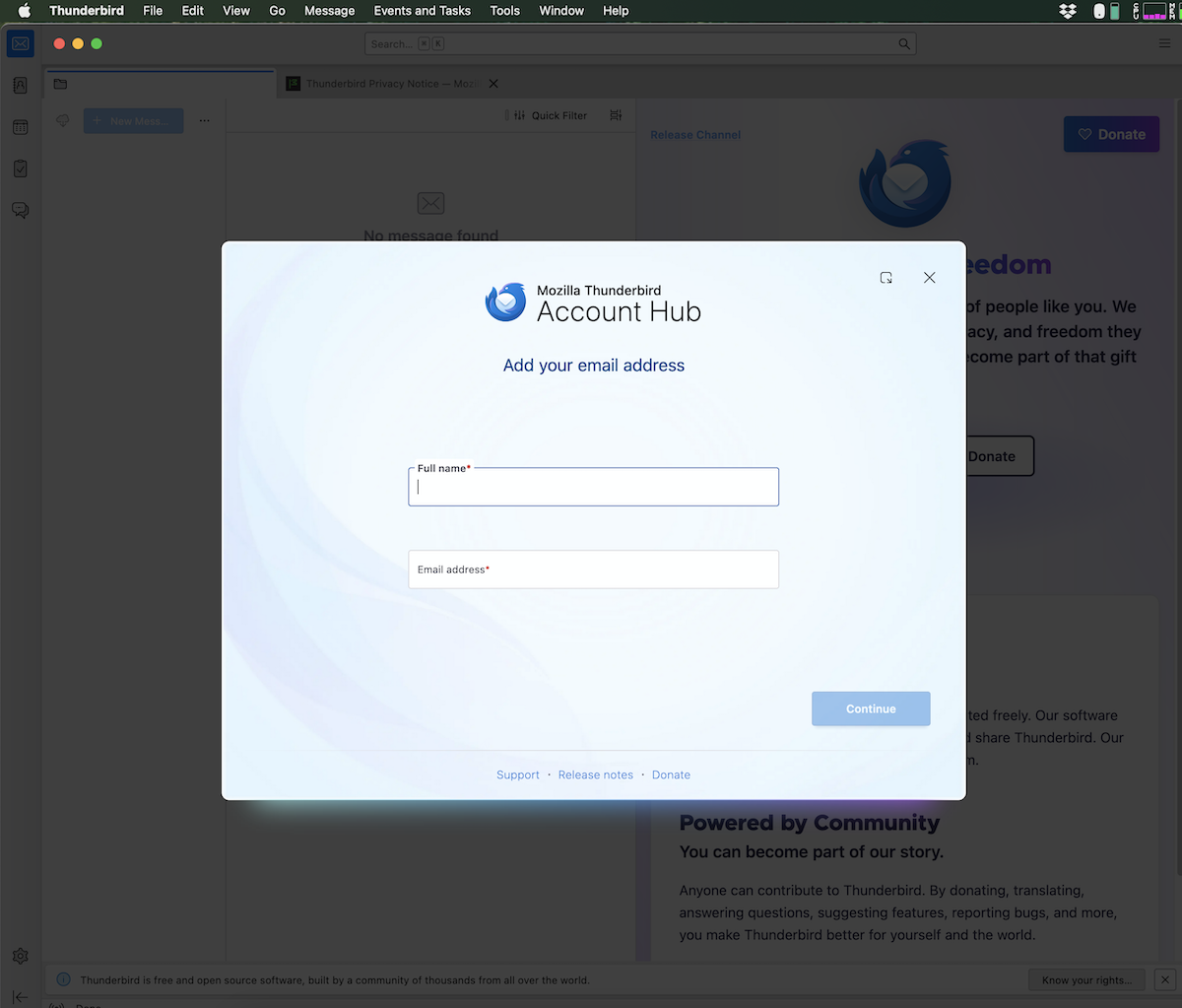
When I want to create a new test profile (which happens rather often), I quit Thunderbird and move the folder "Thunderbird" from my user library to my desktop. That's all, and I've done this for years. So when I restart Thunderbird it will create a new folder "Thunderbird" in the user library, and within it a pristine profile folder containing some default files and folders, but NO user data. Two seconds after restarting Thunderbird I get the start page which displays the Account Hub, prompting the user to set up an account with an existing email address (see attached image). Do you see the same image when you start Thunderbird after removing the Thunderbird folder from your user library? And every time when you thus had created a new profile and set up one of your email accounts, Thunderbird would take more than a minute when you quit and start it again ? My Thunderbird working profile actually contains four accounts, three calendars, three address books, five newsgroups and none of my inbox folders contains more than 500 messages. Accounts are regularly compacted. It takes 5 seconds to open Thunderbird and display the main window. Do you use the POP or the IMAP protocol for your email accounts? How many messages are stored in your biggest inbox folders?
I can't suggest other solutions since actually I don't know the culprit. That's why I suggested to look up this page, too https://wiki.mozilla.org/Thunderbird:Testing:Memory_Usage_Problems
Muudetud Mapenzi poolt