


Does deleting an email account delete the associated emails?

Clearly, this is a very basic question which has undoubtedly been answered before, but I haven't been able to find it. If Thunderbird had an old-style Help feature with an index, I could probably look it right up. But coming to the forum is the only option the program gives me.
All Replies (3)

I'm not sure what you mean by "associated emails", but the answer would be, "no." Deleting one email deletes only that one. However, it would be possible to select multiple message and delete them all with one stroke.
Well, let me say it a little differently.
If my old email AAAAA@BBBBB.COM is no longer in use, can I go into Thunderbird's Accounts section (Tools > Acccount Settings) and delete it without worrying that all of the emails that I sent and received using that address won't be deleted?
I did some experimenting, and it seems that Thunderbird WILL delete all the emails associated with that email address, and frankly, that shocks me. My ISP announced about four years ago that they were no longer offering email addresses, and all email addresses would be deleted from their system. I had about five email addresses using their domain, and frankly, I'm getting tire of looking at them every time I go into Account Settings or send an email in which I have to select my FROM address.
I'll be back later today.
I misread your topic title, sorry...
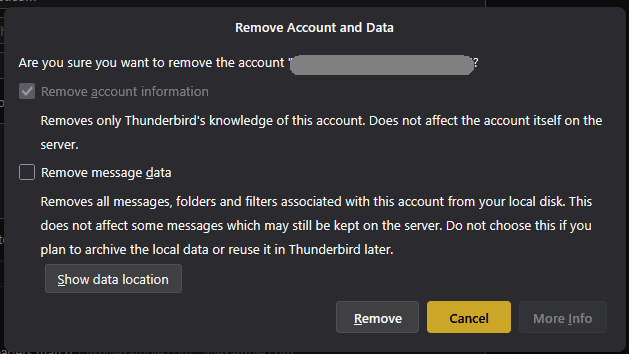
When you delete an email account, you are presented with the opportunity to Remove Message Data or not. Of course, the data is harder to get at, since it's not available in the interface, but it's still there on disk.
A better option, if you still want easy access to those messages, would be to copy them to Local Folders before removing the account.
Muudetud Lin poolt