


I have, in effect, installed Thundebird on a new computer, but my attempts to setup my account aren't working.

I have created an account instance in account settings, and the "Test connection to server" says it is OK, but when I go to the mail tab the get messages button and New Message are grayed out an NO accounts are listed in the "folders" area. Not does it ever ask for my password to the SMTP server I have selected. I have an existing account with my own email service (Hover), and MUST connect to that. This is critical, as I need my e-mail to accomplish necessary activities.
All Replies (5)
Possibly, if you show screenshots of the account that is not working, some suggestions will come. screenshots of the server settings pane and the SMTP server settings pane should help. thank you
OK, I have added a screen shot of the account screen with the account in question. The information in there is correct. Is that what you meant by "server settings pane"? Or is that something else?
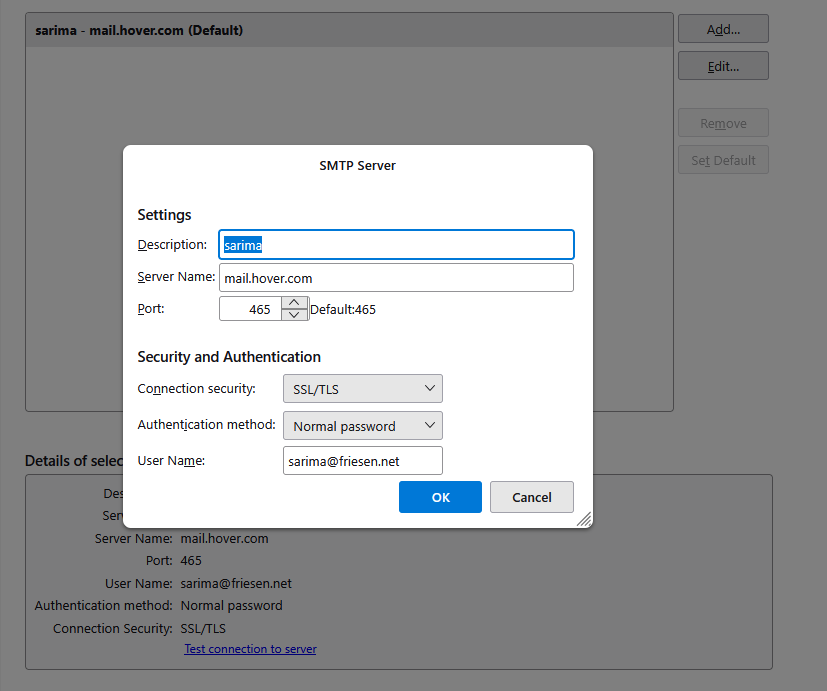
that's the outgoing server settings. the other is at the 'server settings; pane for the account..
I am not sure how to get to the other. Also, with this I would at least expect the New Message button to be active, but it isn't.
Stanley Friesen said
I am not sure how to get to the other.
To get there You either went via the account settings tab and selected (outgoing server SMTP) instead of the account or stated in the identity part of the account settings and clicked on the "Edit outgoing server" button.
Nope clicking the edit outgoing server button does not open the list of outgoing account you have in the background, so I suggest you look at the list of accounts on the left where you selected the outgoing server (SMTP) entry. Probably above the entry you chose in the list with the email address showing usually
Muudetud Matt poolt