

Este tema ha sido archivado.
Haz una nueva pregunta si necesitas ayuda.

Solved
Archivado
How do I install the "+" icon on the Tab Bar to open a new tab? I have it on all my Firefox browsers except one and cannot seem to find how to install it.

The little "+" for a new tab is missing from the Tab Bar on one installation of Firefox. Not sure how to install/find it. Have uninstalled Firefox 4.0 and reinstalled it without success. Same thing when I upgraded to 5.0, including "clean" re-installation.
The little "+" for a new tab is missing from the Tab Bar on one installation of Firefox. Not sure how to install/find it. Have uninstalled Firefox 4.0 and reinstalled it without success. Same thing when I upgraded to 5.0, including "clean" re-installation.
Todas las respuestas (2)
Solución elegida
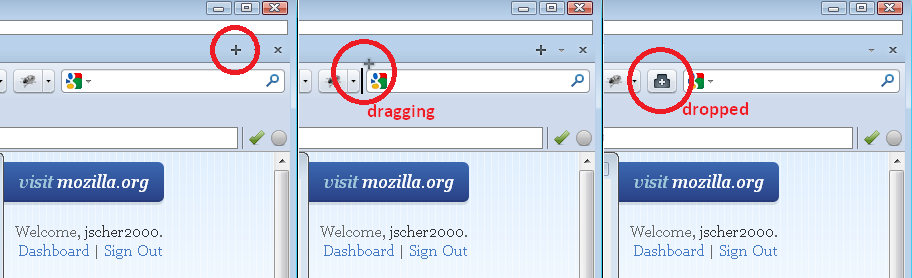
The "+" may have moved to another toolbar or back to the button palette in the Customize dialog. It looks quite different in those locations, as illustrated in the attached image.
If it just doesn't turn up anywhere, you can reset your toolbars using the "Restore Default Set" button at the bottom of the Customize dialog.
Restoring the Default Set cured the problem. Thank you for the advice.
RFS