

Este tema ha sido archivado.
Haz una nueva pregunta si necesitas ayuda.

Solved
Archivado
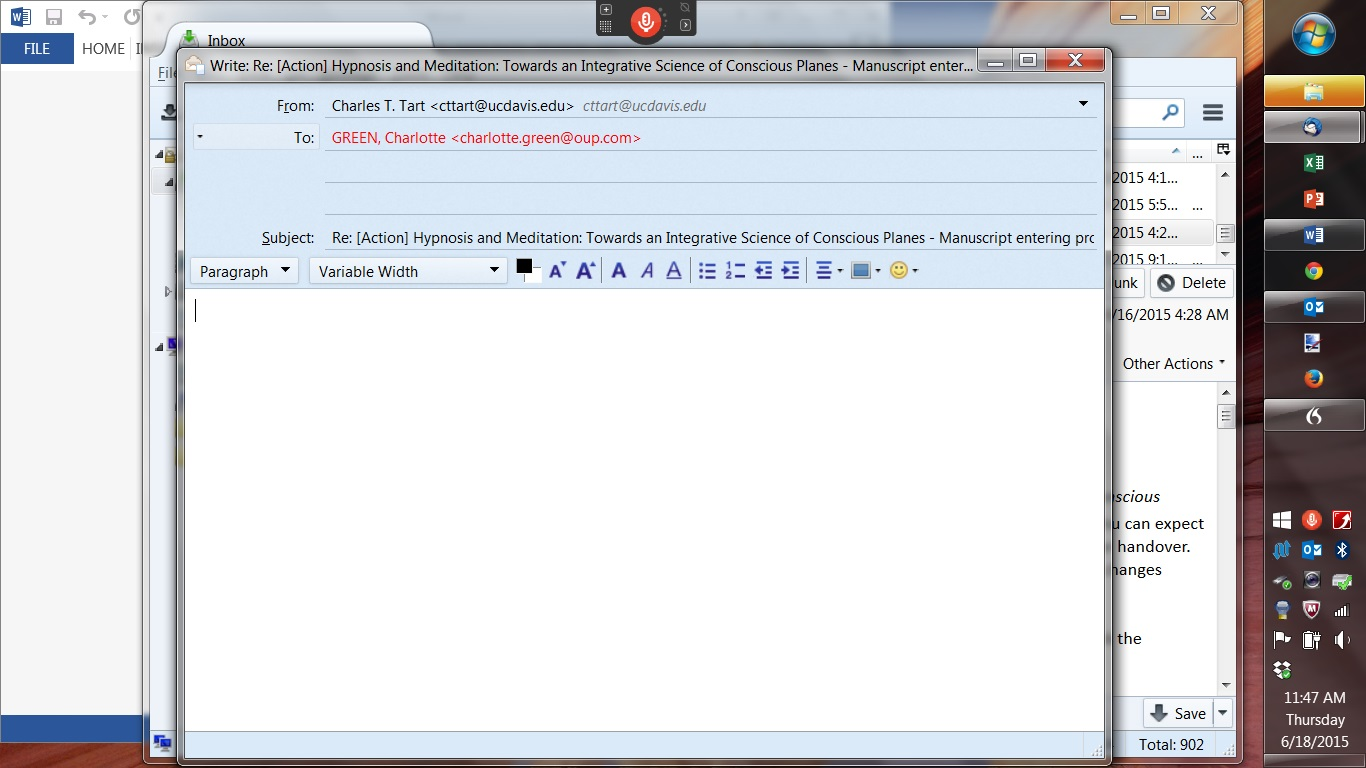
Somehow made the top control bar in composing a message disappear, now have to click ctrl-Return to send, how do I get it back?
My old top bar had buttons for
File Edit View............ Help Send Spelling.......Save
I did something while responding to an email that made that whole top bar disappear, not I have to click ctrl-Enter in the body to make an email send, I can't add an attachment without typing "attachment" in the text to get the option to add it, etc.
I would like the old arrangement, I think it's always been the default, back if possible, can't figure how to do it....
Thanks!
Charley Tart
My old top bar had buttons for
File Edit View............ Help
Send Spelling.......Save
I did something while responding to an email that made that whole top bar disappear, not I have to click ctrl-Enter in the body to make an email send, I can't add an attachment without typing "attachment" in the text to get the option to add it, etc.
I would like the old arrangement, I think it's always been the default, back if possible, can't figure how to do it....
Thanks!
Charley Tart
Todas las respuestas (3)

Solución elegida
In the menu bar of the Write window: View - Toolbars Check 'Composition Toolbar'.
cttart said
My old top bar had buttons for File Edit View............ Help Send Spelling.......Save I did something while responding to an email that made that whole top bar disappear, not I have to click ctrl-Enter in the body to make an email send, I can't add an attachment without typing "attachment" in the text to get the option to add it, etc. I would like the old arrangement, I think it's always been the default, back if possible, can't figure how to do it.... Thanks! Charley Tart
Sadly there is no menu bar in my Write window, the only bar goes from (left) Paragraph to (right) smiley face....
Press F10 to restore the menu bar.