


How do I highlight text in an Outlook e-mail in Firefox?

I use Firefox for Outlook e-mails because IE keeps shutting down when I add an attachment. However, I see no option for highlighting text in an e-mail, only bold, etc.
Όλες οι απαντήσεις (4)
hello Dobrmom9845, the formatting options in webmail will depend on what kind of editor your webmail-provider is using - firefox is just rendering the page as it is getting sent by outlook.com. if you are having issues with that or missing some features, please contact microsoft's support: Problems with email and how to find help
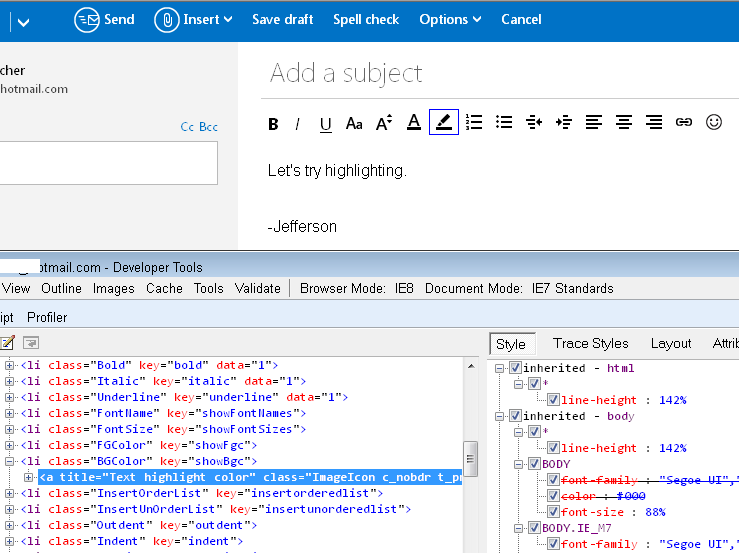
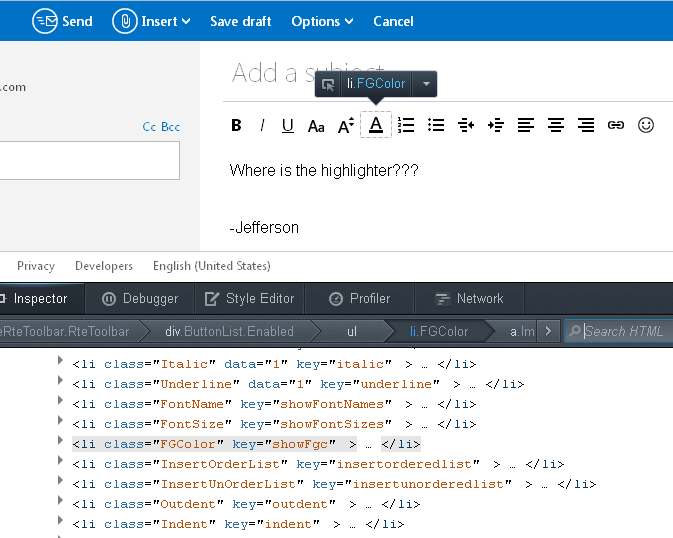
It's missing from my toolbar in Firefox. When I compare the code of the page in IE8 and Fx24 (screen shots attached), the button isn't just hiding in Firefox, it doesn't exist. I don't know whether this is an glitch in Microsoft's script or an intentional difference. But absent someone finding a quick setting change to add it, I think you would need to use an add-on for this.
I haven't looked around for one but might have time to check this evening if you haven't found one by then.
One place to search: https://addons.mozilla.org/firefox/
P.S. I agree with philipp's suggestion to ask Microsoft about this!
I couldn't find an add-on, so I created a bookmarklet. This is a "button" you drag to your Bookmarks Toolbar which instead of loading a web page runs a script on the current page. To give it a try, you can install the bookmarklet from the following page:
http://dev.jeffersonscher.com/bookmarklets.html#olhilite
Then when you have highlighted text in your message, click the button to give it a yellow, cyan, or green background. If you prefer another color, you can edit the script (I can describe how). Unfortunately, these are not bidirectional, meaning, there's no way to use them to remove or change the highlighting. But maybe it's better than nothing.