


how does firefox change windows 7's regedit to set default browser?

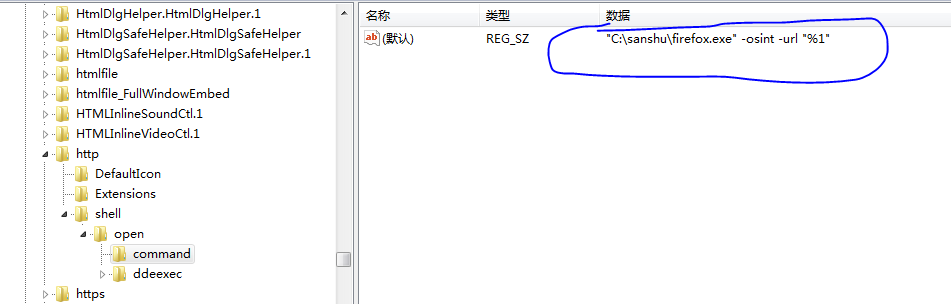
the regedit of my windows 7 shows that “"C:\Program Files\Mozilla Firefox\firefox.exe" -osint -url "%1"” as my default browser,can I change something in my firefox to set regedit like this .""C:\Program Files\Mozilla Firefox\firefox.exe" -profile 'c:\firefox\user\' -osint -url "%1""
Όλες οι απαντήσεις (11)
Firefox > Preferences > Advanced > General: System Defaults:
"Always check to see if Firefox is the default browser on startup"
"Make Firefox the default browser"
See:
I have done something you told me,but my firefox start like this "C:\Program Files\Mozilla Firefox\firefox.exe" -osint -url "%1"
I want to start like ""C:\Program Files\Mozilla Firefox\firefox.exe" -profile 'c:\firefox\user\' -osint -url "%1""
You posted with a Mac user agent.
Do you want to make the change on a Windows computer or the the Mac that you posted this with?
On a windows ,I always start firefox with other profile ,so I use "c:\firefox\firefox.exe --no-remote -profile "c:\firefox\user\"" to start my firefox,but,when I set my firefox as my default browser ,when I click a web link,firefox started without my profile dir like "c:\firefox\user\"
You will have to use the Profile Manager to select the default profile an tick the box or edit the profiles.ini file and move the Default=1 line under the correct profile heading.
Is there any other method ? , I use '-profile "c:\firefox\user\"' to start firefox,there is no profiles.ini in my directory.
Is there any other method ?
Hello the profiles.ini file is located inside the "Firefox" folder in the profile folder path .
http://kb.mozillazine.org/Profiles.ini_file
try : %APPDATA%\Mozilla\Firefox\
thank you
Τροποποιήθηκε στις από τον/την ideato
The OP (thread owner) doesn't want to use a profiles.ini file, but prefers to start Firefox by specifying the absolute location of the profile via the target in the desktop shortcut (-profile "<path>").
In this case Firefox doesn't know which profile to use when you open a file with the default browser and Firefox isn't running yet.
A possibility would be to edit all involved registry keys (e.g. HKEY_CLASSES_ROOT\.html) and add this switch, but that may not last and is difficult to maintain.
cor-el, you are correct, I misunderstood the question, my mistake.
thanks
I use "C:\firefox\firefox.exe" -osint --no-remote -profile "C:\firefox\profile" -url "www.mozilla.org" in my cmd.exe ,but firefox can't start.