


My IT guy found a fix for me, but when I go to Tools, Options, and Content, I can't find Portable Document Format to change the Action to Use Adobe Reader.

When I try the workaround that my IT guy suggested (see below), I can't Scroll down the Content list and find Portable Document Format. I have Windows XP, which may be why I can't find it, but I need to have Adobe Reader as my default, rather than the default to html, which started happening out of the blue today.
"Here is a workaround for Firefox. Open Firefox, click the 'Tools' menu. Select 'Options'. Scroll down the 'Content' list until you find the 'Portable Document Format' entry. Change the 'Action' to 'Use Adobe Reader'.
Now when you click on a PDF document ( a report or trigraph), Firefox will quickly download the file and open it in Adobe Reader, which will allow you to save as a PDF."
Thank you for your anticipated assistance.
Susan Bellows
Όλες οι απαντήσεις (1)
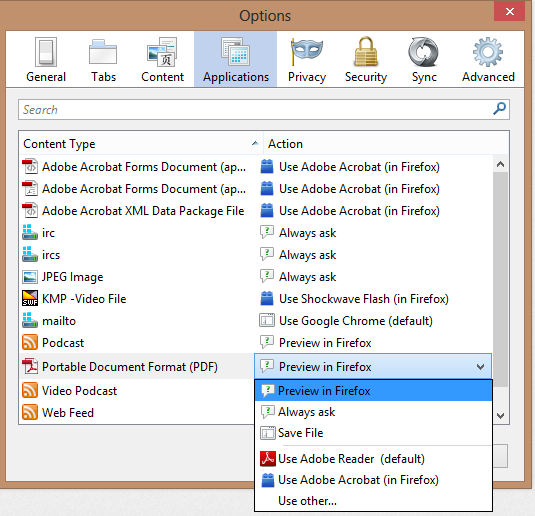
Those menu options are for the older version of firefox. In 19.0, you will find it in Options>>Options menu. Switch to the Applications tab and scroll down to Portable Document Format(PDF) entry and across it from the dropdown menu, select Adobe Reader entry.
Have included the screenshot for your reference.
Τροποποιήθηκε στις από τον/την Navjot Singh