


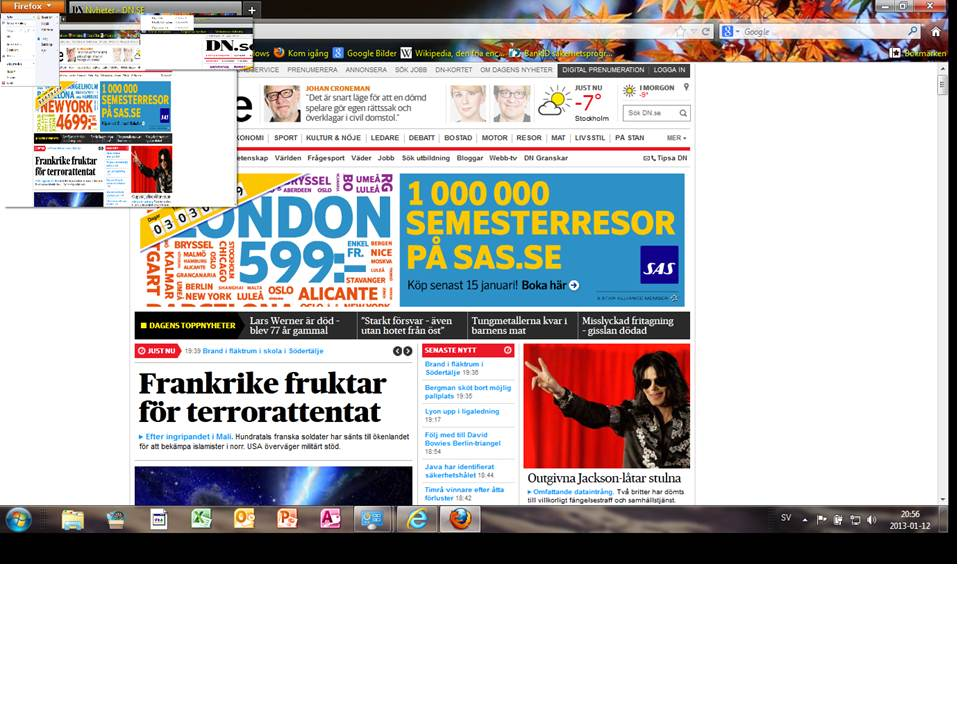
Screen miniatures appear instead of normal menues.

I run FF 18 on a laptop with a 2nd screen connected. As of today when I click on a menu button I don't get the normal menu. Instead I get a miniature picture of my webscreen. I can manouver the cursor and whith it in the right position I get the normal menu in full size. In this situation I have to move arround very cautiously. If I move incorrectly then I'm back at the miniature screen again and have to start all over again. I have uninstalled FF and all it's settings, addons, bookmarks but the problem remains. I've tried to disconnect the 2nd screen but the problem remains.
I can provide a screnshot of the problem but haven't found a way to include the picture.
Όλες οι απαντήσεις (11)
hello christofer, you can attach a screenshot when you post a reply to your original question.
Thanks!
Here it comes.
i wonder if this forum question from a mac user might be a related issue - https://support.mozilla.org/questions/946690
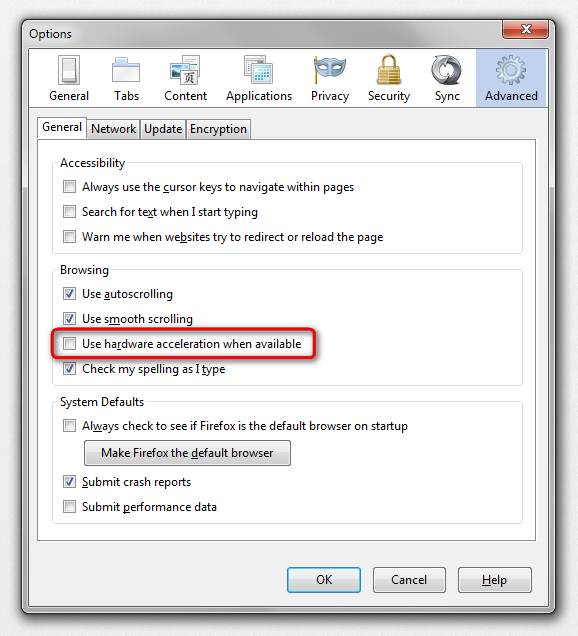
does it make a difference if you try updating your graphics driver or disabling hardware acceleration in firefox > options > advanced > general?
The mac related problem https://support.mozilla.org/questions/946690 is not the same as mine.
Finally I managed to disable hardware acceleration in FF. That solved the problem. Is this a bug or what?
I haven't tried to update the graphics driver yet.
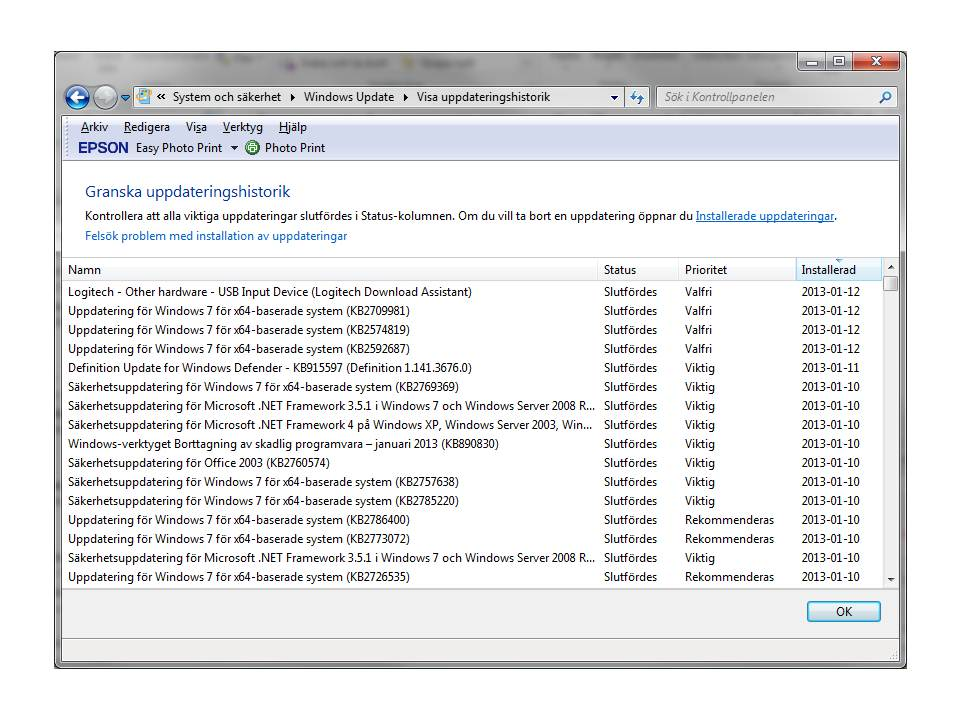
I ran a windows update but I forgot to try activate the hardware accelerator in FF before that. So I don't know if the problem was fixed without running a Win update. FF runs normally now with hardware accelerator activated.
The win update contained only optional updates. See screenshot. 1st Logitech Logitech - Other hardware - USB Input Device (Logitech Download Assistant) 2nd to 4th update for Win 7; KB2709981, KB2574819, KB2592687
You probably had to reboot the computer to install the updates and that also may have helped if you hadn't done this before.
I had rebooted the computer earlier but it didn't help. The graphics problem might still be there though. I had a webpage open with a film ad on on it. The meny started to behave strangely again but in another manner this time. I disabled the hardware accelerator again and the problem disapeared.
can you go to firefox > help > troubleshooting information & copy the content of the graphics section & paste it here? thnx...
I hope this is OK. If not please let me know.// Chris
{
 "application": {
   "name": "Firefox",
   "version": "18.0",
   "userAgent": "Mozilla/5.0 (Windows NT 6.1; WOW64; rv:18.0) Gecko/20100101 Firefox/18.0",
   "supportURL": "http://support.mozilla.org/1/firefox/18.0/WINNT/sv-SE/"
 },
 "modifiedPreferences": {
   "browser.cache.disk.capacity": 358400,
   "browser.cache.disk.smart_size.first_run": false,
   "browser.cache.disk.smart_size.use_old_max": false,
   "browser.cache.disk.smart_size_cached_value": 358400,
   "browser.places.smartBookmarksVersion": 4,
   "browser.startup.homepage_override.buildID": "20130104151925",
   "browser.startup.homepage_override.mstone": "18.0",
   "extensions.lastAppVersion": "18.0",
   "general.autoScroll": false,
   "gfx.direct3d.prefer_10_1": true,
   "gfx.direct2d.disabled": true,
   "layers.acceleration.disabled": true,
   "network.cookie.prefsMigrated": true,
   "places.history.expiration.transient_current_max_pages": 104858,
   "privacy.sanitize.migrateFx3Prefs": true,
   "security.warn_viewing_mixed": false
 },
 "graphics": {
   "numTotalWindows": 1,
   "numAcceleratedWindows": 0,
   "windowLayerManagerType": "Basic",
   "numAcceleratedWindowsMessage": [
     "no information"
   ],
   "adapterDescription": "AMD Radeon HD 7640G + 7670M Dual Graphics",
   "adapterVendorID": "0x1002",
   "adapterDeviceID": "0x9903",
   "adapterRAM": "512",
   "adapterDrivers": "aticfx64 aticfx64 aticfx64 aticfx32 aticfx32 aticfx32 atiumd64 atidxx64 atidxx64 atiumdag atidxx32 atidxx32 atiumdva atiumd6a atitmm64",
   "driverVersion": "8.944.2.1000",
   "driverDate": "4-5-2012",
   "adapterDescription2": "",
   "adapterVendorID2": "",
   "adapterDeviceID2": "",
   "adapterRAM2": "",
   "adapterDrivers2": "",
   "driverVersion2": "",
   "driverDate2": "",
   "isGPU2Active": false,
   "direct2DEnabled": false,
   "directWriteEnabled": false,
   "directWriteVersion": "6.1.7601.17789",
   "direct2DEnabledMessage": [
     "no information"
   ],
   "webglRenderer": "Google Inc. -- ANGLE (AMD Radeon HD 7640G + 7670M Dual Graphics)",
   "info": {
     "AzureCanvasBackend": "cairo",
     "AzureFallbackCanvasBackend": "none",
     "AzureContentBackend": "none"
   }
 },
 "javaScript": {
   "incrementalGCEnabled": true
 },
 "accessibility": {
   "isActive": false,
   "forceDisabled": 0
 },
 "libraryVersions": {
   "NSPR": {
     "minVersion": "4.9.4",
     "version": "4.9.4"
   },
   "NSS": {
     "minVersion": "3.14.1.0 Basic ECC",
     "version": "3.14.1.0 Basic ECC"
   },
   "NSSUTIL": {
     "minVersion": "3.14.1.0",
     "version": "3.14.1.0"
   },
   "NSSSSL": {
     "minVersion": "3.14.1.0 Basic ECC",
     "version": "3.14.1.0 Basic ECC"
   },
   "NSSSMIME": {
     "minVersion": "3.14.1.0 Basic ECC",
     "version": "3.14.1.0 Basic ECC"
   }
 },
 "extensions": [
   {
     "name": "avast! WebRep",
     "version": "7.0.1474",
     "isActive": false,
     "id": "wrc@avast.com"
   }
 ]
}
another thing you could try is to update your graphics driver - this should be the correct link for your model: http://support.amd.com/us/gpudownload/windows/Pages/radeonaiw_vista64.aspx
also enter about:config into the firefox location bar (confirm the info message in case it shows up) & search for preferences starting with gfx. and displayed in bold - right-click and reset those entries to their default value.
Upgrade your graphics drivers to use hardware acceleration and WebGL
Thanks!
It seems as the problem is gone. I tried going to the website where I last experienced the problems. The site works OK and the menues appears normally.