


does sync still work on Aurora for mobile devices (Android)))?
cannot access sync anywhere.. swiping to the side doesn't work, neither is there anything in the menus.
Επιλεγμένη λύση
All apps is in alphabetical order. Aurora is at the top of the screen, whereas Firefox Beta and Firefox Sync are at the bottom.
Όλες οι απαντήσεις (7)

Hi,
In the Aurora mobile build that was just made available today, there is a new sync.
This is the first drop and is very unstable, but if you update to the 1.17 Aurora build, you will see Sync in a new location, under Applications on your Android phone. It has the familiar Sync icon and is called Firefox Sync.
It will sync your Bookmarks and Passwords only and again is very new. But, I set it up this morning on my HTC shift and it is working great for me, so thanks in advance if you try it and test it out!
-Michelle
Hey Michelle,
Thank you for the reply but I've got no 'Firefox Sync' on my HTC today. I updated to latest Aurora and don't see it. Nightly is also missing any Sync.
daniël
Hi,
Sorry you aren't finding it. It is not in the Firefox app yet. You have to go to All Apps on your phone, there you should see the round silver Sync icon, it is currently a separate application (but will be integrated in a future build). I've attached a screenshot from my HTC shift.
-Michelle
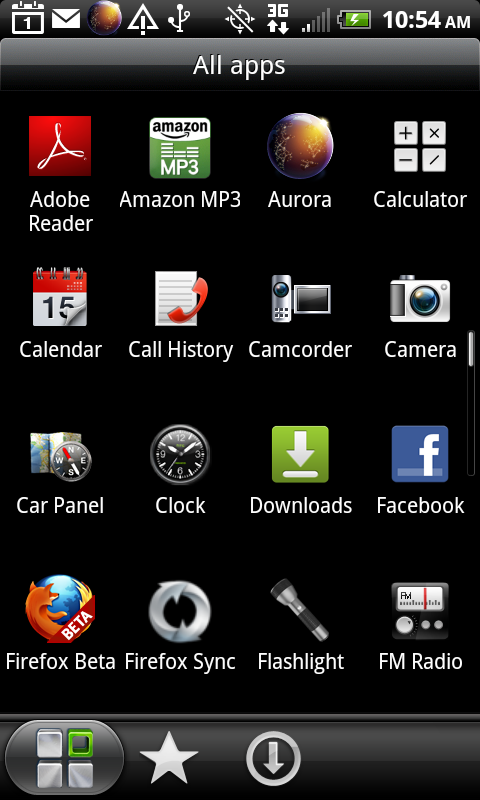
What I'm saying, actually is that it doesn't exist as a separate app not just within the Firefox app. Of course I'm discussing Aurora and Nightly whereas in the screenshot you've got Firefox Beta. Trying that next.
And in Firefox Beta it's not a problem because Sync is still there in settings...
Επιλεγμένη λύση
All apps is in alphabetical order. Aurora is at the top of the screen, whereas Firefox Beta and Firefox Sync are at the bottom.
You're right. Doesn't matter because whatever version Firefox (Beta, Aurora, Nightly) I've got no separate App 'Firefox Sync'.
Gonna stop for awhile. Thanks though. I'll keep updating and hopefully I'll be back to syncing with my desktop in Aurora or Nightly.