


Want to delete a separator in bookmarks

I can not seem to find a way to delete a Separator that I created in Bookmarks. I tried Right Mouse clicking below the separator, since I could not place the cursor on the separator and just wound up deleting the bookmark below the separator. I also do not see anything in the menu that allowed me to create the separator that also allows me to delete the separator. DRESJ@AOL.COM
Επιλεγμένη λύση
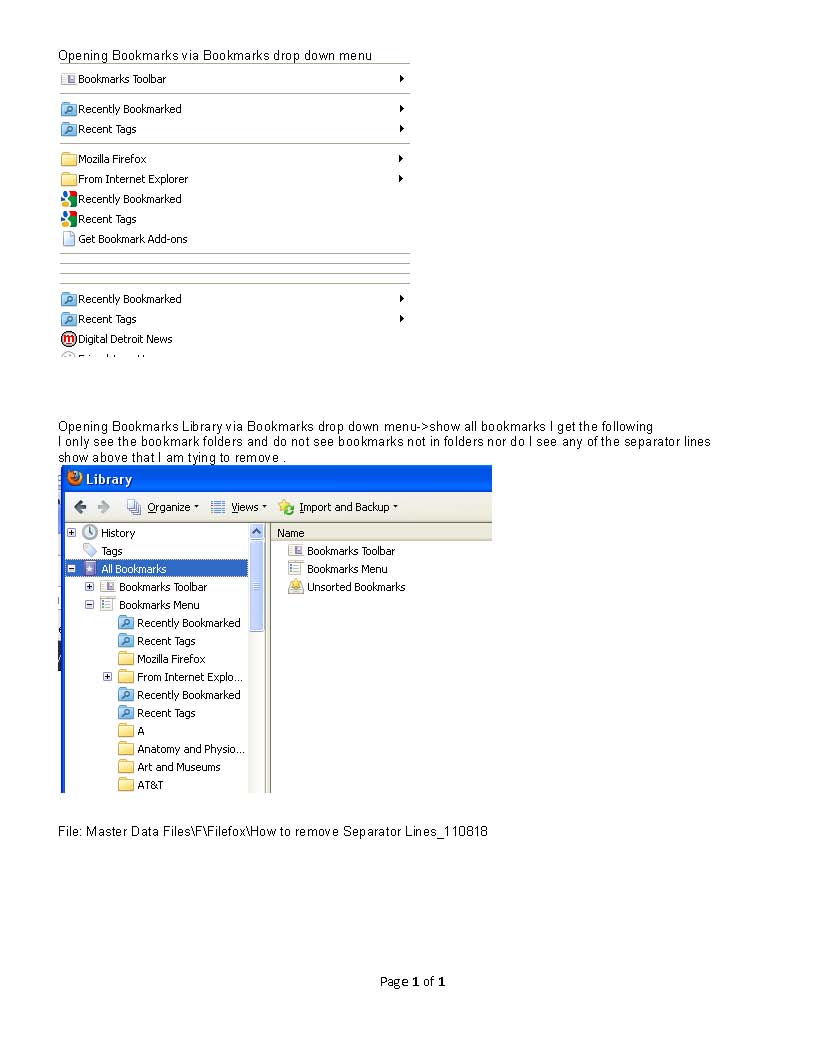
You need to open the Bookmarks Menu folder to see those separators in the right pane.
Προβολή απάντησης εντός συζήτησης 👍 1Όλες οι απαντήσεις (3)
Easiest to remove a a separator is to do that in the Bookmarks Manager (Library)
- (Firefox >) Bookmarks > Show All Bookmarks
That did not work. In the Library I not only do not see the separator lines I also do not see those bookmarks that are not in any folder. See image attached DRESJ@AOL.COM
Επιλεγμένη λύση
You need to open the Bookmarks Menu folder to see those separators in the right pane.