


Linux Dark Theme userContent.css

Greetings,
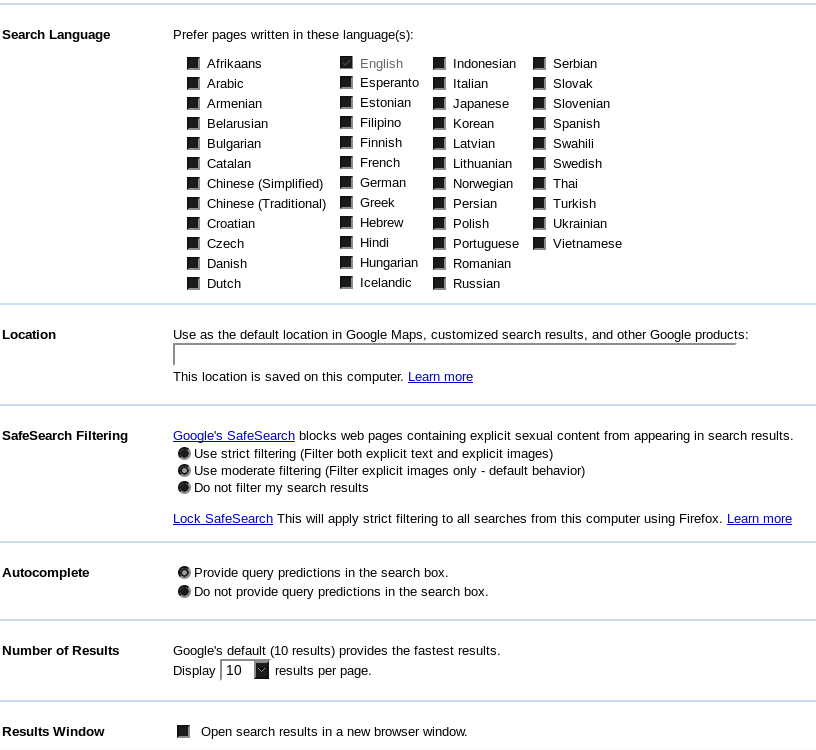
I'm using Firefox 4.0 in Fedora Linux/Gnome When I use a dark gtk theme, the input boxes, textboxes, radio buttons, checkboxes, etc.. become black, In Firefox 3.0 I used to make a userContent.css profile to override these and it worked, but the same userContent.css doesn't seem to work for everything in Firefox 4, I still get black radio boxes, check boxes, drop down menus, etc...
Όλες οι απαντήσεις (4)
Which code are you using?
Did you check the Tools > Error Console for errors?
You may need to add the -moz-appearance: none !important; rule to make the code work.
Input boxes, textboxes are fixed, but I still have black checkboxes, black radio buttons and black dropdown menus, here's an example: http://i52.tinypic.com/jpiv4l.png I'm using Linux Fedora/Gnome, and Firefox 4.0

Here's the userContent.css
--- EDIT --- Actually Checkout the post below this one.
Τροποποιήθηκε στις από τον/την gfx010
Ok here's the same code but spaced for more clearance:
body {
background-attachment: scroll !important;
}
input {
border: 2px inset white;
background-color: white;
color: black;
-moz-appearance: none !important;
}
textarea {
border: 2px inset white;
background-color: white;
color: black;
-moz-appearance: none !important;
}
select {
border: 2px inset white;
background-color: white;
color: black;
-moz-appearance: none !important;
}
input[type="radio"], input[type="checkbox"] {
border: 2px inset white ! important;
background-color: white ! important;
color: ThreeDFace ! important;
-moz-appearance: none !important;
}
.*|*::-moz-radio {
background-color: white;
-moz-appearance: none !important;
}
button,
input[type="reset"],
input[type="button"],
input[type="submit"] {
border: 2px outset white;
background-color: #eeeeee;
color: black;
-moz-appearance: none !important;
}
body {
background-color: white;
color: black;
display: block;
margin: 8px;
-moz-appearance: none !important;
}
So you know what might be causing this problem?