


Windows 10 reached EOS (end of support) on October 14, 2025. If you are on Windows 10, see this article.

Avatar for Username

Αναζήτηση στην υποστήριξη

Προσοχή στις απάτες! Δεν θα σας ζητήσουμε ποτέ να καλέσετε ή να στείλετε μήνυμα σε κάποιον αριθμό τηλεφώνου ή να μοιραστείτε προσωπικά δεδομένα. Αναφέρετε τυχόν ύποπτη δραστηριότητα μέσω της επιλογής «Αναφορά παραβίασης».

Μάθετε περισσότερα
Ανοικτό

Unable to Pin extension except when adding to firofox

nathanklessig

The option to Pin an extension to the toolbar in the browser is no longer available anywhere in firefox.

I can unpin them at will. But the only way to pin to the toolbar again is to remove the extension and select "pin to toolbar" when it's readded to firefox.. Trouble is that my other computers see I removed it sometimes and remove it there but when they readd the extension to firefox they are not pinned on that computer. and there is no way to get it pinned.

this happens with all extensions and once they are unpinned I'm only able to remove the extension from firefox and readd it to get a stupid option to repin it.

please fix this.

The option to Pin an extension to the toolbar in the browser is no longer available anywhere in firefox. I can unpin them at will. But the only way to pin to the toolbar again is to remove the extension and select "pin to toolbar" when it's readded to firefox.. Trouble is that my other computers see I removed it sometimes and remove it there but when they readd the extension to firefox they are not pinned on that computer. and there is no way to get it pinned. this happens with all extensions and once they are unpinned I'm only able to remove the extension from firefox and readd it to get a stupid option to repin it. please fix this.

Όλες οι απαντήσεις (1)

Hi Nathan!

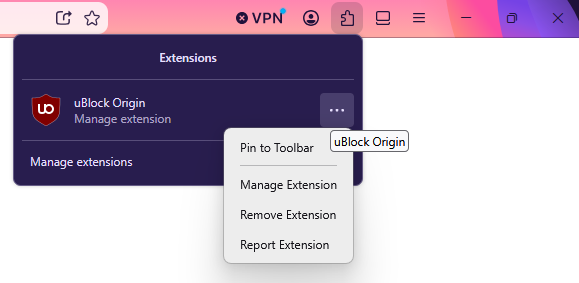
You should be able to pin them from the Extensions dropdown, if the extension supports it, just like on the attached screenshot. Is this menu item missing for you?

Regards, Balázs
Υποβολή ερώτησης

Πρέπει να συνδεθείτε στον λογαριασμό σας για να απαντήσετε σε δημοσιεύσεις. Ξεκινήστε μια νέα ερώτηση εάν δεν διαθέτετε ακόμα λογαριασμό.