


Can't complete installation on new Windows 11 laptop: What is my "email account password"?

I downloaded Thunderbird on my new Windows 11 laptop and began setup by entering my full name and email address ([redacted]@utexas.edu, operated by Gmail). The next screen asks for my "email account password." I entered my Google password that allows me to access my email at Gmail (https://mail.google.com/mail/u/0/#inbox). But "Authentication failed," and I am stuck! I cannot finish installing Thunderbird. I have used Thunderbird for many years on my prior laptop (Windows 10).
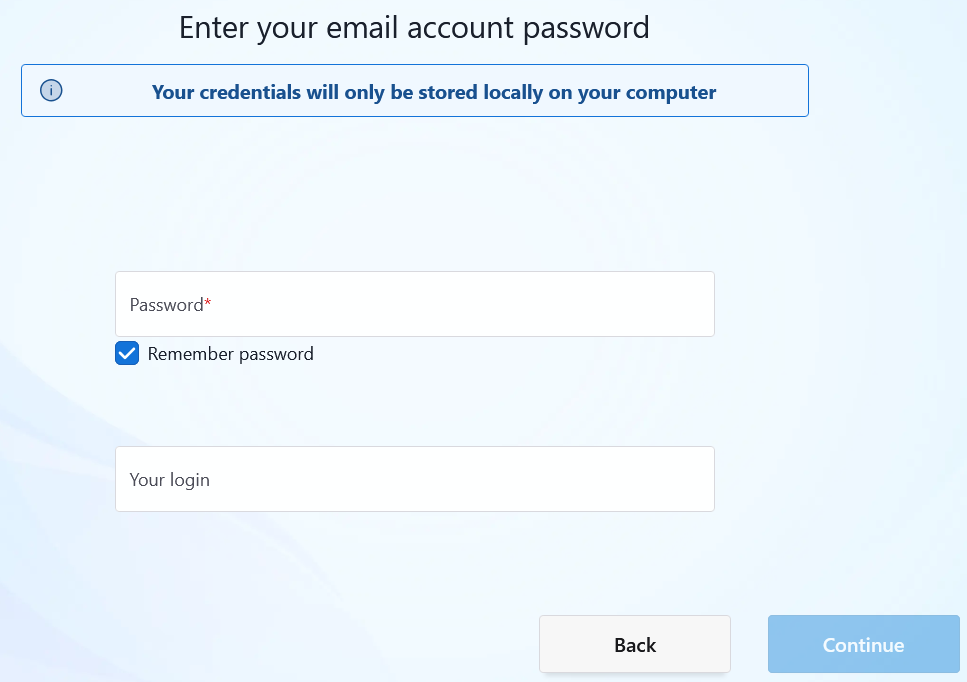
Τροποποιήθηκε στις από τον/την christ1
Όλες οι απαντήσεις (2)
I have not idea why you posted an image of a blank screen, but I think I am with the issue as Google required oauth authentication not your password.
But I looked at the utexas web and they are talking exclusively office365. https://tech.utexas.edu/initiatives/official-student-email so I am now wondering if you are conflating the provider from the past with newer requirements. I think I am now confused. Could you please clarify.
Matt, thank you for your effort. I posted the "blank screen," because it shows that Thunderbird is asking me for my "email account password." Lack of that password is what is preventing me from finishing the Thunderbird installation. That password is what I need help with. What could it be besides the Google password (Google calls it a "password") that gives me full Web access to my email account that I've had for many years, d.r.davis@utexas.edu. I am retired from the University, not a student affected by the 2025 email policy you cite. Do you have any idea about how to find the password that Thunderbird is asking for?