


backing up my full TB in W11 in 2026
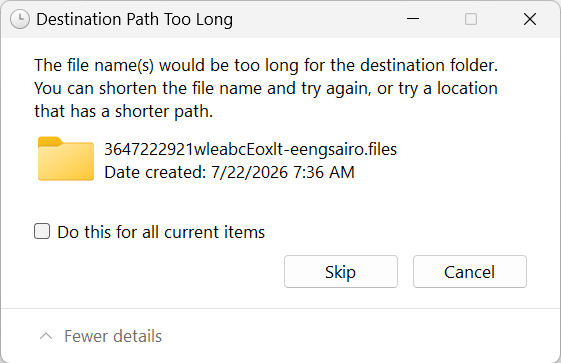
Back when W110 went to w11 I got a new computer and was given great directions here to back up my TB profile by searching %appdata% and copy the thunderbird folder to external source. That file is 198 MB. I do this every month now ..It is my understanding it saves my profile and all emails including local ones. Now in Aug 2026 when i copy this file, I am getting an error a file is too long and have no choice but to skip that file..I will attach a pic of the error. Is this back up ok to use or is it corrupt because of the error?
I also found in TB help there is an export feature in TB to a zip file but that .zip is huge..I did one just in case. I think you just open TB>select hamburger menu three lines on top right>tools>export. I did that back up/export also today and that is a .zip file folder that is less properties like 175 MB.
So now which way is the correct way to keep a safe copy of my TB in case my computer crashes or i have to put on another pc?
Όλες οι απαντήσεις (15)
Your approach to copy the thunderbird folder at appdata\roaming is preferred. That file is not a thunerbird file, so I have no idea what it is. I suggest you look in profile folder to see where it is stored. Possibly an attachment? My belief is that you can ignore it. The thunderbird zip does work, but has never, in my opinion, been reliable. It also strips passwords. If in doubt, post a screenshot of where this file exists in profile folder.
I will do my best to see if i can find it. Feel better I have a back up now.
I could not find a file that starts with that number but it said it was created 7-2-26 so i took a screenshot of files created that date..does this help you?


This looks like a windows issue : the file path is too long.
You may want to look at your registry LongPathsEnabled key to see if it is set to 0. If so change it to 1 and reboot your PC.
HKEY_LOCAL_MACHINE\SYSTEM\CurrentControlSet\Control\FileSystem\LongPathsEnabled
so nervous going into the registry but you have never steared me wrong...it was set to 0 - I changed to1 and restarted...still getting message...Should I go back and put it back to 0?
If i copy and paste that Thunderbird folder to my desktop is does not give me this error..so my path is too long? I save it in documents>folder named for TB back up COPY>back up with date.
The file is associated with an addon. I am puzzled why you cannot copy it. But I'm no guru on copying.
so should i put that registry number back? change my path file names to shorter ones?
Just an FYI... I encountered the same problem in 2024. https://support.mozilla.org/en-US/questions/1435866
David..I did read that also but i too prefer not to use the TB export..that file is smaller than old fashioned way copy and paste so I stayed with the old fashioned way. It has just been for like 2 months I have been getting this error.. If i select to say "skip" do you agree that back up of TB file will be ok to use as a back up..Google says it is not but not too reliant on Google. If i open that .zip file from TB export and i click on the .tx6....properties..it has like 20 less files so I have no confidence in the TB export now.
could a work around be to save the file on my desktop and then move to a dedicate dated folder?
Τροποποιήθηκε στις από τον/την OldBob2
OldBob2 said
so nervous going into the registry but you have never steared me wrong...it was set to 0 - I changed to1 and restarted...still getting message...Should I go back and put it back to 0? If i copy and paste that Thunderbird folder to my desktop is does not give me this error..so my path is too long? I save it in documents>folder named for TB back up COPY>back up with date.
No you should leave it to 1. This is the default when Windows 11 is installed. Your PC was probably upgraded from Windows 10 to Windows 11.
I presume that you use Windows Explorer to perform your copy , and this app is not "long path aware". Here are some alternatives : 1) Use Robocopy (windows native) command from cmd . To have the whole syntax do : robocopy /? 2) 7zip a free utility widely use and safe that you can download ( just to a search and you'll find it ). Once downloaded you can verify if it is virus free by upload the downloaded file to https://www.virustotal.com/gui/home/upload to verify.
OldBob2 said
so nervous going into the registry but you have never steared me wrong...it was set to 0 - I changed to1 and restarted...still getting message...Should I go back and put it back to 0? If i copy and paste that Thunderbird folder to my desktop is does not give me this error..so my path is too long? I save it in documents>folder named for TB back up COPY>back up with date.
I just put in a suggestion but it did show up so I just rephrase it.
I presume that you use Windows File Explorer to perform your copy . This tool is not "Long Path aware". Here are some alternatives : 1) Use windows native robocopy command . From cmd do robocopy /? to have the full syntax 2) Free opensource 7zip that is widely use and safe.
Yes, BUT there is probably one addon that may not work. However, what you can do is, after doing the backup, go to your profile folder and locate the storage>default folder and copy that one file from the profile and paste it into the same location in the exported folder.
Thank you for your patience..should be easier Another question if I may..I do back up the tx6pm..... folder separately that lists Local folders so what does doing the full THUNDERBIRD folder give me that I need if i crash or need to move to another PC.
backing up the entire profile lets you restart on another pc with no loss of data or settings.
Thank you