


Cannot submit forms on a particular website
Good Day.
I have encountered a problem recently with on particular forum site.
When I attempt to login I receive an error after pressing the submit button.
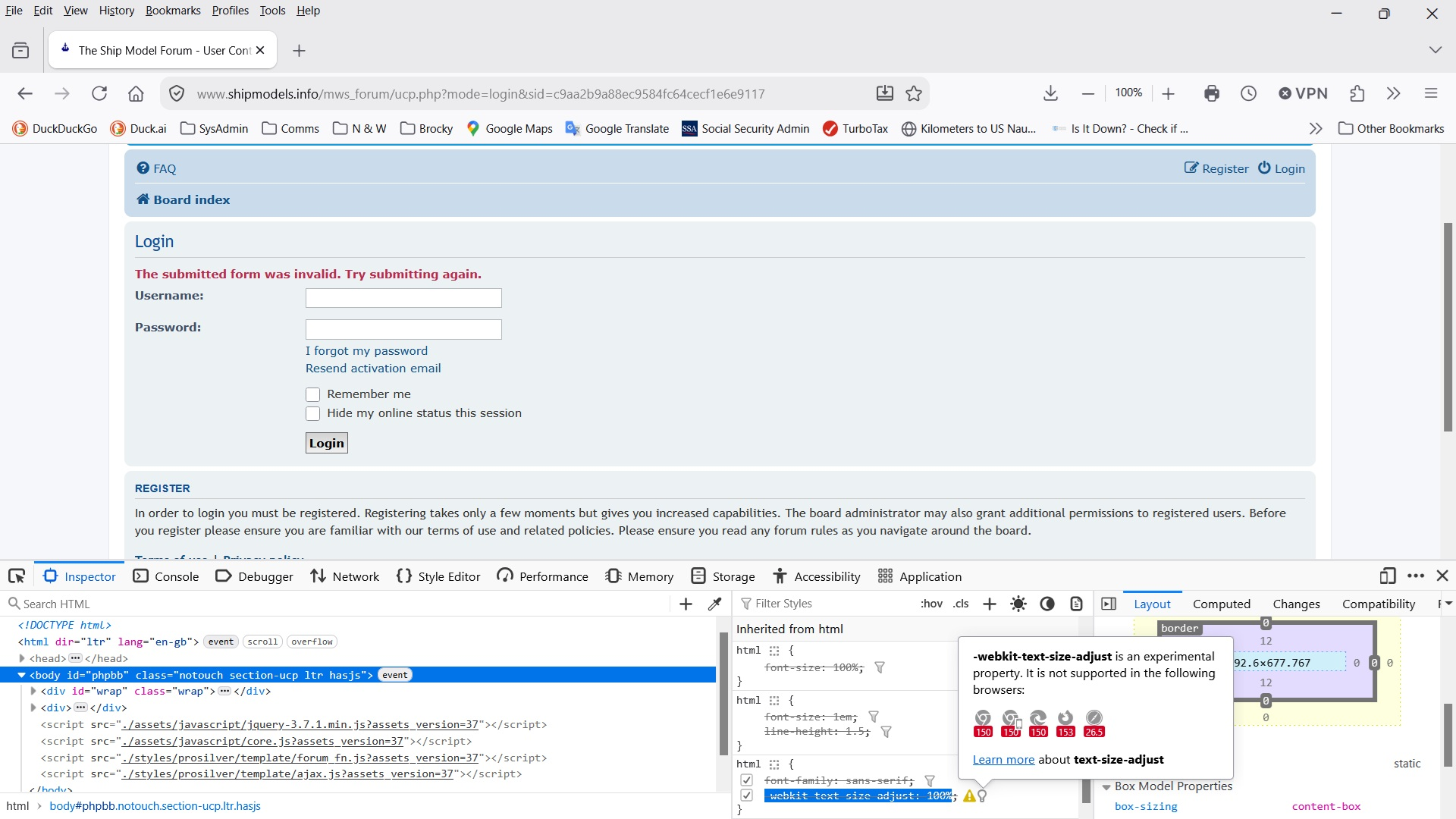
The form displays this error "The submitted form was invalid. Try submitting again."
I have been using the site regulary for several years and have never had this problem
The following is what I am using:
    Firefox ver 153.0.1 64 bit
    Windows 10 and/or Windows 10 (yes this is happening on all 3 of my PCs)
The forum site is using phpBB Forum Software. I do not know the version. As stated above they have been using this software for several years.
In trouble shooting this issue I have discovered that if I do the following in the specified order I can login and create and respond to posts and Private Messages. But as soon as I log out I receive the invalid form message until I do the following steps again.
            1) Clear all cookies, temporary cache, site settings, browsing and download history, site settings
               and saved form info.
            2) Shutdown Firefox
            3) Navigate to my profile with Windows Explorer
            4) Delete the file cookies.sqlite
I must do this each and every time I access the site.
I am at a loss as to what to do about this. Does Firefox have any error logs or console logs? If so how can I enable them to see if I can get a better idea of what is happening?
Thanks in advance for any help with this.
Όλες οι απαντήσεις (4)
You'd see the cookie/session communication in Network pane of console (F12) — however if a legacy site is running into e.g. a partitioning issue you'd also need to have some context around SameSite defaults etc. to infer anything useful from the headers sent & received (cookies get mostly set on "document" type objects).
If you only use the site using a new Private Window, does the same issue happen the next time as well?
Hi Jbr,
Yes it runs just the same. Unless I clear the history cache completey and delete the cookies.sqlite file I get the invalid form error when ever I try to post something to the forum site.
Also something strange happened this afternoon when I was working on the issue and flipping between Firefox normal windows and the Private windows the site began to respond normally. After logging off the forum I could log back on without any problems. I could shut down Firefox and start a new session and login to the site without clearing the cache or manually deleting the cookies file. This went on for several hours until I put the laptop to sleep to eat dinner. When I got back to the laptop, I found that I once again had to clear the cache and delete the cookies file before I could login.
I have contacted the site admin and he says I'm the only one who has reported anything like this. He is really a forums admin and can only works the account side of the system, not the technical communications or server side of things so I have no hope of any help from them.
Oh and one thing I did notice in the F12 window specifically the inspector window was an error about
webkit-text-size-adjust. See the attached image.
I see the form has extra protections that need to be passed correctly — make sure you're not using any addons that tamper with sites you visit — e.g. by restarting into Troubleshoot Mode (from Help menu) and trying to use the site from there.