


Windows 10 reached EOS (end of support) on October 14, 2025. If you are on Windows 10, see this article.

Αναζήτηση στην υποστήριξη

Προσοχή στις απάτες! Δεν θα σας ζητήσουμε ποτέ να καλέσετε ή να στείλετε μήνυμα σε κάποιον αριθμό τηλεφώνου ή να μοιραστείτε προσωπικά δεδομένα. Αναφέρετε τυχόν ύποπτη δραστηριότητα μέσω της επιλογής «Αναφορά παραβίασης».

Μάθετε περισσότερα

Cannot get started with Mozilla VPN

  • 4 απαντήσεις
  • 1 έχει αυτό το πρόβλημα
  • 32 προβολές
  • Τελευταία απάντηση από Kiki
  • Επιλύθηκε

When I open the Mozilla VPN window I am met with the "Get Started" page. I click the "Get Started" button and sign in. When I get to the "Signed in successfully!" page, it tells me to open the Mozilla VPN window again (it does this for me) and to turn it on and all that. However, when the window is opened again, I am met with the same "Get Started" page from the beginning, leaving me in the endless loop of logging in. I am running a fully updated Windows 11. Could it be an extension I have?
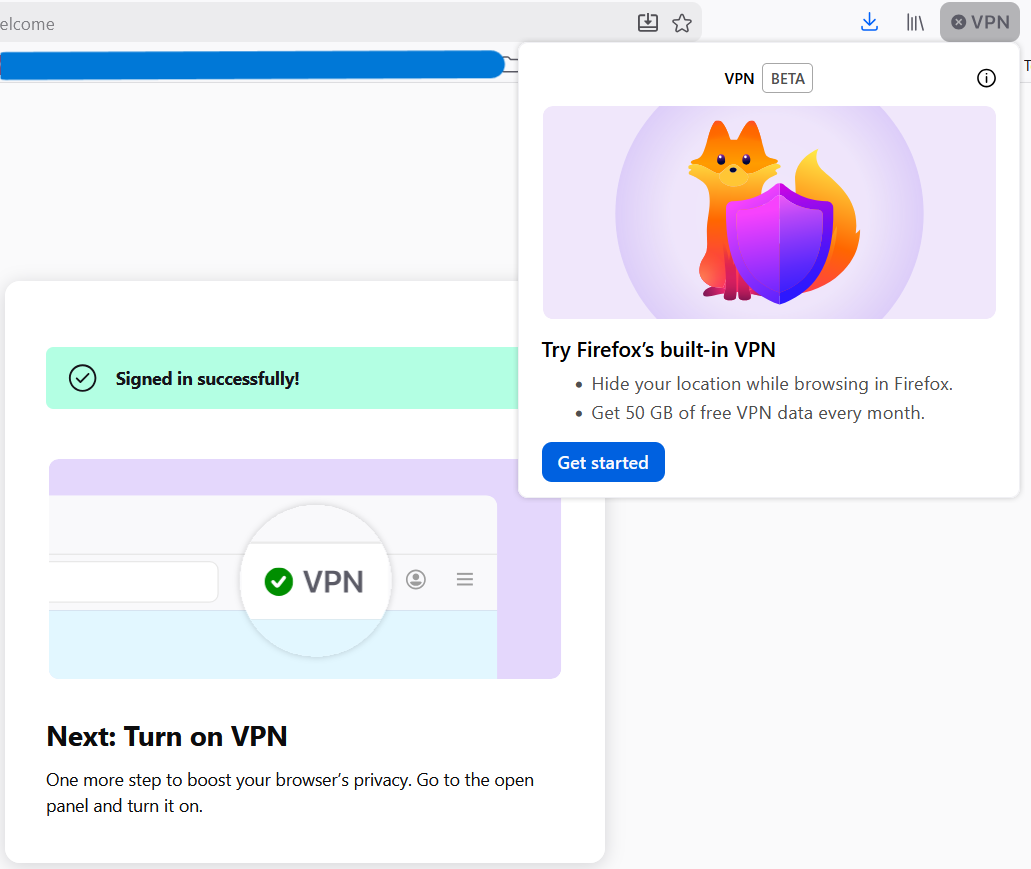
When I open the Mozilla VPN window I am met with the "Get Started" page. I click the "Get Started" button and sign in. When I get to the "Signed in successfully!" page, it tells me to open the Mozilla VPN window again (it does this for me) and to turn it on and all that. However, when the window is opened again, I am met with the same "Get Started" page from the beginning, leaving me in the endless loop of logging in. I am running a fully updated Windows 11. Could it be an extension I have?
Συνημμένα στιγμιότυπα

Επιλεγμένη λύση

It seems even though it looked like I was logged in to the browser, in reality my account was disconnected. I re-connected it and the VPN seems to be working now.

Προβολή απάντησης εντός συζήτησης 👍 0

Όλες οι απαντήσεις (4)

Hi Austin,

This looks totally out of normal. I'm probably stating the obvious here, but have you tried restarting the browser to see if it help?

Επιλεγμένη λύση

It seems even though it looked like I was logged in to the browser, in reality my account was disconnected. I re-connected it and the VPN seems to be working now.

Oh, I'm glad you've finally managed to solved it. Happy browsing!

Υποβολή ερώτησης

Πρέπει να συνδεθείτε στον λογαριασμό σας για να απαντήσετε σε δημοσιεύσεις. Ξεκινήστε μια νέα ερώτηση εάν δεν διαθέτετε ακόμα λογαριασμό.