


Windows 10 reached EOS (end of support) on October 14, 2025. For more information, see this article.

Αναζήτηση στην υποστήριξη

Προσοχή στις απάτες! Δεν θα σας ζητήσουμε ποτέ να καλέσετε ή να στείλετε μήνυμα σε κάποιον αριθμό τηλεφώνου ή να μοιραστείτε προσωπικά δεδομένα. Αναφέρετε τυχόν ύποπτη δραστηριότητα μέσω της επιλογής «Αναφορά παραβίασης».

Μάθετε περισσότερα

Navigate by clicking URL segments in the address bar

  • 3 απαντήσεις
  • 1 έχει αυτό το πρόβλημα
  • 149 προβολές
  • Τελευταία απάντηση από jonzn4SUSE

Is it possible to click individual segments of an URL in the address bar to navigate there directly (without manually selecting and deleting the tail)? It's a convenient way to reach upper layers of a website.

For example Vivaldi implements it via Ctrl+<Mouseover/click> (see attached screen capture)

Is there an option or addon to enable this? Thanks in advance

(In reference to [post] where it said "This thread was archived. Please ask a new question if you need help.")
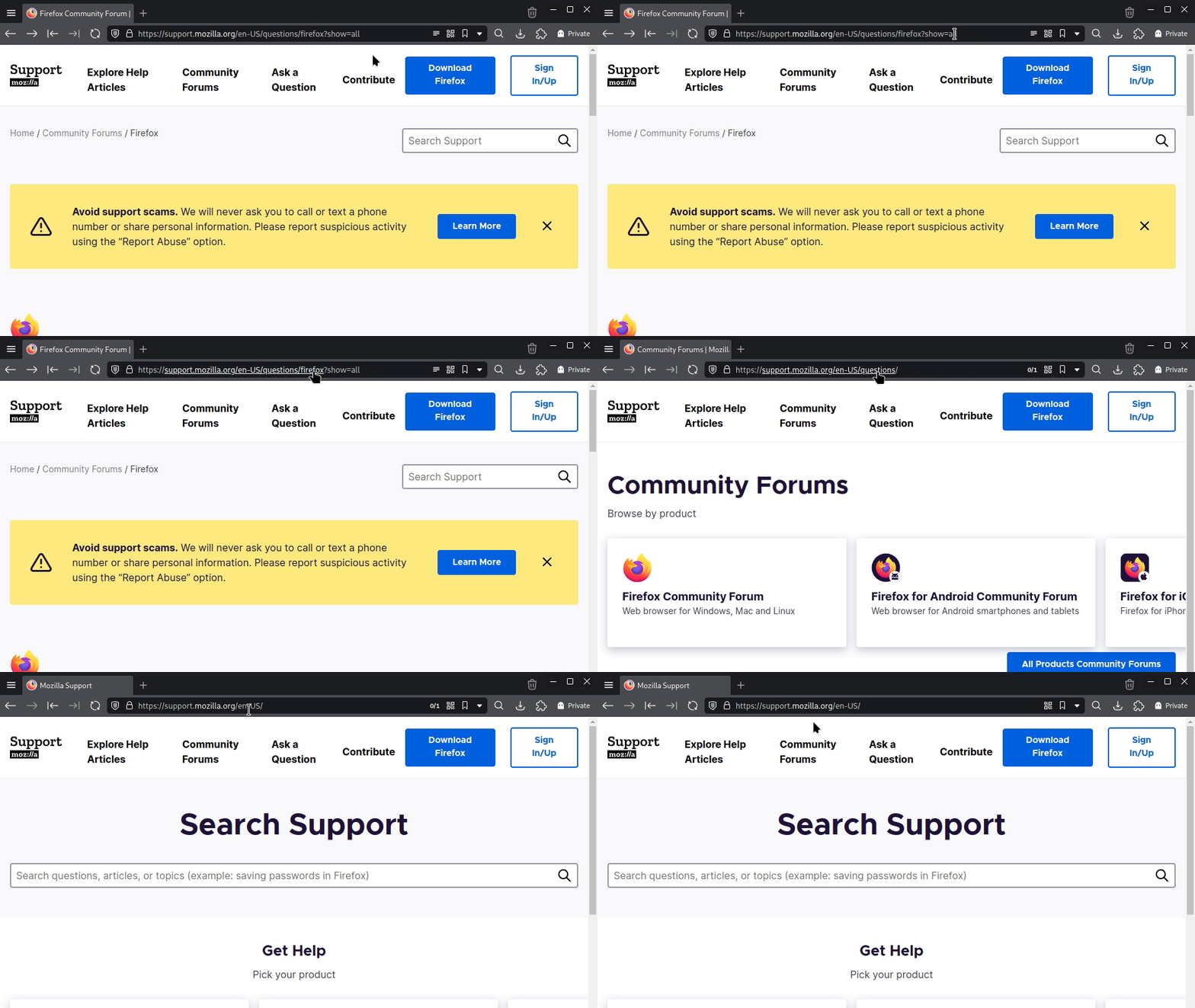
Is it possible to click individual segments of an URL in the address bar to navigate there directly (without manually selecting and deleting the tail)? It's a convenient way to reach upper layers of a website. For example Vivaldi implements it via Ctrl+<Mouseover/click> (see attached screen capture) Is there an option or addon to enable this? Thanks in advance (In reference to [[https://support.mozilla.org/en-US/questions/1476628|this post]] where it said "This thread was archived. Please ask a new question if you need help.")
Συνημμένα στιγμιότυπα

Όλες οι απαντήσεις (3)

Firefox does not currently support clicking individual URL segments in the address bar like Vivaldi does. There is also no built-in option to enable this behavior. Some add-ons have tried to improve address bar navigation, but none truly replicate segment-click navigation due to Firefox security and UI limits. For now, manually editing the URL or using the breadcrumb navigation within websites is the only practical workaround.

Thanks for confirmation. That's exactly why I'm requesting this feature to be provided officially by Mozilla. It's a major productivity and convenience booster for the user.

That's a nice option. This is not exactly the same, but I've been using uppity for sometime. https://addons.mozilla.org/en-US/firefox/addon/uppity/

Υποβολή ερώτησης

Πρέπει να συνδεθείτε στον λογαριασμό σας για να απαντήσετε σε δημοσιεύσεις. Ξεκινήστε μια νέα ερώτηση εάν δεν διαθέτετε ακόμα λογαριασμό.