


Windows 10 reached EOS (end of support) on October 14, 2025. For more information, see this article.

Αναζήτηση στην υποστήριξη

Προσοχή στις απάτες! Δεν θα σας ζητήσουμε ποτέ να καλέσετε ή να στείλετε μήνυμα σε κάποιον αριθμό τηλεφώνου ή να μοιραστείτε προσωπικά δεδομένα. Αναφέρετε τυχόν ύποπτη δραστηριότητα μέσω της επιλογής «Αναφορά παραβίασης».

Μάθετε περισσότερα

Profile management

  • 1 απάντηση
  • 0 έχουν αυτό το πρόβλημα
  • Τελευταία απάντηση από cetaceus1

περισσότερες επιλογές

Hello I got a pop up or it was new tab informing about new firefox functions. It was about profile creation and management. Now i have two profiles and cant switch back to my old one. I cant seem to be able to delete new profile to return to my old one.
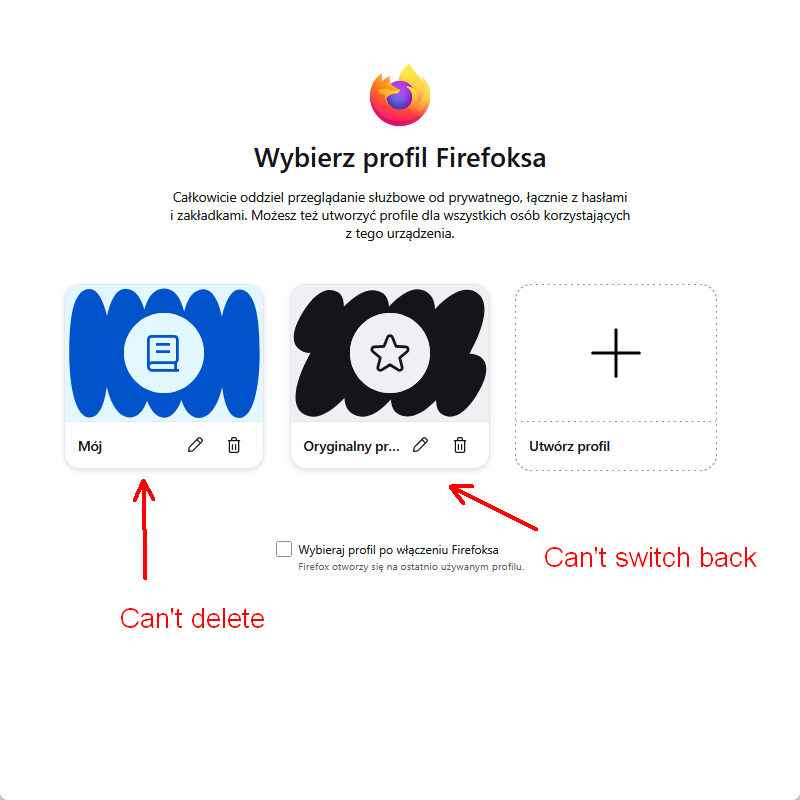
Hello I got a pop up or it was new tab informing about new firefox functions. It was about profile creation and management. Now i have two profiles and cant switch back to my old one. I cant seem to be able to delete new profile to return to my old one.
Συνημμένα στιγμιότυπα

Όλες οι απαντήσεις (1)

περισσότερες επιλογές

I experimented with this profiles feature a while ago but since I realised syncing multiple profiles resulted in the bookmarks homogenising across all profiles (exactly what I didn't want) I went back to just one profile.

First, when you have multiple profiles you can't delete the default profile. When you create a second profile, Firefox automatically makes that the default profile. This would be why you can't delete that profile you now don't want. Go to your other profile as in your screenshot and edit it to make it the default. Then you can delete the other profile and just have one profile.

Υποβολή ερώτησης

Πρέπει να συνδεθείτε στον λογαριασμό σας για να απαντήσετε σε δημοσιεύσεις. Ξεκινήστε μια νέα ερώτηση εάν δεν διαθέτετε ακόμα λογαριασμό.