Windows 10 reached EOS (end of support) on October 14, 2025. For more information, see this article.

Αναζήτηση στην υποστήριξη

Προσοχή στις απάτες! Δεν θα σας ζητήσουμε ποτέ να καλέσετε ή να στείλετε μήνυμα σε κάποιον αριθμό τηλεφώνου ή να μοιραστείτε προσωπικά δεδομένα. Αναφέρετε τυχόν ύποπτη δραστηριότητα μέσω της επιλογής «Αναφορά παραβίασης».

Μάθετε περισσότερα

reopen pages on startup

  • 8 απαντήσεις
  • 3 έχουν αυτό το πρόβλημα
  • 253 προβολές
  • Τελευταία απάντηση από ReadWrite1 p138

περισσότερες επιλογές

Where do I find Mozilla settings to return my system to automatically reopen pages on startup?

Where do I find Mozilla settings to return my system to automatically reopen pages on startup?

Όλες οι απαντήσεις (8)

περισσότερες επιλογές

Oneota said

Where do I find Mozilla settings to return my system to automatically reopen pages on startup?

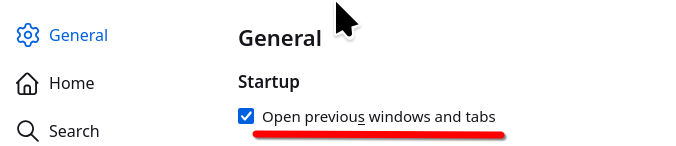
You said system... do you mean to return the tabs you had open previously? If so, here is a screenshot of the option. see screenshot
περισσότερες επιλογές

Huh? Where do I find that that is in your screen shot? It doesn't look like anything on my computer screen.

περισσότερες επιλογές

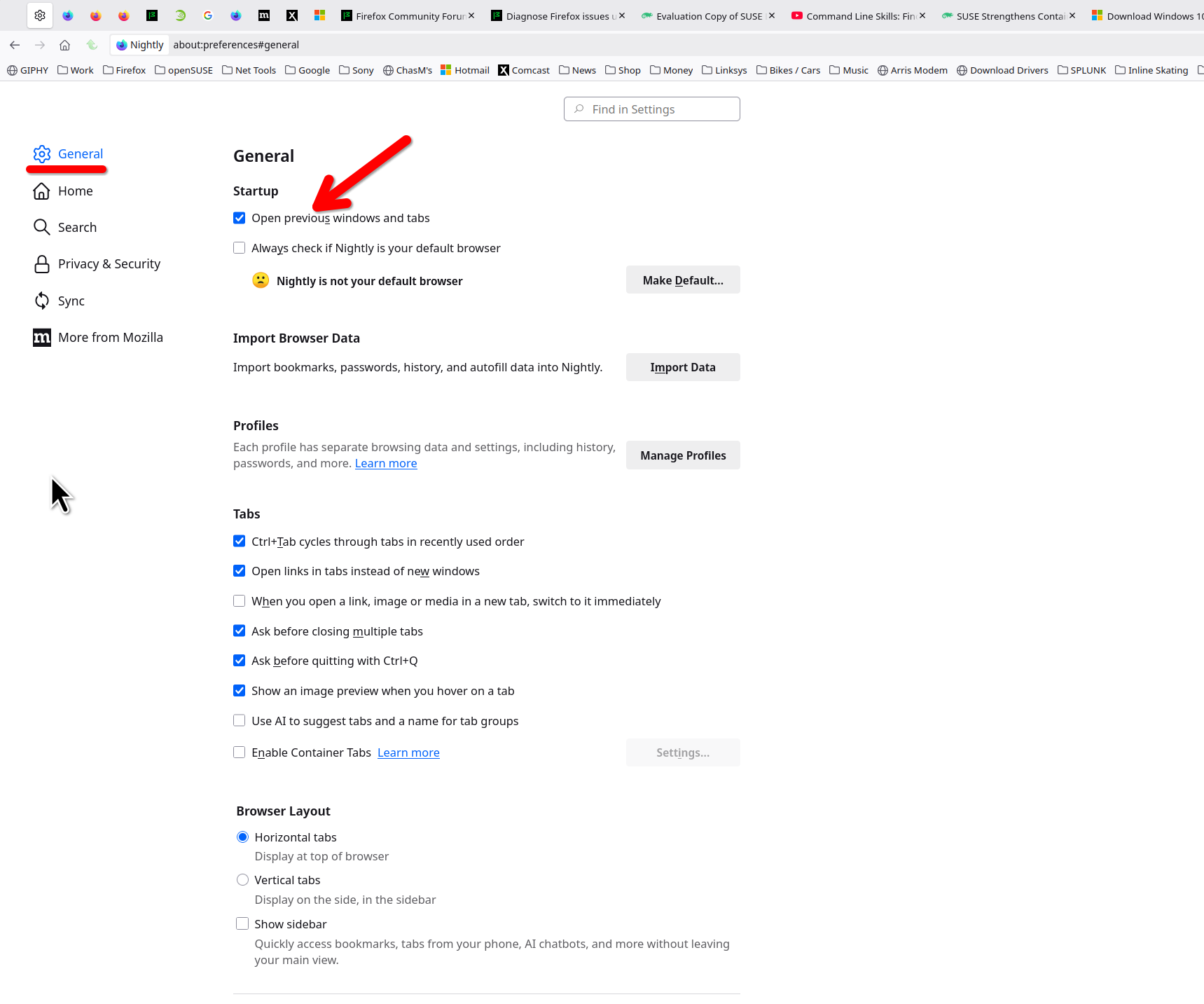
The settings page. see bigger screenshot Post a screenshot of what you're seeing.
περισσότερες επιλογές

This is what I see on settings:

περισσότερες επιλογές

That is not the settings page in the browser.

περισσότερες επιλογές

So, where do I get what I'm supposed be looking at????

περισσότερες επιλογές

In the Settings. Click ≡ in the top right corner and select Settings from the menu.

περισσότερες επιλογές

offering some helpful information :

i discovered the problem was caused by Windows11 multiple desktops :

another desktop was already showing all the Firefox tabs :

this caused the current desktop to not show all the Firefox tabs.

Υποβολή ερώτησης

Πρέπει να συνδεθείτε στον λογαριασμό σας για να απαντήσετε σε δημοσιεύσεις. Ξεκινήστε μια νέα ερώτηση εάν δεν διαθέτετε ακόμα λογαριασμό.