


updated address bar with unified search?
I've received email twice about the updated address bar with the unified search dropdown. Why am I not seeing it in my up-to-date Firefox/Windows 11?
Επιλεγμένη λύση
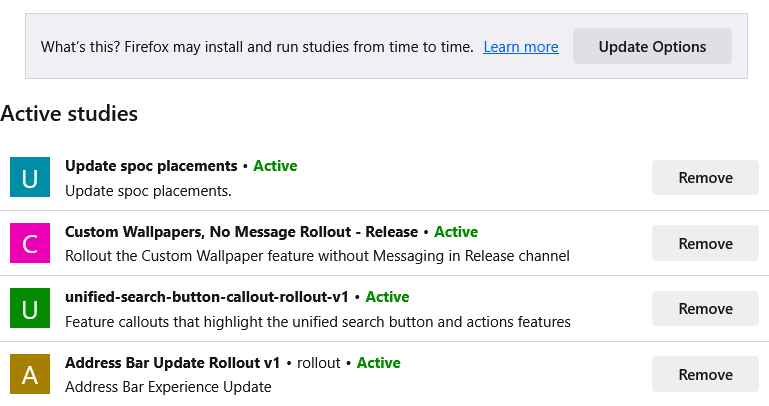
Hi Ralph, some features are progressively rolled out using the "study" system. I see this one listed in my about:studies page (screenshot attached).
If you disabled studies in your Firefox, the address bar changes will probably be turned on permanently in an upcoming version of Firefox. To try it now, you can toggle a preference behind the scenes to enable it:
(1) In a new tab, type or paste about:config in the address bar and press Enter/Return. Click the button accepting the risk.
More info on about:config: Configuration Editor for Firefox. The moderators would like us to remind you that changes made through this back door aren't fully supported and aren't guaranteed to continue working in the future.
(2) In the search box in the page, type or paste scotchBonnet and pause while the list is filtered
(3) Double-click the browser.urlbar.scotchBonnet.enableOverride preference to switch the value from false to true
(Preferences containing feature code names are definitely subject to renaming/removal in the future.)
Προβολή απάντησης εντός συζήτησης 👍 1Όλες οι απαντήσεις (2)
Επιλεγμένη λύση
Hi Ralph, some features are progressively rolled out using the "study" system. I see this one listed in my about:studies page (screenshot attached).
If you disabled studies in your Firefox, the address bar changes will probably be turned on permanently in an upcoming version of Firefox. To try it now, you can toggle a preference behind the scenes to enable it:
(1) In a new tab, type or paste about:config in the address bar and press Enter/Return. Click the button accepting the risk.
More info on about:config: Configuration Editor for Firefox. The moderators would like us to remind you that changes made through this back door aren't fully supported and aren't guaranteed to continue working in the future.
(2) In the search box in the page, type or paste scotchBonnet and pause while the list is filtered
(3) Double-click the browser.urlbar.scotchBonnet.enableOverride preference to switch the value from false to true
(Preferences containing feature code names are definitely subject to renaming/removal in the future.)
Thanks! Got the new address bar! Super!