

Αυτό το νήμα αρχειοθετήθηκε.
Κάντε νέα ερώτηση αν χρειάζεστε βοήθεια.

Επιλύθηκε
Αρχειοθετήθηκε
Printing PDF

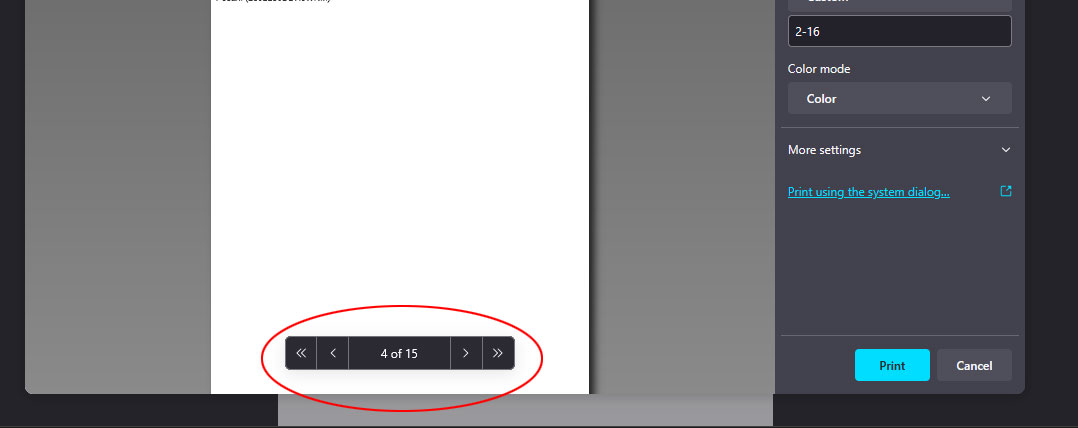
When printing a PDF with custom page ranges, the footer text in the print preview (see image) does not match the actual page. As shown in the example image, if I want to print pages 2-16, the preview indicating page 4 is actually page 5.
So, if I want to print with a very custom range, such as 2-4, 6-10, 12-14, 16, it will be very confusing and will take longer to adjust.
And I also print custom ranges like this very often for daily tasks. I’m not sure if this is a bug or just a minor adjustment needed in Firefox’s coding. Thank you in advance for your help.
When printing a PDF with custom page ranges, the footer text in the print preview (see image) does not match the actual page. As shown in the example image, if I want to print pages 2-16, the preview indicating page 4 is actually page 5.
So, if I want to print with a very custom range, such as 2-4, 6-10, 12-14, 16, it will be very confusing and will take longer to adjust.
And I also print custom ranges like this very often for daily tasks. I’m not sure if this is a bug or just a minor adjustment needed in Firefox’s coding. Thank you in advance for your help.
Όλες οι απαντήσεις (2)
the firefox version 135.0.1 (64-bit) in Win 11
Επιλεγμένη λύση
I solved the problem, after I switched to Chrome. 👍
Τροποποιήθηκε στις από τον/την Desri