


Firefox opens maximized, then minimizes, then maximizes again

When I open Firefox it opens a maximized window with tabs, then it opens a minimized with a single tab, then it reopens a maximized window with all session tabs. Each window displays in succession, one window at a time.
I'm on desktop using Windows 11.
I just read a post saying this behavior was caused by the resist fingerprinting feature. Can someone explain how that causes the repeated opening of browser window 3 times. Is there a way to retain the anti-fingerprinting behavior w/o the multiple window opening behavior?
Τροποποιήθηκε στις από τον/την Richard Silverstein
Όλες οι απαντήσεις (3)
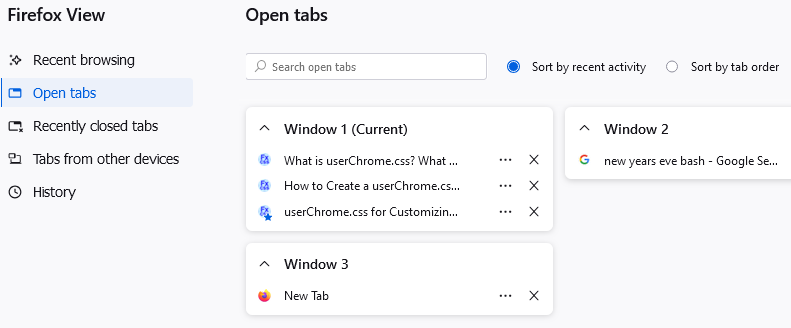
It sounds like Firefox is opening multiple windows rather than simply resizing a single window. To check on that, could you use the Firefox View (file cabinet) button at the upper left, or type or paste about:firefoxview into the address bar in a new tab and press Enter to load it. The Open Tabs list should show if there are multiple windows. (Example attached)
You should be able to close unwanted tabs/windows there, or if you want to keep it, switch to the tab and then drag the tab from the tab bar in that window to the tab bar in the main window. (Unfortunately I don't see a way to drag tabs between windows on Firefox View.)
jscher2000 - Support Volunteer said
It sounds like Firefox is opening multiple windows rather than simply resizing a single window.
I don't think so. The windows open in succession. First, the maximized window. Then it closes & the minimized window opens. Then that closes & the maximized window reopens. Only one window at a time displays.
I can't type anything for view anywhere. I had to open another browser to go here to look for an answer. When I put the curser on the firefox icon and open it, it only shows small two inch by one inch screen. It will not show the page full screen.
Τροποποιήθηκε στις από τον/την Rob Longmire