


Windows 10 reached EOS (end of support) on October 14, 2025. If you are on Windows 10, see this article.

Αναζήτηση στην υποστήριξη

Προσοχή στις απάτες! Δεν θα σας ζητήσουμε ποτέ να καλέσετε ή να στείλετε μήνυμα σε κάποιον αριθμό τηλεφώνου ή να μοιραστείτε προσωπικά δεδομένα. Αναφέρετε τυχόν ύποπτη δραστηριότητα μέσω της επιλογής «Αναφορά παραβίασης».

Μάθετε περισσότερα

Αυτό το νήμα αρχειοθετήθηκε. Κάντε νέα ερώτηση αν χρειάζεστε βοήθεια.

Pop-up window ´Manage sharing your microphone with the site´ by MS Teams Links

  • 1 απάντηση
  • 7 έχουν αυτό το πρόβλημα
  • 136 προβολές
  • Τελευταία απάντηση από markwarner22
  • Αρχειοθετήθηκε

We have noticed that opening a Microsoft Teams meetings link in Firefox does not open pop-up window asking the user to allow microphone access. Reopening the link in new tab without closing the Firefox causes the pop-up window to appear (sometimes it takes more then two tries). If one closes the Firefox and then reopens the link, the permission pop-up window will not be shown.

Is this a known issue? Can we expect this issue to be resolved in the near future?

Currently we use Firefox version 128.5.1esr (64-bit) and Windows 10 (22H2) on our computers.
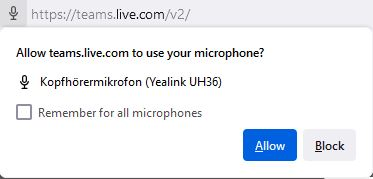
We have noticed that opening a Microsoft Teams meetings link in Firefox does not open pop-up window asking the user to allow microphone access. Reopening the link in new tab without closing the Firefox causes the pop-up window to appear (sometimes it takes more then two tries). If one closes the Firefox and then reopens the link, the permission pop-up window will not be shown. Is this a known issue? Can we expect this issue to be resolved in the near future? Currently we use Firefox version 128.5.1esr (64-bit) and Windows 10 (22H2) on our computers.
Συνημμένα στιγμιότυπα

Όλες οι απαντήσεις (1)

Probably it's incompatible with Firefox browser to properly connect. Your best to use Edge since that is Microsoft product and most likely better compatible to use with Microsoft teams for better connectivity.