


Double page view on Firefox for Mac

Double page (side-by-side) viewing of PDF documents in Firefox (Windows), involves:
go to View in the top menu, select Page Display, and choose “Two-Up”
How do you view such double pages in Firefox (Mac), since it seems not to have a "Page Display" facility?
Double page (side-by-side) viewing of PDF documents in Firefox (Windows), involves:
go to View in the top menu, select Page Display, and choose “Two-Up”
How do you view such double pages in Firefox (Mac), since it seems not
to have a "Page Display" facility?
Όλες οι απαντήσεις (2)
Hmm, I do not have that on my View menu in Firefox for Windows. That info could be for a different browser.
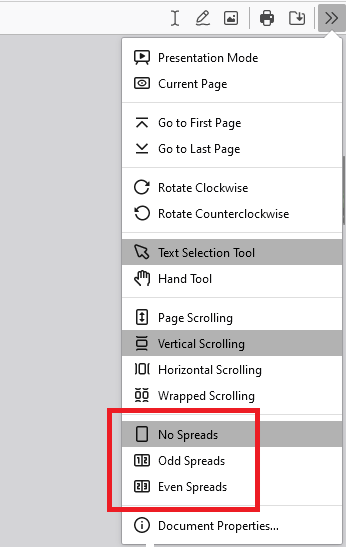
To show a multi-page view of the PDF in Firefox's built-in PDF viewer, click the overflow menu button at the right end of the viewer toolbar (>>) and choose Odd Spreads or Even Spreads.
Does that work on yours?
Brian, these are instructions for Adobe Reader, not for Firefox.Where did you take it from? Instructions for Firefox are the same for all systems.
Τροποποιήθηκε στις από τον/την TyDraniu