


Windows 10 reached EOS (end of support) on October 14, 2025. If you are on Windows 10, see this article.

Αναζήτηση στην υποστήριξη

Προσοχή στις απάτες! Δεν θα σας ζητήσουμε ποτέ να καλέσετε ή να στείλετε μήνυμα σε κάποιον αριθμό τηλεφώνου ή να μοιραστείτε προσωπικά δεδομένα. Αναφέρετε τυχόν ύποπτη δραστηριότητα μέσω της επιλογής «Αναφορά παραβίασης».

Μάθετε περισσότερα

Αυτό το νήμα αρχειοθετήθηκε. Κάντε νέα ερώτηση αν χρειάζεστε βοήθεια.

Firefox Password Manager

  • 3 απαντήσεις
  • 0 έχουν αυτό το πρόβλημα
  • 169 προβολές
  • Τελευταία απάντηση από cor-el

I have set a master password for firefox Logins and Passwords. When I try to look at Passwords sometimes the login screen pops up to allow me to enter the Master Password. Other times I get the screen (see attached photo) that has a login button. When I click the button the screen flashes but does not pop up a password window. If I close all tabs and other windows of firefox browser then start only one firefox browser window it will ask for the master password. That fixes it temporarily but I have to close many tabs and several firefox windows.
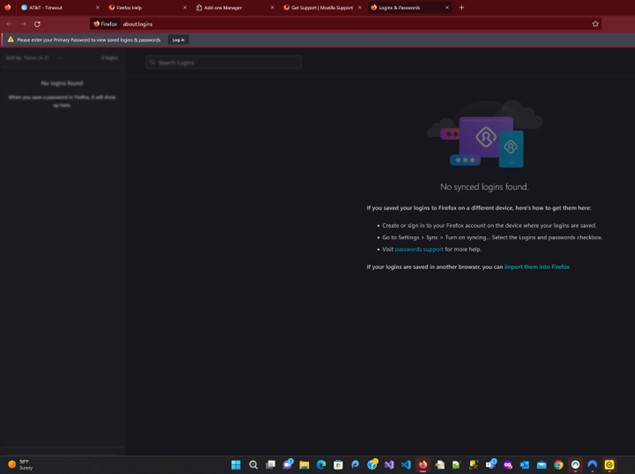
I have set a master password for firefox Logins and Passwords. When I try to look at Passwords sometimes the login screen pops up to allow me to enter the Master Password. Other times I get the screen (see attached photo) that has a login button. When I click the button the screen flashes but does not pop up a password window. If I close all tabs and other windows of firefox browser then start only one firefox browser window it will ask for the master password. That fixes it temporarily but I have to close many tabs and several firefox windows.
Συνημμένα στιγμιότυπα

Όλες οι απαντήσεις (3)

Ok so this time after shrinking all the browsers the login screen was behind them and didn't bring to front.

Sorry Scratch that.... the popup login window was for another program. Please see original post that is still an issue.

Did you try to close and reopen the tab with the about:logins page if clicking the Login button doesn't work as this usually happens if you cancel the Primary Password prompt?