


Private mode colors with CSS

Hello,
I've changed the background color on the private tabs/windows with this CSS:
@-moz-document url(about:privatebrowsing){
 html.private{
  background-color: #2B2A33 !important;
  --in-content-page-color: gray !important;
}
I would like to make the "background-color" to be the same as the window background without hardcoding it, so it always match the theme, ie:
background-color: <window.background> !important;
I would like to do the same with the background color of the search box in the private mode window, but I can't find the id.
Regards.
Hello,
I've changed the background color on the private tabs/windows with this CSS:
<pre>
@-moz-document url(about:privatebrowsing){
html.private{
background-color: #2B2A33 !important;
--in-content-page-color: gray !important;
}</pre><br>
I would like to make the "background-color" to be the same as the window background without hardcoding it, so it always match the theme, ie:
<pre> background-color: <window.background> !important;</pre><br>
I would like to do the same with the background color of the search box in the private mode window, but I can't find the id.
Regards.
Τροποποιήθηκε στις από τον/την jlwally
Επιλεγμένη λύση
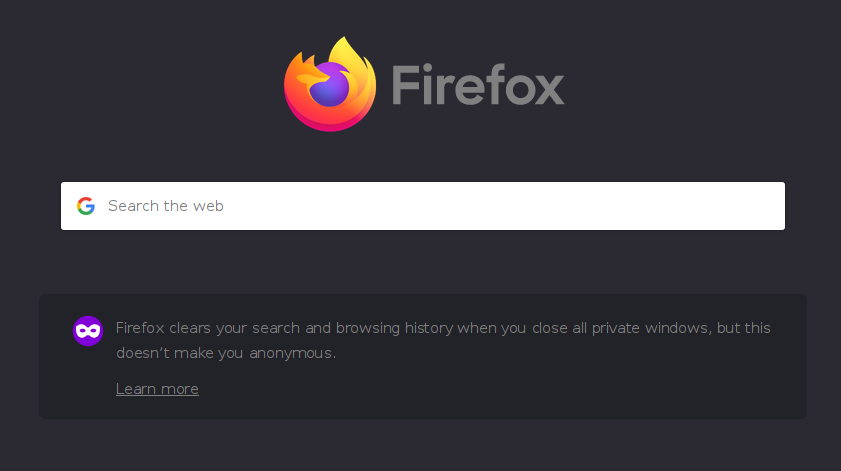
Solved it myself. Attached is an image with the result.
@-moz-document url(about:privatebrowsing){
 html.private{ background-color: #2B2A33 !important; } /* back color */
 html.private div.showSearch button.search-handoff-button {
  background-color: #42414D !important; } /* search box back color */
 html.private div.showPrivate div.info { display: none !important; } /* hide bottom panel */
}
Had to hardcode the colors but will do for now.
Regards.
Προβολή απάντησης εντός συζήτησης 👍 1Όλες οι απαντήσεις (1)
Επιλεγμένη λύση
Solved it myself. Attached is an image with the result.
@-moz-document url(about:privatebrowsing){
 html.private{ background-color: #2B2A33 !important; } /* back color */
 html.private div.showSearch button.search-handoff-button {
  background-color: #42414D !important; } /* search box back color */
 html.private div.showPrivate div.info { display: none !important; } /* hide bottom panel */
}
Had to hardcode the colors but will do for now.
Regards.
