


Windows 10 reached EOS (end of support) on October 14, 2025. If you are on Windows 10, see this article.

Αναζήτηση στην υποστήριξη

Προσοχή στις απάτες! Δεν θα σας ζητήσουμε ποτέ να καλέσετε ή να στείλετε μήνυμα σε κάποιον αριθμό τηλεφώνου ή να μοιραστείτε προσωπικά δεδομένα. Αναφέρετε τυχόν ύποπτη δραστηριότητα μέσω της επιλογής «Αναφορά παραβίασης».

Μάθετε περισσότερα

Αυτό το νήμα αρχειοθετήθηκε. Κάντε νέα ερώτηση αν χρειάζεστε βοήθεια.

Can't Delete Events from Lightning Calendar Connected to Outlook.com via iCalendar (ICS)

  • 2 απαντήσεις
  • 1 έχει αυτό το πρόβλημα
  • 199 προβολές
  • Τελευταία απάντηση από john76
  • Επιλύθηκε

I've successfully connected Lightning to an Outlook.com calendar using the iCalender (ICS) protocol. However, when I try to delete an event from Thunderbird/Lightning, I get this message:

Error Code: MODIFICATION_FAILED Description: If you're seeing this message after snoozing or dismissing a reminder and this is for a calendar you do not want to add or edit events for, you can mark this calendar as read-only to avoid such experience in future. To do so, get to the calendar properties by right-clicking on this calendar in the list in the calendar or task view.

And under Edit > Calendar Properties, "Read Only" becomes re-checked. If I uncheck it again and attempt to delete an event, I get the above message again (and the event does not delete).

So how can I successfully delete events in Lightning?
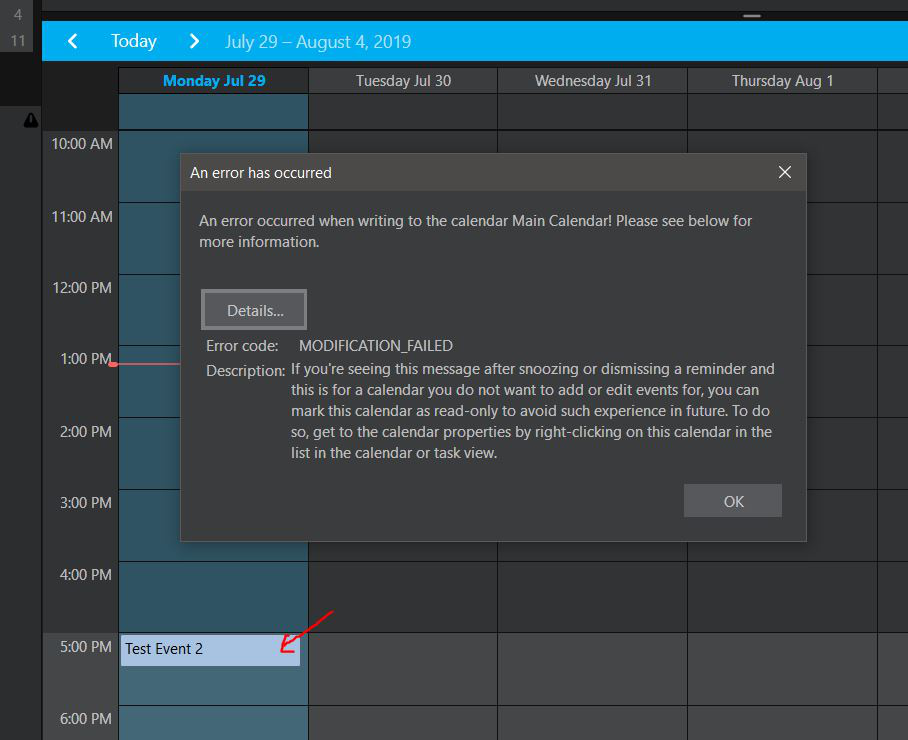
I've successfully connected Lightning to an Outlook.com calendar using the iCalender (ICS) protocol. However, when I try to delete an event from Thunderbird/Lightning, I get this message: Error Code: MODIFICATION_FAILED Description: If you're seeing this message after snoozing or dismissing a reminder and this is for a calendar you do not want to add or edit events for, you can mark this calendar as read-only to avoid such experience in future. To do so, get to the calendar properties by right-clicking on this calendar in the list in the calendar or task view. And under Edit > Calendar Properties, "Read Only" becomes re-checked. If I uncheck it again and attempt to delete an event, I get the above message again (and the event does not delete). So how can I successfully delete events in Lightning?
Συνημμένα στιγμιότυπα

Τροποποιήθηκε στις από τον/την john76

Επιλεγμένη λύση

Updating this in case anyone runs across it. You'll want to use the TBSync add on. It works really well.

Προβολή απάντησης εντός συζήτησης 👍 0

Όλες οι απαντήσεις (2)

Well, here's the answer: https://thunderbirdtweaks.blogspot.com/2016/10/outlook-calendar-in-thunderbird.html

At the bottom of that article, in the comment section, someone posted this link for the latest add on file (2019) that you'll want to use: https://github.com/ExchangeCalendar/exchangecalendar/releases

Επιλεγμένη λύση

Updating this in case anyone runs across it. You'll want to use the TBSync add on. It works really well.