


File upload window can not be resized after upgrading to Firefox 7

After upgrading to Firefox 7.0.1 the file upload window is small and can not be resized.
Ɖɔɖɔɖo si wotia
It sounds like whatever it is, is as you originally said site specific.
All Replies (6)
Try in Firefox's safe mode
- do not make changes when you see the first options window - click on continue
- use the default themes
- if the above does not help then whilst still in safe mode disable all plugins
- see also troubleshooting extensions and themes and troubleshooting plugins
What is it that you are trying to do download files from somewhere on the internet to your own computer ?
- if so see also downloads Window
I am already running the default theme and now I have tried to run Firefox in safe mode with all plugins disabled, but I still can't resize the builtin File upload dialog. If I don't remeber completly wrong it was rezizeable in earlier version of Firefox.
It is not the download window that appears when you download a file from Internet to your computer, it is the upload window that shows when you want to upload a file from your computer to a server.
Now when I wanted to upload the image of the upload window, I found that this upload window is resizeable, it must be site specific?
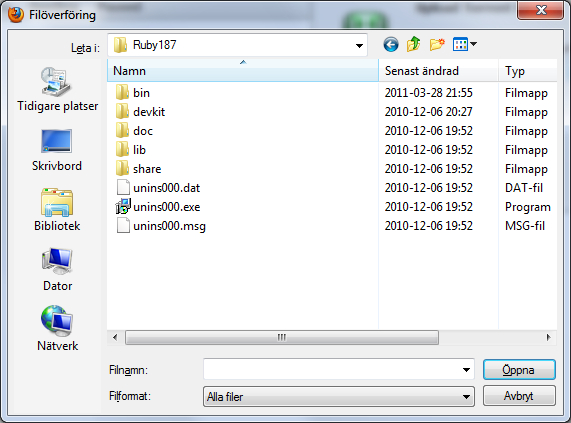
You could try the advanced javascript properties
Firefox button -> Options -> |Content | -> (Javascript -> Advanced)
I didn't change anything, I tried to disable all javascript options and then I tried to enable all of them, but no change.
But I found that the difference between the file upload below (Add images) that I can resize and the one that I have a problem with, is the 'multiple' attribute. I removed it with the help of Firebug and then the File upload window became resizeable! I don't know if it is a bug or not, but at least I know why it doesn't work on that particular page.
HTML: <input type="file" multiple="multiple" id="torrent_upload_file" name="torrent_files[]">
Moomin trɔe
Ɖɔɖɔɖo si wotia
It sounds like whatever it is, is as you originally said site specific.
Yeah, but it used to work with that page before version 7 (if I remember it right) and multiple is a valid HTML5 attribute. I will see if I can find out how to report a bug.