


Windows 10 reached EOS (end of support) on October 14, 2025. If you are on Windows 10, see this article.

Search Support

Avoid support scams. We will never ask you to call or text a phone number or share personal information. Please report suspicious activity using the “Report Abuse” option.

Learn More
Open

Wikipedia suddenly displaying with huge font as of 8th October 2026

StellarX

Hello,

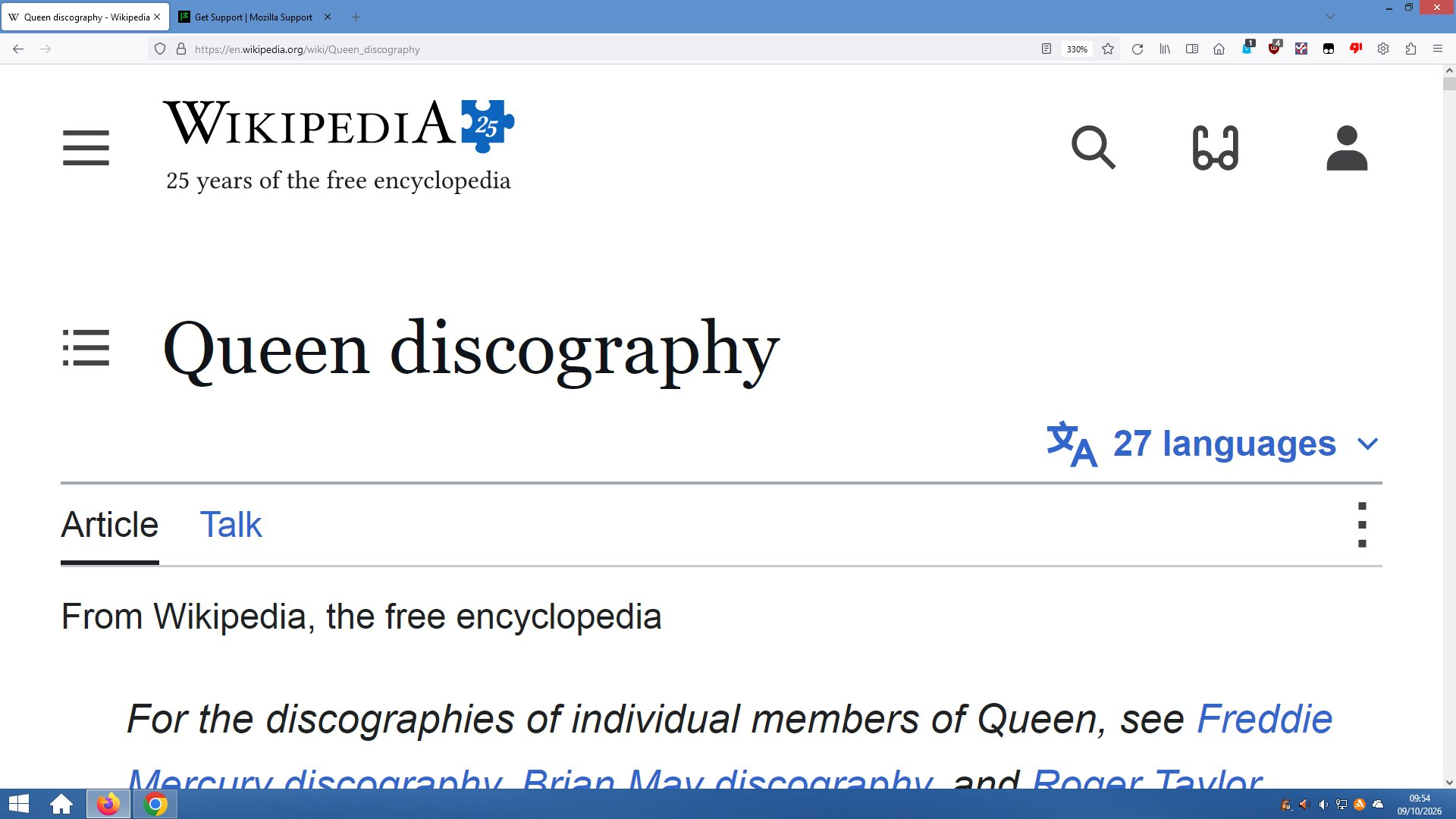
For some inexplicable reason, when I visit any Wikipedia page (as of Thursday 8th October 2026), the pages display with a huge oversized font that also impacts the format and layout of the page in my browser. I have not made any adjustments on my PC to increase font display size. Wikipedia is the ONLY website that displays in this manner.

I am running Firefox 115.42.0esr (64-bit), which appears to indicate Firefox is up-to-date on my Windows 8.1 desktop PC. Please note that I am still running Windows 8.1 on this device out of choice.

I reported the fault initially to Wikipedia itself, and the response is that any fault is at my end. I have visited the same Wikipedia pages via Chrome Version 109.0.5414.168 (Official Build) (64-bit) and the pages display normally.

I have attached a sample screenshot to illustrate.

Any ideas how I can resolve this issue please?

Many thanks - Dean
Hello, For some inexplicable reason, when I visit any Wikipedia page (as of Thursday 8th October 2026), the pages display with a huge oversized font that also impacts the format and layout of the page in my browser. I have not made any adjustments on my PC to increase font display size. Wikipedia is the ONLY website that displays in this manner. I am running Firefox 115.42.0esr (64-bit), which appears to indicate Firefox is up-to-date on my Windows 8.1 desktop PC. Please note that I am still running Windows 8.1 on this device out of choice. I reported the fault initially to Wikipedia itself, and the response is that any fault is at my end. I have visited the same Wikipedia pages via Chrome Version 109.0.5414.168 (Official Build) (64-bit) and the pages display normally. I have attached a sample screenshot to illustrate. Any ideas how I can resolve this issue please? Many thanks - Dean
Screen ƒe photowo kpe ɖe eŋu

All Replies (1)

And the page set to 330% zoom (see the value in the address bar next to the bookmark star) is deliberate, or you don't think that's connected? If you reset the zoom level on that site back to 100% (either with Ctrl + 0 shortcut, or from browser menu with the "Zoom" item +/- controls), do you still see any issue with the page?

Bia biabia

You must log in to your account to reply to posts. Please start a new question, if you do not have an account yet.