


The firefox built in VPN won't load any websites, help please?
I've been using firefox for a little while- maybe three months now. I'm no expert on any of the config options. I run firefox using the built in VPN that my friend showed me how to enable, and I've been using it since. But now, as of roughly today, whenever I enable the VPN, no websites will load. At all. When I turn it off, they load instantly. But whenever I turn it on, it just gets stuck loading forever and ever, never actually getting anywhere. I tried enabling network.dns.disableIPv6 in the config page, because that's what I saw on a mozilla support page- nothing. Didn't do anything. The browser.ipprotection.enabled is still on, and I didn't change anything in settings. There was a firefox update very recently, but everything still worked with the VPN on. I just updated my computer, but I don't think that's it either because it wasn't loading things earlier today either. Not sure how to fix this. Please help?
All Replies (5)
Hello,
You can try these fixes : First, go to menu > privacy & security, then scroll down to DNS over HTTPS, then set it to off. After that, try using the built in VPN again.
Next, check your 50GB data limit. If hit, the VPN may fail to function, until the monthly allowance of 50GB resets, monthly.
Next, try clearing network cache and cookies. *Keep in mind that this will sign you out of some websites, so make sure you have all your account info saved* To do so, go to settings > privacy & security, then find the Cookies and Site Data section and click clear data. After that, check cache and cookies, and click clear.
Lastly, try switching server locations for the built in VPN, and testing each server.
dessertdish said
Hello, You can try these fixes : First, go to menu > privacy & security, then scroll down to DNS over HTTPS, then set it to off. After that, try using the built in VPN again. Next, check your 50GB data limit. If hit, the VPN may fail to function, until the monthly allowance of 50GB resets, monthly. Next, try clearing network cache and cookies. *Keep in mind that this will sign you out of some websites, so make sure you have all your account info saved* To do so, go to settings > privacy & security, then find the Cookies and Site Data section and click clear data. After that, check cache and cookies, and click clear. Lastly, try switching server locations for the built in VPN, and testing each server.
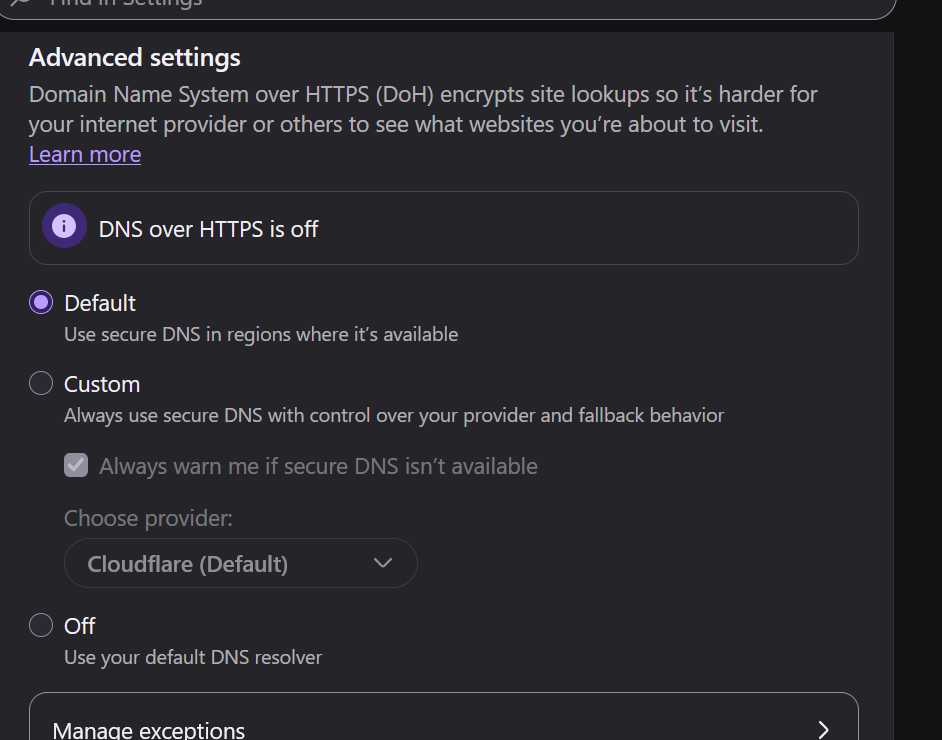
For some reason, the DNS over HTTPS was already off. I never turned it off, it just was like that. I included a screenshot of what it shows, and that was the what I saw when I got there. I didn't touch anything. My 50GB limit is only at 45.1, meaning I only used 4.9 out of the 50. Besides, it reset this month, and it would be very hard to use 50GB of data in 8 days. Anyway, that's not it. I tried switching locations and out of the ten or so I tried, none of them worked. I CAN try them all of you think one of them would work, but I kinda doubt it. I tried clearing my cache and cookies, then completely ending firefox and starting it up again, and that didn't work. just signed me out of everything. Not really sure what to do now. Thank you for replying though, especially so soon after I originally made the post.
Hello,
Since the previous fixes didn't work, you can try these additional ones : Go to about:networking#dns, and click clear DNS cache button. After that, restart firefox, and re-enable the VPN and test again.
Next, go to about:config again, then search for "network.dns.disableIPv6" and set it to false if true. After that, restart Firefox and test. If it doesn't work, re-enable it.
dessertdish said
Hello, Since the previous fixes didn't work, you can try these additional ones : Go to about:networking#dns, and click clear DNS cache button. After that, restart firefox, and re-enable the VPN and test again. Next, go to about:config again, then search for "network.dns.disableIPv6" and set it to false if true. After that, restart Firefox and test. If it doesn't work, re-enable it.
Nope. Nothing worked. I went to the about:network#dns and pressed the button, but it didn't seem to do anything. I ended firefox and started it up again. No change. I disabled network.dns.disableIPv6, ended, started again, nothing. I even tried clearing the DNS again with network.dns.disableIPv6 disabled, but no change. I re-enabled it since you said to.
Here are some additional methods : Search command prompt in windows start, and then run it as admin. After that, run this command : CheckNetIsolation LoopbackExempt -a -n="Mozilla.Firefox" After that, close command prompt, and try using VPN again.
Also, as a question, when you cant load the website, what error does it give? A screenshot would be preferred if there is an error. If it is a blank page, you may ignore this.