


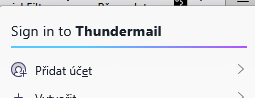
How to permanently remove "Sign into thundermail" from Thunderbird menu.
I use Thunderbird expluicitly because it is open source application not bound to any specific services. I am very dissapointed to find connection to "thundermail" build into application and WANT IT PHYSICALLY REMOVE from it.
I kindly ask to help in removing it from my copies of Thunderbird. Thank you.
All Replies (3)
Ɖɔɖɔɖo si wotia
The only way I know to remove this item is to use a certain CSS code in a userChrome.css file in the Thunderbird profile
• in Thunderbird go to Settings > General > scroll to bottom and click "Config Editor...", search for toolkit.legacyUserProfileCustomizations.stylesheets and toggle its value from false to true • open a text editor and copy + paste the following CSS code in the editor
#tbpro-menu-id-root {
display: none !important; }
• name the file userChrome.css , save it to your Desktop and remove the .txt suffixe your OS will add
• create a folder, name it chrome and move the userChrome.css file in folder chrome
• in Thunderbird go to Help >Troubleshooting Information > Profile Folder > Open Folder...., then exit Thunderbird
• move the folder chrome in the profile folder and restart Thunderbird
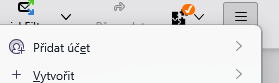
I would like to thank you very much for your time and help, as seen on attached screenshot, unwanted item dissepeared. I STRONGLY ASK Mozilla developers to make this OPTIONAL and disabled by default. Again, thank you. Vojtech Bednar
I'm glad that this solution works for you. Personally this new item doesn't bother me since I don't use the App button ≡ very often.