


Why can't I turn on VPN?

When I click "VPN," i get a box with a button that says "get started." I click "get started" and it prompts me to sign in. I'm already signed in, so I click continue, and I get a message that says "sign in successful! Now turn on VPN" and the VPN box comes back up with the "get started" button. This sends me in an endless loop. I never get the button that actually lets you turn on VPN. What is going wrong?
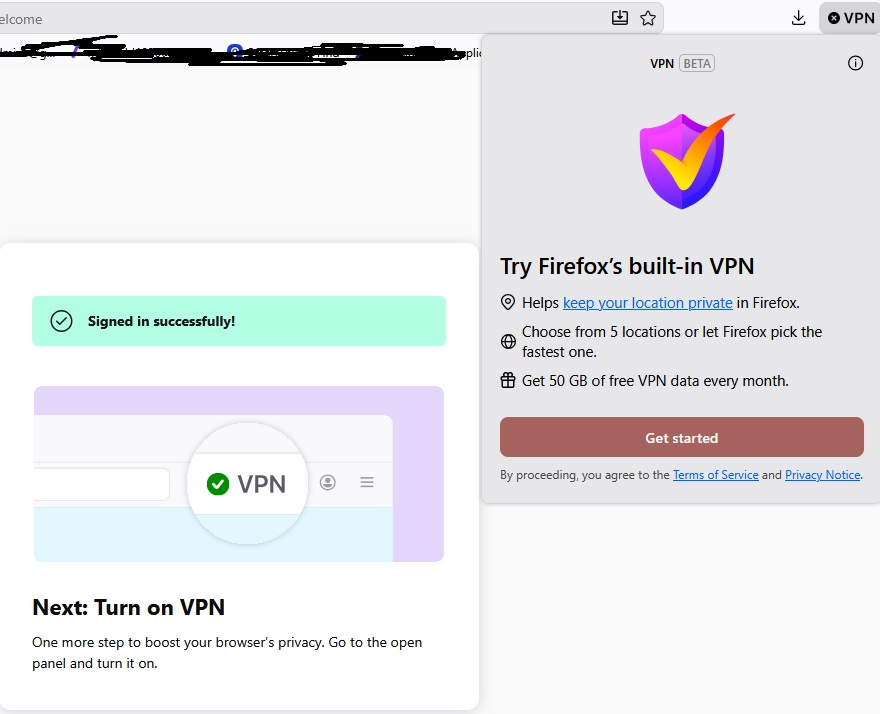
All Replies (2)
Hi,
The Firefox built-in VPN is being introduced gradually. It’s available to some users in the US, UK, Germany, and France (starting with Firefox version 149), and in Canada starting with Firefox version 150.
If you’re in one of these countries and using one of those Firefox versions, but still don’t see the built-in VPN, it may simply not have reached you yet. Since this is an experiment, the feature is being rolled out in stages. You can check the about:studies page to see whether you’re part of the holdback study.
The built-in VPN may also be unavailable if Enterprise policies are blocking it. You can check this by going to about:policies in Firefox.
Signing out of your Mozilla account and signing back in may also help. Before signing out, make sure you know your password and that Sync is enabled so you don’t risk losing or overwriting browser data.
Finally, when the built-in VPN is available, you should see a VPN icon in the top-right corner of the toolbar. Selecting it will open a prompt to turn on the VPN. If you don’t see the icon, try customizing your toolbar by right-clicking the toolbar and checking the overflow menu to add it back. For more information, see the Use built-in VPN in Firefox article.
If you wish, you can post your feedback about the Firefox built-in VPN to the Mozilla Connect thread.
I do have the icon at the top of my browser. This is where I have been trying to turn it on but getting stuck in a loop and "get started -sign in - get started - sign in." Please refer to the screenshot I posted - you can see the icon on my browser and the message I get after signing in (spoiler: it's the same as the message I get before signing in). I just downloaded Firefox and created my account a few days ago after years of using Chrome, so everything should be up to date.