


How do we make left column show everything below last Account name?

Preamble:
- There are 34 email Accounts listed in left column.
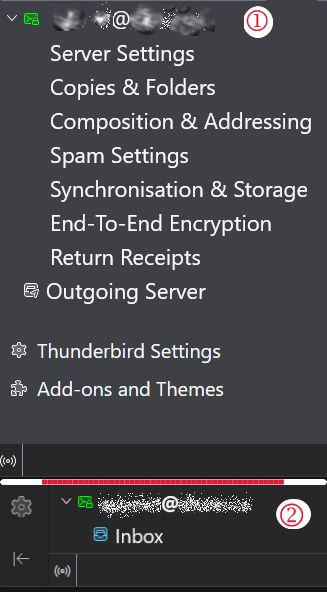
- (Image 1) When in "Mail" column I can see down to only the Account Name (address). There is only the Account Name and Inbox.. nothing else below that can be seen - no Drafts, Sent, Archives, Spam, or Deleted. Anything below is missing too.
- When choosing "Account Setting", everything for last account shows up, plus Outgoing, Add-ons (Image 2). Too, we can see the Offline/Online Icon.
QUESTION: How may I fix it so that the last account shows all sub-sections of the account - i.e., Server Settings, Copies & Folders etcetera right on down to Online/Offline or at best, down to "Return Receipts" for the last account?
Thanks for volunteering, ~r
redacted trɔe
All Replies (7)
I am confused. that is not the pane that shows folders. That pane is for the account information, such as server settings and passwords, not message folders. Am I misunderstanding? If so, please clarify. thanks.
Quote David: "I am confused. that is not the pane that shows folders. "
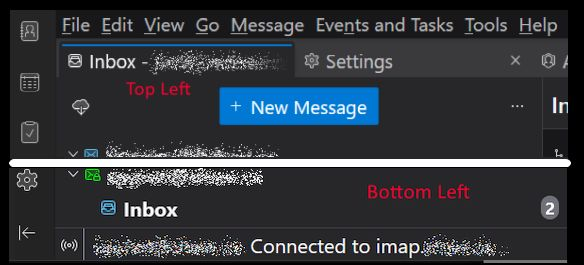
Sorry. Hope this new image is a better one. You can see that the bottom of the screen has Account name and only Inbox shows, not the other items such as sent, deleted, spam, etcetera.
The last email account name, assume its redacted@whatever.ccc don't show on the Email page with the blue box with "+ New Message" near the top. Where as the last Inbox account at the bottom new image marked in red with Bottom Left. It does however show up in Account Settings.
It would be great if on the page with all the various email boxes to show the sent,. spam etcetera boxes. Sorry for the error in using the Accounts page with the Email page in first image. This time U used the Page with the email boxes. The email at the bottom left needs more room.
I checked all my screen/Tbird settings - are OK. ~r
Can't you scroll further down in the folder pane using the scroll button of your mouse or the mouse pointer to move the scrollbar on the right of the folder pane? Thunderbird has no known limit of the number of accounts. You say you have 34 accounts listed in the folder pane, so inevitably there must be a scrollbar but maybe it is hidden by default. Does the same issu happen if you run Thunderbird in 'troubleshoot mode'? https://support.mozilla.org/en-US/kb/troubleshoot-mode-thunderbird
Mapenzi trɔe
Mapenzi said: "Can't you scroll further down in the folder pane..."
No. The revised image is attached to this post. It includes cursor position and bottom left of Thunderbird GUI w/ Scroll Bar at it's very bottom. I hope this helps. ~r
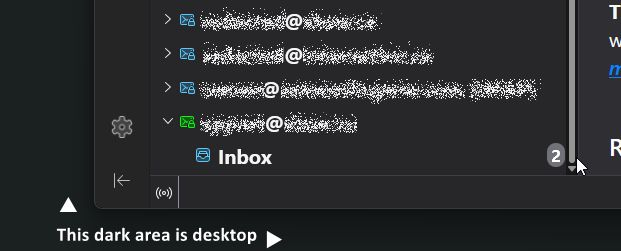
Very convincing new screen shot. But still rather odd, I've never seen that in my life. And in 'troubleshoot mode' no luck neither?
It shows properly if I switch to the Account Settings - see attached image.
I think I'll try setting a new account and hopefully, it will be last on the list and I can leave it blank. That would force the existing last account up to where it's other folders are visible.
Maybe I should let you know what my rig is: Alienware Aurora ACT1250 Gaming Desktop CPU intel I-9 Ultra GPU Nvidia RTX 5080 Monitor: Samsung Odyssey OLED G9 49" QHD 240Hz 0.03ms GTG Curved OLED G-Sync FreeSync Smart Monitor
I doubt hardware has anything to do with it, on the remote possibility... it could be. ~r
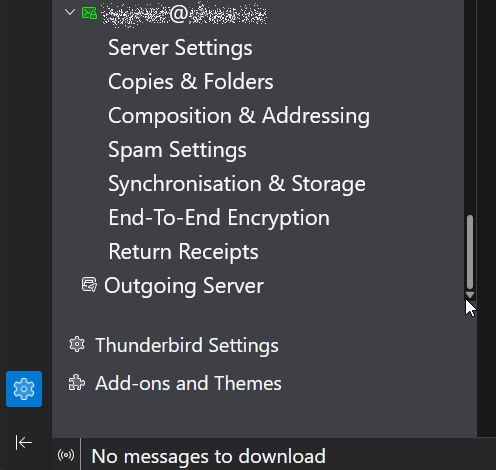
I am thinking there is no problem, but a misunderstanding of the folder pane and the account settings pane. I say that because you switch from one to the other. The account settings pane will never show message folders. If the folder pane is just showing inbox for an account, that is a different issue. Your latest screenshot shows that the last account shows all settings, so I see no problem with the account settings pane. What is it that you want to see but are not seeing?