


Windows 10 reached EOS (end of support) on October 14, 2025. For more information, see this article.

Search Support

Avoid support scams. We will never ask you to call or text a phone number or share personal information. Please report suspicious activity using the “Report Abuse” option.

Learn More

Bookmarks/Icons

  • 1 ŋuɖoɖo
  • 0 masɔmasɔ sia le wosi
  • 27 views
  • Nuɖoɖo mlɔetɔ Ron Smith

more options

Windows 10 After restarting computer, the bookmarks were missing (I somehow managed to get them back), the Instapaper and Bitwarden icons are missing from the menu bar and video's will not play (but will on play on MSN). While trying to figure this out, the Puzzle/Add-ons icon is also now missing. The instruction in the photo do match what I see when clicking on the Puzzle.
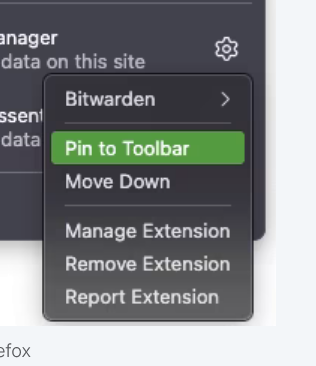
Windows 10 After restarting computer, the bookmarks were missing (I somehow managed to get them back), the Instapaper and Bitwarden icons are missing from the menu bar and video's will not play (but will on play on MSN). While trying to figure this out, the Puzzle/Add-ons icon is also now missing. The instruction in the photo do match what I see when clicking on the Puzzle.
Screen ƒe photowo kpe ɖe eŋu

All Replies (1)

more options

The instruction in the photo do NOT match what I see when clicking on the Puzzle, which is now missing. The icon is also not shown in the Customize Toolbar page but does appear in the toolbar while the page is open.

This 'solution' from Mozilla Connect from 6-24 did not work for me...I found the fix: in the panel of "Manage Extensions" I click on the green button (indicating the extension is enabled) to disable it, then click on it again to enable it, only now, the extension icon reappears on my toolbar!

Bia biabia

You must log in to your account to reply to posts. Please start a new question, if you do not have an account yet.