


missing calendar

I lost my calendar and can't find it in Thunderbird. In extensions installed Lightning and provider for Google Calendar Help, please!
Ŋuɖoɖo si wotia
Is there anything which prevents you from pressing the 'Remove' button?
Xle ŋuɖoɖo sia le goya me 👍 0All Replies (10)

Please post your Troubleshooting Information.
At the top right of the Thunderbird window, click the menu button  , then select Help > Troubleshooting Information.
Press the "Copy text to clipboard button" and paste the information into your reply.
, then select Help > Troubleshooting Information.
Press the "Copy text to clipboard button" and paste the information into your reply.
Сведения о приложении
   Имя: Thunderbird
   Версия: 52.0.1
   User Agent: Mozilla/5.0 (Windows NT 6.1; WOW64; rv:52.0) Gecko/20100101 Thunderbird/52.0.1
   Папка профиля: Открыть папку
             (Локальный диск)
   ID сборки приложения: 20170413214957
   Включённые плагины: about:plugins
   Конфигурация сборки: about:buildconfig
   Использование памяти: about:memory
   Профили: about:profiles
 Учётные записи почты и новостей
   account1:
     INCOMING: account1, , (imap) imap.gmail.com:993, SSL, OAuth2
     OUTGOING: , smtp.gmail.com:465, SSL, OAuth2, true
   account2:
     INCOMING: account2, , (none) Local Folders, plain, passwordCleartext
Сообщения о падениях
 Расширения
   Провайдер для Календаря Google, 3.3, true, {a62ef8ec-5fdc-40c2-873c-223b8a6925cc}
   CompactHeader, 2.1.0, true, {58D4392A-842E-11DE-B51A-C7B855D89593}
   Lightning Nightly Updater (Unofficial), 0.11.110714, true, lightning-nightly-updater@olive
Важные изменённые настройки
Имя: Значение
     browser.cache.disk.capacity: 358400
     browser.cache.disk.filesystem_reported: 1
     extensions.lastAppVersion: 52.0.1
     font.internaluseonly.changed: true
     font.name.monospace.el: Consolas
     font.name.monospace.x-cyrillic: Consolas
     font.name.monospace.x-unicode: Consolas
     font.name.monospace.x-western: Consolas
     font.name.sans-serif.el: Calibri
     font.name.sans-serif.x-cyrillic: Calibri
     font.name.sans-serif.x-unicode: Calibri
     font.name.sans-serif.x-western: Calibri
     font.name.serif.el: Cambria
     font.name.serif.x-cyrillic: Cambria
     font.name.serif.x-unicode: Cambria
     font.name.serif.x-western: Cambria
     font.size.fixed.el: 14
     font.size.fixed.x-cyrillic: 14
     font.size.fixed.x-unicode: 14
     font.size.fixed.x-western: 14
     font.size.variable.el: 17
     font.size.variable.x-cyrillic: 17
     font.size.variable.x-unicode: 17
     font.size.variable.x-western: 17
     mail.openMessageBehavior.version: 1
     mail.winsearch.firstRunDone: true
     mailnews.database.global.datastore.id: 3e490847-b3e5-44e2-9960-8ccf195757d
     media.gmp.storage.version.observed: 1
     network.cookie.cookieBehavior: 2
     network.cookie.prefsMigrated: true
     network.predictor.cleaned-up: true
     places.database.lastMaintenance: 1493619611
     places.history.expiration.transient_current_max_pages: 122334
     security.sandbox.content.tempDirSuffix: {fe729b6d-d437-4626-975e-088f56d42afe}
Графика
     GPU #1
     Описание: Intel(R) HD Graphics 3000
     Код производителя: 0x8086
     Код устройства: 0x0116
     Видеопамять: Unknown
     Драйвера: igdumd64 igd10umd64 igd10umd64 igdumd32 igd10umd32 igd10umd32
     Версия драйвера: 9.17.10.3517
     Дата разработки драйвера: 3-20-2014
     Features
     Direct2D: false
     DirectWrite: true (6.2.9200.22084)
     Визуализатор WebGL: Google Inc. -- ANGLE (Intel(R) HD Graphics 3000 Direct3D9Ex vs_3_0 ps_3_0) -- OpenGL ES 2.0 (ANGLE 2.1.0.2a250c8a0e15)
     AzureCanvasBackend: skia
     AzureCanvasAccelerated: 0
     AzureFallbackCanvasBackend: cairo
     AzureContentBackend: skia
JavaScript
Инкрементальный GC: 1
Поддержка доступности
   Активирована: 0
   Отключение поддержки доступности: 0
Версии библиотек
     Ожидаемая минимальная версия
     Используемая версия
     NSPR
     4.13.1
     4.13.1
     NSS
     3.28.3
     3.28.3
     NSS Util
     3.28.3
     3.28.3
     NSS SSL
     3.28.3
     3.28.3
     NSS S/MIME
     3.28.3
     3.28.3
1. Get rid of the 'Lightning Nightly Updater' extension. 2. Update to Thunderbird 52.1.0. 3. I don't see Lightning in your list of installed extensions. Report back if Lightning is still missing after updating to Thunderbird 52.1.0.
А как это сделать? У меня в настройках стоит, вроде -

Ɖɔɖɔɖo si wotia
Is there anything which prevents you from pressing the 'Remove' button?
если я удалю, то нужно будет потом установить заново или что делать потом?
а удалять нужно все расширения или только Lightning?
You don't have Lightning installed, and you want to get rid of Lightning Nightly Updater. Please re-read https://support.mozilla.org/en-US/questions/1158471#answer-964519
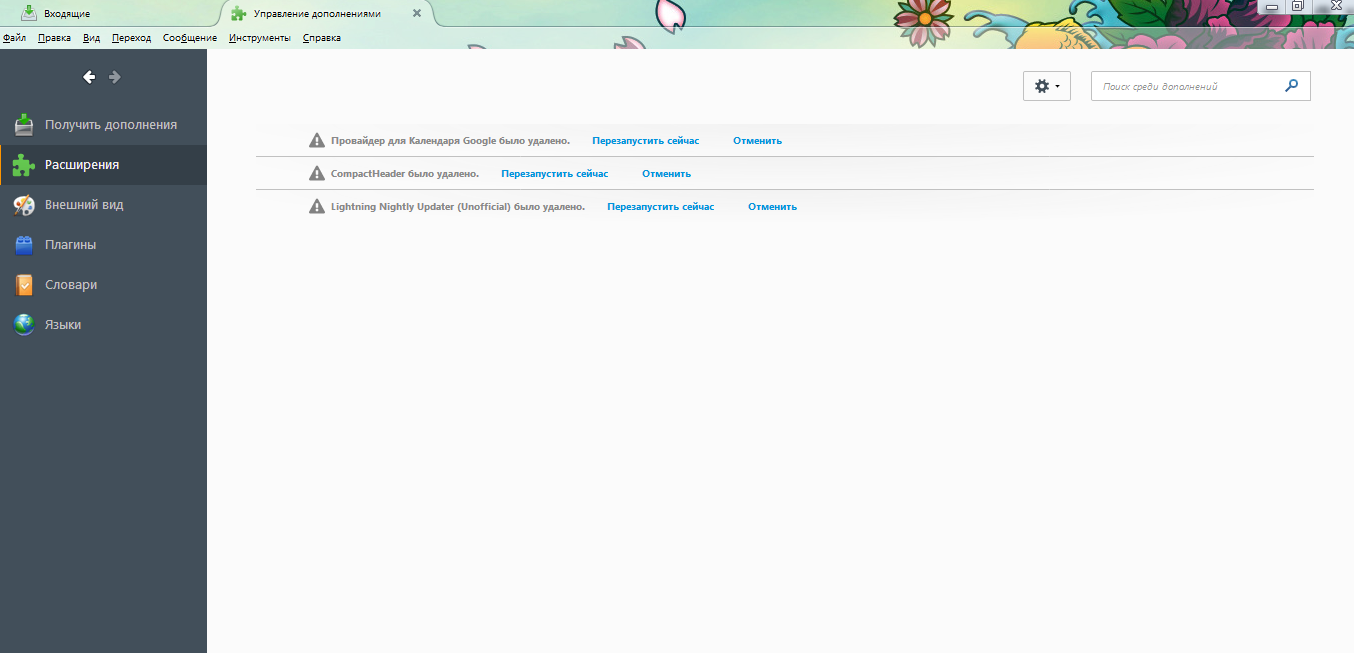
Удалил все расширения. Теперь их нужно заново установить, верно?
I'd suggest you ask in a forum for your language.