


How can you uncheck "digitally sign messages" when adding a new account? I do not want to use this.

When I try to add a new account ( or even modify an existing account) the box next to "Digitally sign messages" is checked by default and it is not accessible to uncheck
Ŋuɖoɖo si wotia
I check through all my accounts and they have no signatures tick. were you previously signing mails to get it set in the first place?
Now I assume you have no mail account you want to digitally sign mail for. Go to Tools menu (alt+T) > Options > Advanced > general and type in to the search box
sign
You will get a list of entries below including mail.identity.id#.sign_mail where # is a number
Each account has a number, but is you not signing mail then setting all to false is not an issue.
locate the one that is set to true right click and select toggle. Close the config editor once your done and restart Thunderbird.
If you are you are signing mail on an account you will need to go back latter to the account settings and turn back on any you have incorrectly turned off here in the config editor.
Xle ŋuɖoɖo sia le goya me 👍 1All Replies (6)
Hello,
In order to better assist you with your issue please provide us with a screenshot. If you need help to create a screenshot, please see How do I create a screenshot of my problem?
Once you've done this, attach the saved screenshot file to your forum post by clicking the Browse... button below the Post your reply box. This will help us to visualize the problem.
Thank you!
Screenshot shows box next to "Digitally sign messages" is checked and it is not accessible to uncheck
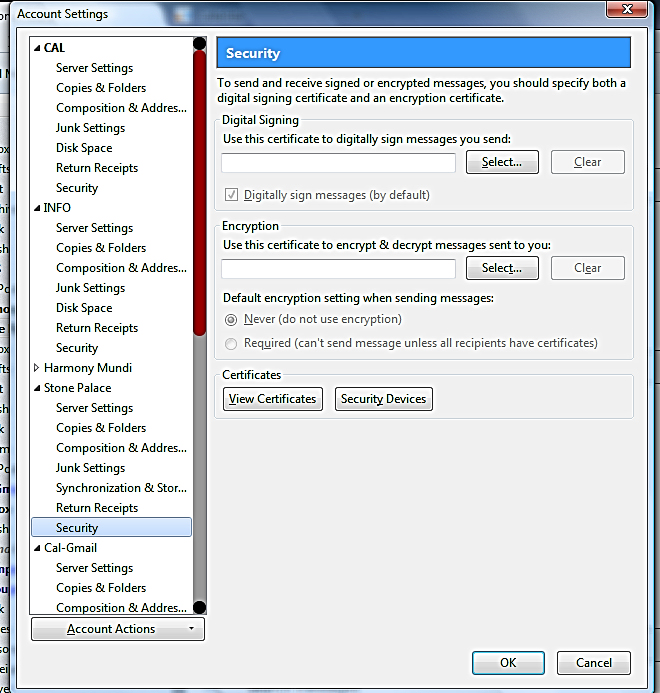
What adverse effect does this have? Given there is no digital certificate then having it checked should mean nothing
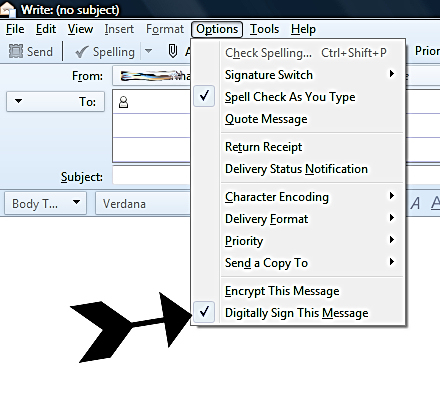
As is (with the box checked) each time I send an email I have to uncheck "Digitally sign this message" for every email I send before it will send.
Ɖɔɖɔɖo si wotia
I check through all my accounts and they have no signatures tick. were you previously signing mails to get it set in the first place?
Now I assume you have no mail account you want to digitally sign mail for. Go to Tools menu (alt+T) > Options > Advanced > general and type in to the search box
sign
You will get a list of entries below including mail.identity.id#.sign_mail where # is a number
Each account has a number, but is you not signing mail then setting all to false is not an issue.
locate the one that is set to true right click and select toggle. Close the config editor once your done and restart Thunderbird.
If you are you are signing mail on an account you will need to go back latter to the account settings and turn back on any you have incorrectly turned off here in the config editor.
Matt - Thanks so much for your assistance! That worked!