


How do I keep Firefox from remembering my login data?
I'd like to prevent Firefox from remembering login data. Specifically, my login name for Websites. When I go to eBay, for example, and start to type-in my username, Firefox suggests the proper name, signifying that it's stored somewhere. I know the login info can be cleared, but can it be prevented from saving in the first place?
Wšykne wótegrona (5)

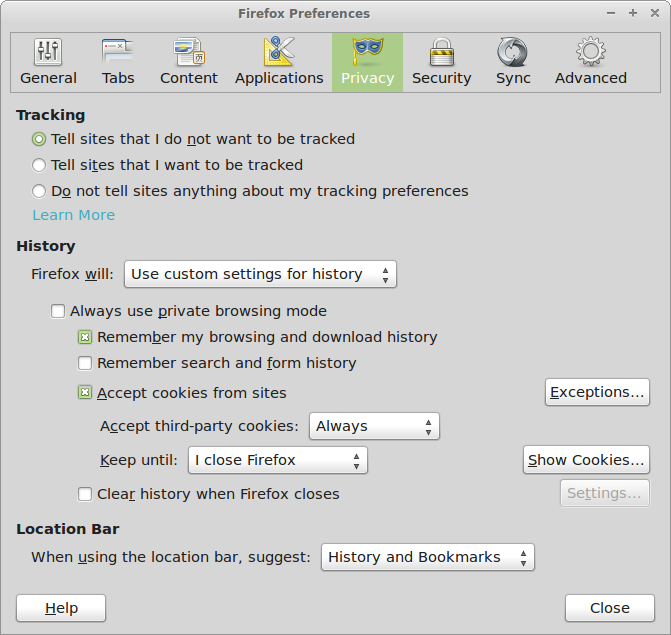
Hello, You can do this by going to the preferences and selection an option to not remember the form and search history. The navigation path is Firefox -> Preferences -> Privacy and uncheck the 'Remember my search and form history' option. This will prevent Firefox from remembering your login data.
I have also attached a screenshot of the preference window. Please check this and let us know if it has helped to solve your query.
Thank you
Use these steps to remove saved (form) data from a drop-down list:
- click the (empty) input field on the web page to open the drop-down list
- highlight an entry in the drop-down list
- press the Delete key (on Mac: Shift+Delete) to remove it.
When the Firefox Password Manager is disabled then Firefox may be storing the user name (but not the password) as saved form data.
- Tools > Options > Privacy > Firefox will: "Use custom settings for history": "Remember search and form history"
- https://support.mozilla.org/kb/Form+autocomplete
Hi, and thanks for the tip, but evidently my 25.0.1 version of Firefox is different. Instead of Firefox/Preferences, I have Tools/Options and a much simpler screen (attached). I must be missing something here.
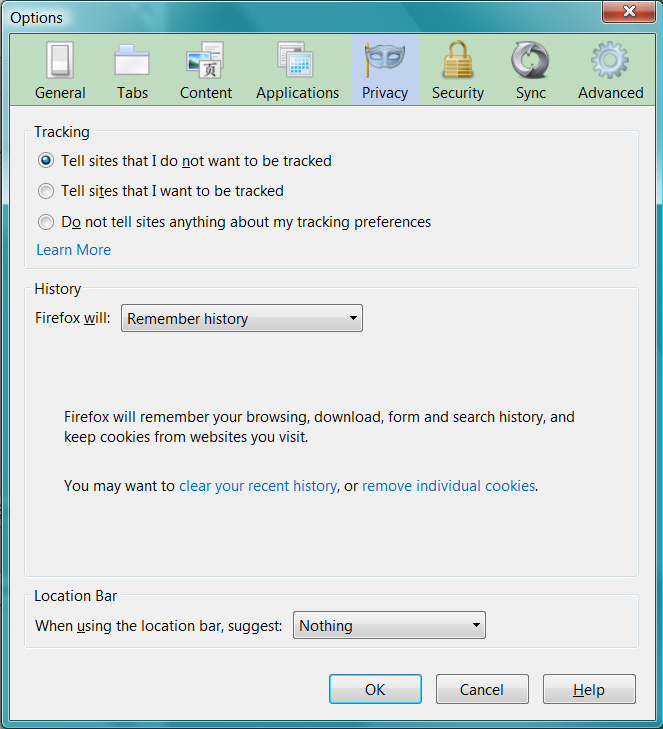
To see all History and Cookie settings, choose:
- Tools > Options > Privacy > Firefox will: "Use custom settings for history"
Thanks, cor-el; found it, removed the check. I'm trusting that will take care of the problem. Again, thanks to all.