


How do I move the "Open a New Tab" button to the left side instead on on the right

How do I move the "Open a New Tab" button to the left side instead on on the right
Wubrane rozwězanje
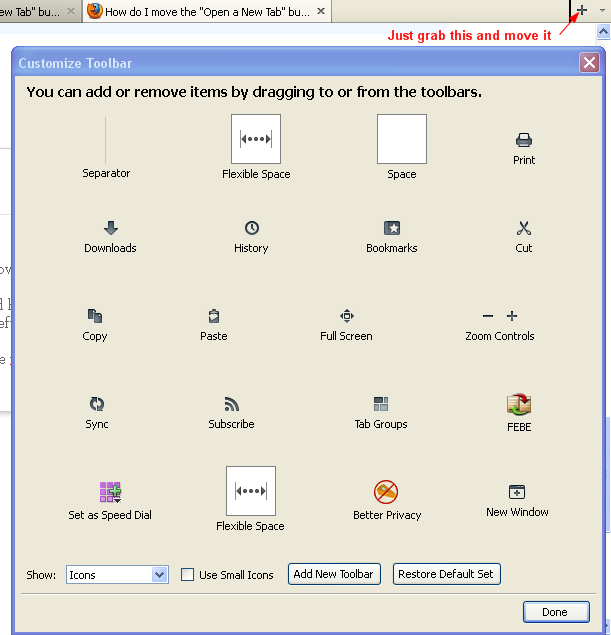
You need the Customize window open first in order to move around toolbar icons and on/off. Both of us stated that you can move the New Tab icon which is sitting on Tab bar and looks like a + to another toolbar or on left side of tab bar.
Wšykne wótegrona (9)
Hey Double-D,
This is actually really easy. All you have to do is right click in a blank section of the header and choose Customize. Then just drag the + symbol to the left side of the page.
You should look at the Knowledge Base article on customizing the toolbar. It will give you all the help you need.
Hopefully this helps!
No that is not what I asked for
I Want to move the + icon that is to the right of the tabs NOT add another ICON on the tool bar
How do I move the + icon on that appears next to the tabs
He did answer the question.
When you have the Customize window open you can then drag that + icon to another toolbar and it will then turn into a New Tab icon like before.
OK My mistake, I was under the impression that the tabs were not a tool bar
I don't see a OPEN NEW Tab button when I open customize toolbar - where can I find that

Wót Double-D změnjony
OK I figured it out
The new tab ICON is not listed in the customize window
I did however figure out that I can just drag (click and hold the icon on the right of the tabs) "Open New Tab" and just move it to the left
I think others were telling me this but I expected to see teh open new tab in the customize window that was displayed
Wubrane rozwězanje
You need the Customize window open first in order to move around toolbar icons and on/off. Both of us stated that you can move the New Tab icon which is sitting on Tab bar and looks like a + to another toolbar or on left side of tab bar.
Yeah thats what I said - It was my fault
I think 'others were telling me this but I expected to see the open new tab in the customize window that was displayed
my problem is that when FF is in Customize mode, the [+] tab is on teh far right, but after I click ok it closes to the far left.
this change is very recent, I did not change anything intentionally.
fixed it, opened a new FF instance, recreated my pinned tabs.
now it is back to normal.