


Sometimes a plugin-container.exe instance starts hogging a ton of memory -- I would like to know which plugin is running inside that plugin-container without having to one-by-one disable the plugins. Which process called plugin-container.exe?

As described above, I have several instances of plugin-container.exe running, which is OK. It would make me feel safer to know which plugins are running inside each of these, since I would be better able to know whether there is malware running inside one of them, or which website might have made the process start hogging memory. I am a power user, I usually have 80-100 tabs open, and of course it is hard to track the website or plugin down without having to waste a lot of time. Could you provide in future releases this information? Is it already available under one of the about: pages (e.g. config, plugins, memory, etc?)
Wšykne wótegrona (9)
The plugin is Adobe Flash. Whenever you go to a flash website or watch videos online, memory usage goes up for that process.
Thanks Efreak!
Maybe I was not clear. I usually have 4-5 plugin-container.exe processes running. I know now that the large one that hogs is the Adobe Flash player, but, for example I don't know which plug-in initiated the other plugin-container.exe instances.
One of them actually says "googletalkplugin.exe" if you dig deep, which is OK. At least I know why the plugin-container.exe was started. But there are other instances that are just there and there is no way to figure out which plug-in initiated it.
This would of course also help figure out if it is really the Adobe Flash plug in that is hogging all the memory, OR even if within Firefox in the about: pages one could figure out which TABS are using which plug-ins.
Like that you could freely choose to terminate the process directly, or close the TAB.
1) What I am looking for is a way to determine which plug-in is running under which instance of plugin-container.exe
2) Additionally it would be great to have a summary of which TABS are using which plugins (e.g. in the about:plugins page or yet another about: page)
Thank you
Wót opaddr změnjony
I'm sorry, but I can't help you with this problem, I personally only have one plugin container process running. I've never heard of multiple plugin container processes. I've always thought that the one process handled all the plugins.
OK, that's strange. Would be good to hear if anyone else knows why there are several plugin-container.exe processes out there. I thought it was because each plug-in runs separately??
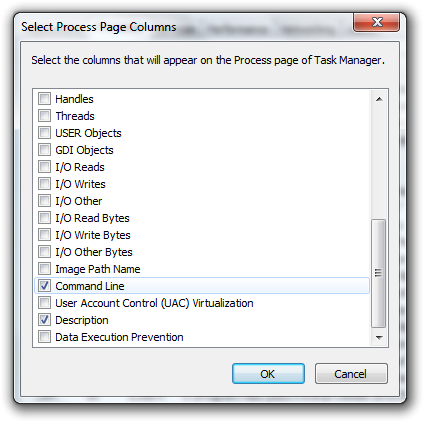
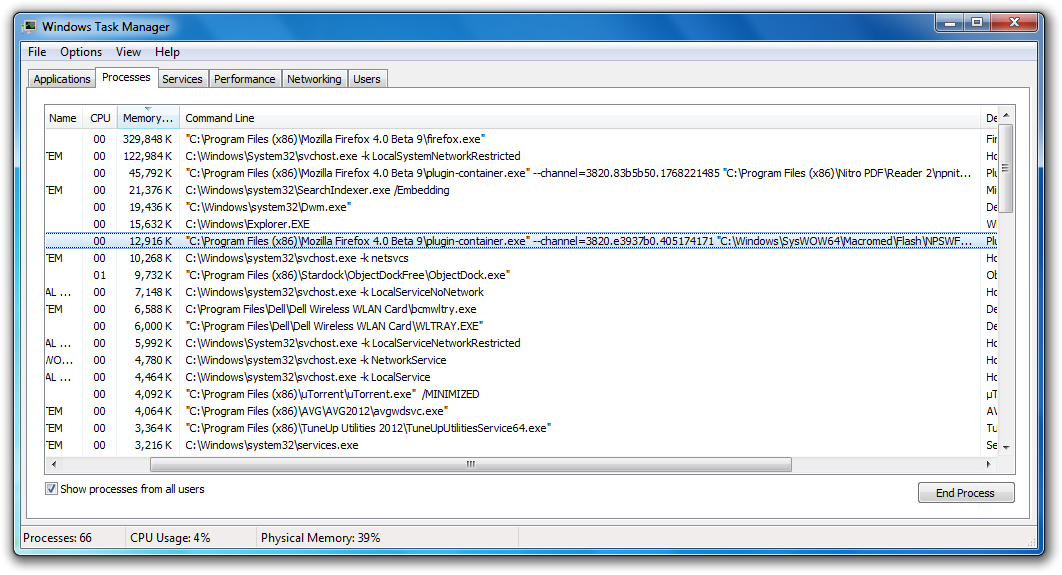
I'm sorry, you were right, each plugin does have a separate process when they are running at the same time. I just tested a pdf reader plugin with the normal flash one and there were two. >>>>>>>>>>>>>>>>>>>>>>>>>>>>> I did find out how to identify which plugin uses each plugin container process. All you have to do is open task manager, and make sure you have the command line view selected. Then expand the command line column to see the full path of the specific plugin. From there you can decide if you want to disable the specific plugin. See the screenshots below. The second screenshot you can see that the adobe flash pugin and nitro pdf plugin are running.
Wót Efreak101 změnjony
Hi Efreak!
Thanks, that actually helped. Nevertheless, full disclosure, it only helped if I ran the task manager with administrator privileges. If I did not select those privileges then the information in the command line column for plugin-container.exe was empty.
Thank you for your help!
It turns out that Silverlight is usually using a lot of resources. Additionally it would be good to easily know which TABS are running which plug-ins in order to stop the TABS, instead of just killing the process.
Yeah, I noticed that the Silverlight plugin process stays open (until browser restart) even if you close the tab that was using it. That could amount to a lot of plugin processes.
Wót Efreak101 změnjony
I used the solution by AliceWyman in this thread.
https://support.mozilla.com/en-US/questions/713600#answer-8632
Disabling that dom.ipc.plugins released 500 MB of RAM straight away and my browsing speed also picked up.
I don't know why FF puts such performance degrading plugins in an updated version.
My FF 8.0 uses about 180 to 350 MB depending on no.of tabs open.
Wót amkeew změnjony
Thanks for the informative link @amkeew. So @opaddr you can disable the plugin container process of certain plugins or all of them. From the article: "If you only want to disable certain plugins from running "out-of-process", you can "blacklist" each plugin by creating a new boolean preference dom.ipc.plugins.enabled.<filename> and setting its value to false. Filenames of specific plugins can be found in about:plugins and should be entered in lower-case. For example, to disable OOPP for the Adobe Flash plugin on Windows, create a new boolean preference named dom.ipc.plugins.enabled.npswf32.dll and set its value to false." In your case, you could disable the silverlight one.
Wót Efreak101 změnjony