


The flyout menus for choosing From: and To: cities are not working on southwest.com despite clearing cache and cookies on Firefox 3.5.16.

When using both Firefox 3.5.16 on Windows XP and the Debian GNU/Linux branded Iceweasel 3.5.16, the menus to select the To and From cities do not appear. Normally the fields are temporarily filled with "From", "To", "Depart", and "Return" but they are not filled in when the browser loads.
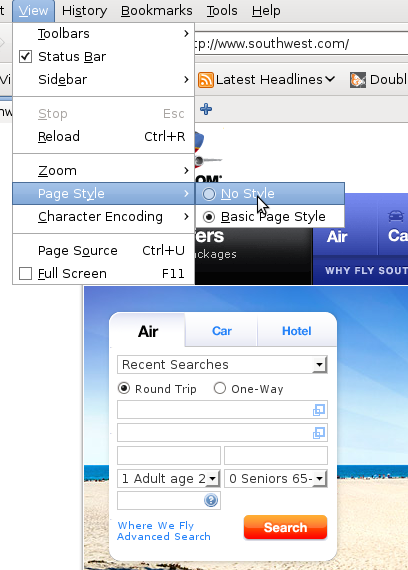
This can be worked around by going to View -> Page Styles and selecting No Style that will display a non-CSS stylized form which can be used.
Wšykne wótegrona (3)
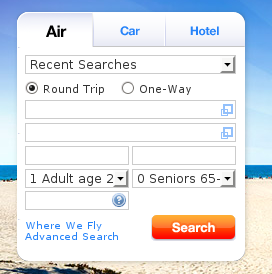
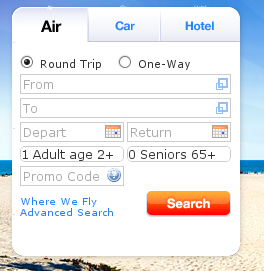
Attached are two images from what is seen with Firefox and with Epiphany (a Gecko based browser for Gnome). On the Firefox one you can see that the fields are blank. On the Epiphany one you can see there is some text in the fields and that there are calendar buttons for the dates.
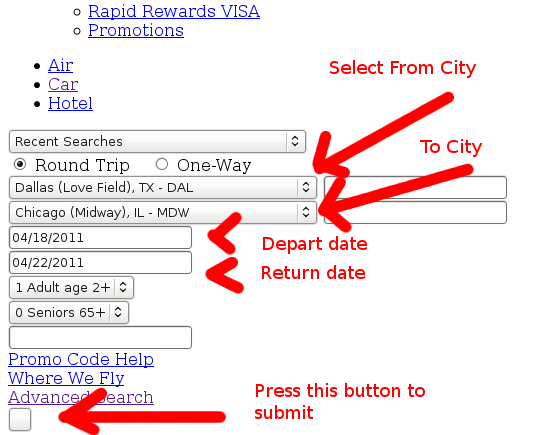
Here is an illustration of the work around that involves disabling CSS temporarily:
View -> Page Style -> No Style
Enter the information as indicated by the red arrows and press the button with no text to submit (or press enter in a text field).
On the next page you should able to enable CSS
View -> Page Style -> Basic Page Style
This webpage appears to work correctly: http://www.southwest.com/flight/shortcut/low-fare-search.html