


"too many sessions" during smtp verio.com, with filtaquilla. [was I need a filter on a message to FULLY FINISH before a next message starts to be filtered."

I need a filter on a message to FULLY FINISH before a next message starts to be filtered. The "help" (quotes because it's an abyssal crap) says that simply ending the filter with Stop Filter Execution does it - but that's simply NOT TRUE: calling a console program in the filter, I can see five DOS boxes opening at the same time with five messages matching, i.e. the filters on the next message DID NOT wait! So... what can I do??
All of the above is because I'm getting "Too many simultaneous connections on the server". I'd like to limit the concurrency, but it only seems to be possible in IMAP, while this connection is a POP. Why only IMAP??!
Wót Wayne Mery změnjony
Wšykne wótegrona (18)
Starting with your problem symptom "Too many simultaneous connections on the server"...
1. How many pop accounts do you have? 2. Do any of your filters move messages to a different account? 3. Do your filters have more than one action (other than Stop Filter Execution)?
Hi Wayne, Thank you for your followup.
In reply to your questions: - I have three POP3 accounts serviced by that TB - None of the filters moves messages to another of those POP3s, but the very filter causing the "too many connections" forwards the filtered message to another address (a Gmail) which is not serviced by the TB - Yes, several of my filters have multiple actions, typically running a program of mine (that does no mailing) and then moving known trash to a local folder. The problematic filter (1) runs a program (no mailing), (2) forwards the message to a gmail address, (3) moves the message to a local folder, (4) calls a program that sleeps for a few seconds (my desperate and so far futile attempt to solve this problem) and (5) stops filter execution. This is the top filter (i.e. the 1st applied to a message).
When I call filters on five matching messages, I see five DOS boxes open immediately... although the sleep program waits for ten seconds!
Thank you for your help!
Emanuel
> When I call filters on five matching messages, I see five DOS boxes open immediately... although the sleep program waits for ten seconds!
You wouldn't see this with stock Thunderbird. Do you have the extension filtaquilla installed in Tools > Add-ons?
The DOS boxes came from the sleep program. I have now yanked it from the filter and no DOS boxes.
But yes, I do have FiltaQuilla add-on installed in TB.
E.Falkenauer said
The problematic filter (1) runs a program (no mailing), (2) forwards the message to a gmail address, (3) moves the message to a local folder, (4) calls a program that sleeps for a few seconds (my desperate and so far futile attempt to solve this problem) and (5) stops filter execution. This is the top filter (i.e. the 1st applied to a message).
I would guess that the problem lies in the execution of the send Vs Thunderbird choice of SMTP server for that send. Thunderbird makes some rather odd choices at times regarding the SMTP server to use in a filter to Forward.
It may be the SMRP for the identity that received the email, or it might be the "default" SMTP and that appears to be affected by your choice of folders. if you are not using ALL try that first. Then check that all of your SMTP server are functional. I have seen the to many connections error fed back by an invalid SMTP credential (in that case the person had set it for no password hat a password was required, so one connection exceeded the servers connection limit.
The other common cause is related to IMAP and you specifically talk about POP
What is the connection error verbatim please.
> if you are not using ALL try that first
Huh, what "ALL" are you referring to?
But gosh, you may be onto something: now the message is - see the screenshot (too many sessions). 😵
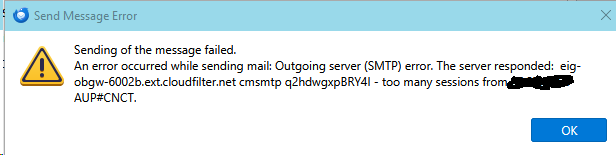
Oh no, it's the same message as before... 😢 Well not quite: it's too many sessions, not too many connections!
Wót E.Falkenauer změnjony
but what9is that server name?
Ok I googled that error and the AI came back with
This string is an outbound mail server error log from an SMTP transaction routed through CloudFilter (an anti-spam and email-filtering gateway used by major web hosts like Endurance International Group/EIG brands). It indicates that an outgoing email was blocked or rejected due to a violation of an Acceptable Use Policy (cmsmtp rejection).
it is largely based on this source from 2022 https://community.verizon.com/discussion/1251485/emails-not-arriving-to-vtext-com
Essentially the issue is your server is rejecting your mail, not a Thunderbird issue at all. My guess is your provider has rate limited your IP address and your filtering is sending the forwards to fast for their limits. But6 as you make no mention of your provider I can not form any sort of view as to what their sending limits may be.
SO it looks to me you need to determine what the sending limits imposed by your mail provider are and how you are exceeding them, not getting Thunderbird to filter things completely before moving to the next topic.
Let's try an experiment and see if it makes any substantive change.
- Disable the filter when getting new mail
- Place Thunderbird in offline mode.
- Run the filter against the folder manually
- Take Thunderbird back online to allow the sending of outgoing mail accumulated in the outbox.
Is there still an error? That should force a single send for each execution of the filter rather than for each match in the new mail. It might shed light as to the issue being numerical (number of emails) or connection frequency.
Wót Matt změnjony
Our IP (including mail) is verio.com.
Let's try an experiment and see if it makes any substantive change.
   Disable the filter when getting new mail
   Place Thunderbird in offline mode.
   Run the filter against the folder manually
   Take Thunderbird back online to allow the sending of outgoing mail accumulated in the outbox.
Is there still an error?
-- Will try. Thanks!!
No luck...: - With five messages in the remote inbox matching the filter, I went offline (said No to Download now?) - run the filter, and got five error messages (attached) that SMTP is unavailable (obviously, because offline) - the Outbox remained EMPTY - Went online again - The messages WERE MOVED to the local folder - But NONE was sent to the Forward address
Phew...
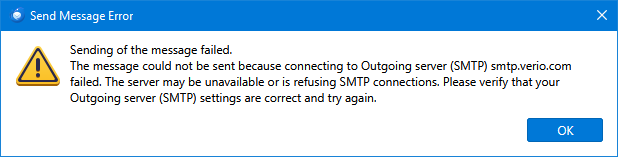
Modest progress:
Running the Sleep program (five seconds wait) AFTER the Forward but BEFORE the move to the local folder... produces - 👍 No error messages - 👍 Moves all the messages from the remote inbox into the local folder - 👍👎 Forwards THREE OF the FIVE matching messages to the Forward address.
It's _nearly_ ok... I guess the two lost messages are due to the "too many simultaneous connections"?
Thank you for your help!
Jeeez, this SHOULD BE ABSOLUTELY TRIVIAL!!!!
I simply want messages coming from a certain address to be forwarded to another email address and moved to a local folder.
But it appears IMPOSSIBLE IN TB, because (1) TB cannot limit simultaneous connections in POP (while it supposedly can in IMAP - what's the idiotic deal??!) and (2) it runs filters simultaneously on all matching messages, even though it's supposed NOT to do that with Stop Filter Execution.
What's so f***ing DIFFICULT???!!!
> It's _nearly_ ok... I guess the two lost messages are due to the "too many simultaneous connections"?
So it's not an imap or pop problem. As Matt said, "too many sessions" suggests throttling by your service provider in the smtp step of sending emails. Unless Thunderbird has chosen the wrong smtp server, I don't see how this can be fixed by Thunderbird. What happens if you increase the delay?
> What happens if you increase the delay?
What "delay" are you referring to?? The one I'm trying to insert since a week now to avoid server access simultaneity... without success, because TB filters all messages in parallel (and I have 32 threads in my machine) and there is apparently no way to avoid it... which causes congestion on the SMTP's side? Even though it's supposedly a piece of cake with "Stop Filter Execution" as per TB documentation?? [Hint: that's a plain lie.]
You're right in one point: the problem is undoubtedly caused by too many simultaneous server requests... *initiated by TB*. Ergo it should be TB's job to avoid that problem, by limiting the concurrency, as it's supposed to do in IMAP. What's preventing you to from limiting the number of active threads in POP as well??!

> What's preventing you to from limiting the number of active threads in POP as well??!
You mean SMTP threads I think.
Let me state how I think you are set up and what *might* be happening.
You have 3 pop accounts with filters that forward messages and then move them to local folders. I think you are probably using the same SMTP server on each pop3 account (verio.com smtp server). I suspect that all 3 smtp servers setup for the accounts are actually separate smtp accounts even though they use the same address, ports etc. So when all 3 pop accounts receive a message that triggers the filter to do a forward, tb creates 3 smtp clients and connections to the server which may exceed the number of simultaneous connections or sessions.
If this is true then the solution would be to go into Server Settings for each pop3 account and make sure that Outgoing Server is selected to the SAME verio smtp account.
If all 3 pop3 accounts are now using the same/common smtp account, tb should only make 1 client instance for that smtp server and one connection at a time and avoid the complaints by the verio smtp server of too many connections/sessions.
gd_smth said
> What's preventing you to from limiting the number of active threads in POP as well??! You mean SMTP threads I think. Let me state how I think you are set up and what *might* be happening. You have 3 pop accounts with filters that forward messages and then move them to local folders. I think you are probably using the same SMTP server on each pop3 account (verio.com smtp server). I suspect that all 3 smtp servers setup for the accounts are actually separate smtp accounts even though they use the same address, ports etc. So when all 3 pop accounts receive a message that triggers the filter to do a forward, tb creates 3 smtp clients and connections to the server which may exceed the number of simultaneous connections or sessions. If this is true then the solution would be to go into Server Settings for each pop3 account and make sure that Outgoing Server is selected to the SAME verio smtp account. If all 3 pop3 accounts are now using the same/common smtp account, tb should only make 1 client instance for that smtp server and one connection at a time and avoid the complaints by the verio smtp server of too many connections/sessions.
I tried this with 3 separate pop3 accounts going to same provider all with different mail addresses. My provider wouldn't allow it, but others may. So this is not a valid general solution.
I think you are right and there needs to be a limit on number of simultaneous smtp instances to the same server logged in with different email addresses and passwords.
I did this google (AI) search: "if I have 3 pop3 accounts with same provider, can all 3 accounts use the same smtp account for sending?"
It came back and said it is possible but can vary by provider. It asked for providers and I enter mine: charter.net. I came back and said, as I have verified, it's not allowed: "charter/spectrum enforces a strict anti-spoofing policy. The outgoing SMTP server will check the credentials you use to log in against the "From" address on the email. If you log into SMTP using account1@charter.net but try to send an email as account2@charter.net, the server will reject the message to prevent unauthorized email spoofing."
Then I asked about your provider verio.com: "With verio.com, all three accounts can typically share a single SMTP configuration for sending mail. Unlike residential internet service providers like Spectrum (Charter), Verio functions as a business web and domain hosting platform."
Since I don't have a verio account I can't independently verify this, but it does sound like my work-around suggestion just might work with verio.com.