


Can someone help me in real time? I have to move twenty years of records to a new computer.

I have Thunderbird on the old computer. For twenty+ years I have read the instructions for moving it to the new computer. i cannot understand/am not at all confident in my ability AND I have only ONE keyboard/mouse. I have to move it from one computer to the other to operate them.
Right now all email is on the old computer, no email is on the new computer. No email has ever been on my cellular telephone. One set of periforals - keyboard/mouse.
I DO have the Bravura, the Plugable transfer cable and accompanying software, and many other things came across, but not the Thunderbird.
I want to do the move/installation correctly so that not one stored email is lost or corrupted.
I need help.
Wšykne wótegrona (23)
These steps work for most:
- ensure thunderbird is NOT running on old machine
- enter %appdata% in search window on task bar and press Enter key
- this should open windows file explorer in Appdata\roaming folder
- highlight the Thunderbird folder and copy to external media
- ensure thunderbird is installed on second computer, started once and NOT running
- enter %appdata% in search window on task bar and press Enter key
- you should be in Appdata\roaming folder. DELETE the thunderbird folder there
- now , paste your copied thunderbird folder there.
- start thunderbird and all should be there
it is so confusing. i will not be able to complete these tasks without making a mess of them. turn on, turn off, delete - that all sounds so risky. and what is external media? i don't understand what that is. so the connecting data transfer cord is not applicable? and what is turned off? the computers or the Thunderbird.... so 1) Do not open Thunderbird on the source computer 2) do i need all the percentage marks on the word app data? 3) what is external media? 4) how should I install thunderbird? do I get an entirely new download in the new computer? do I need to load it in with all the information abouit POP3 and passwords before I transfer anything? I mean, start from scratch as though I have not been using it for twenty years? 5) - now this second command to open app data - this is on the new computer, correct? I am Deleting the newly installed thunderbird? this is really confusing. mostly this thing about "external Media" - and that can't be the BRAVURA Plugable Transfer Cable? those are the points that seem to cause me stumbling blocks. thanks -candace at least the second keyboard/mouse came in the mail...
Wót zelda9 změnjony
ok. i downloaded Thunderbird. It remembered everything, but no files, of course, and that is what we are talking about, isn't it?
My reference to external media is because most do not have a connecting cable and must copy the data to a USB stick and then to the receiving computer. The download should be just as instructed: no accounts, nothing. Just install, start it, and then exit.
i apologise. I am still confused about what to turn off and when and what to copy and how and I really need help. SOmeone who is patient enough to stay on the phone or computer and walk me through it step... by very slow and cautious step. I am sorry. I just do not get enough of it to feel that I will not completely ruin everything.
After the download it loaded a thousand+ emails and remembered all my personal data
Wót zelda9 změnjony
i turned off thunderbird in the old computer app data
and entered app data in the search and it didn't show me thunderbird, or any other application
the screen lists this PC, 3D objects, desktop, documents, downloads, music, pictures, vidos, OSC, HP Recovery, DVD RW Drivethree USB drives and Local Disk L and some old Microsoft office stuff I have no idea
Not app data but %appdata% - the percent signs are part of it. What I gave are detail steps to follow. If you are uncomfortable with that, you may do better by having someone else read the steps and follow them. I do understand your caution.
i DID ask if the percentage marks were part of it. using the instructions online from mozilla support, i have got as far as the copying of the thunderbird folder, now I am wrestling with the plugable application. Nobody here, just this chicken
Wót zelda9 změnjony
Once thunderbird in installed on new PC, just copy the appdata\roaming\thunderbird folder from old PC to overlay the thunderbird folder on the new PC at appdata\roaming\thunderbird. Be sure that thunderbird is not running on either PC while doing this.
i followed instructions carefully... the data I was trying to move sems not to have moved.
I did the procedure with finding the Thunderbird folder (up three) in the old computer, closing thunderbird, copying the folder to a usb stick, moving it to the other computer, finding the Thunderbird folder (up three) on the new computer, closing Thunderbird, pasting from the USB...
But I am not seeing the area on the left under my email address or under local folders where I would expect that MANY files and folders should populate the field. Am I looking in the wrong place? or perhaps just not activated? Computer has been turned off and started again since the procedure. Under my email address all i see is inbox, sent, trash, and drafts Under local folders, only drafts, trash, and outbox - and it will not allow me to empty trash under local folders. Also, I would expect all these files/folders to be listed there if the data transfer worked. Please advise. Thanks!
Can you post a screenshot of what you see? That will be a big help.
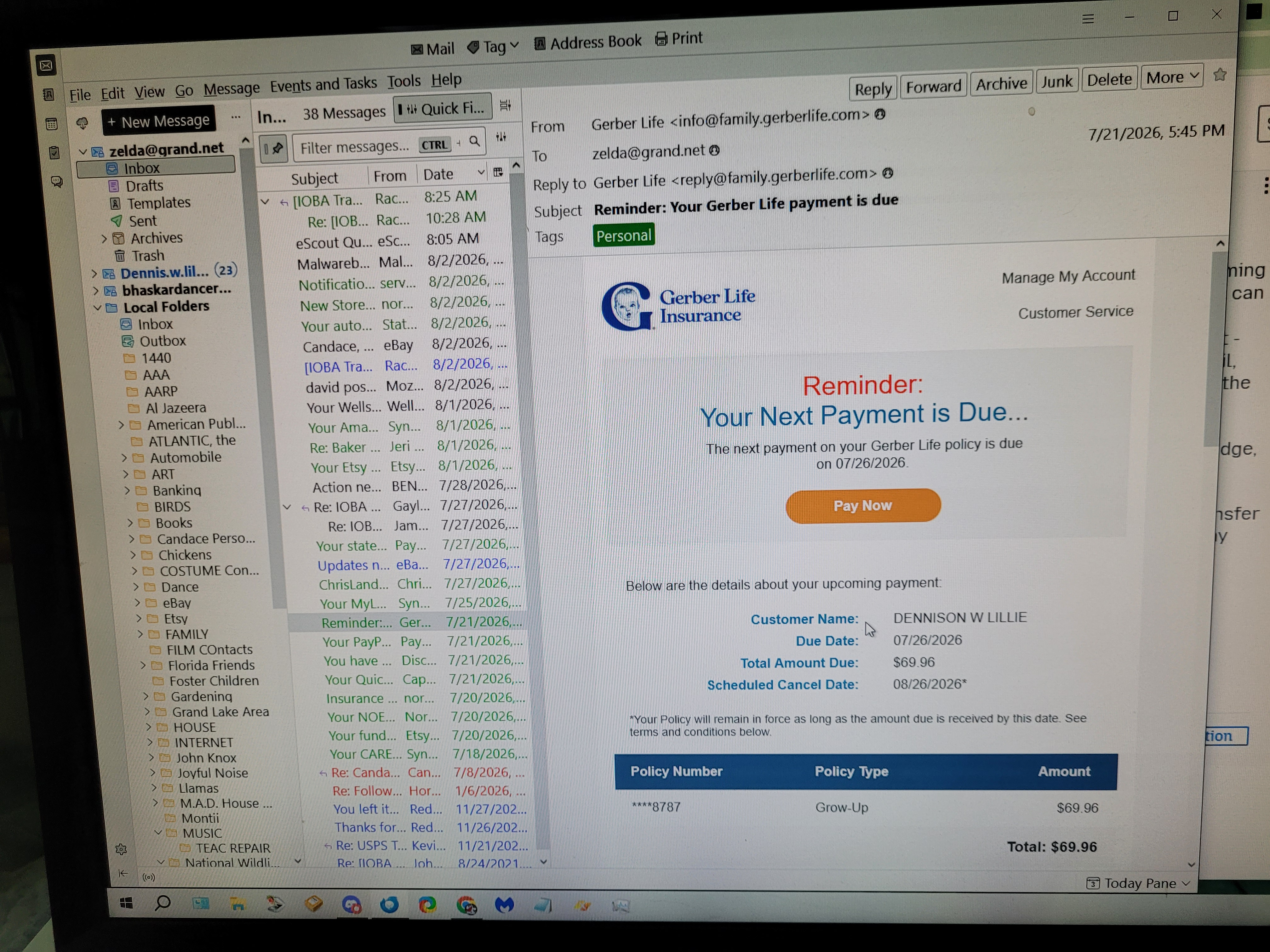
YES! OK. Here we are. The Thunderbird on the old computer has a column to the left of the incoming and text that has ALL the files and saved emails for twenty years, and you can access them. This is what is missing from the new Thunderbird. Also, my son managed to put several things up in the space above the text - like a personal task bar above - so I could access them. Shortcuts to email, TAGS, and the address book. I can't figure out how to do that by myself in the new computer.
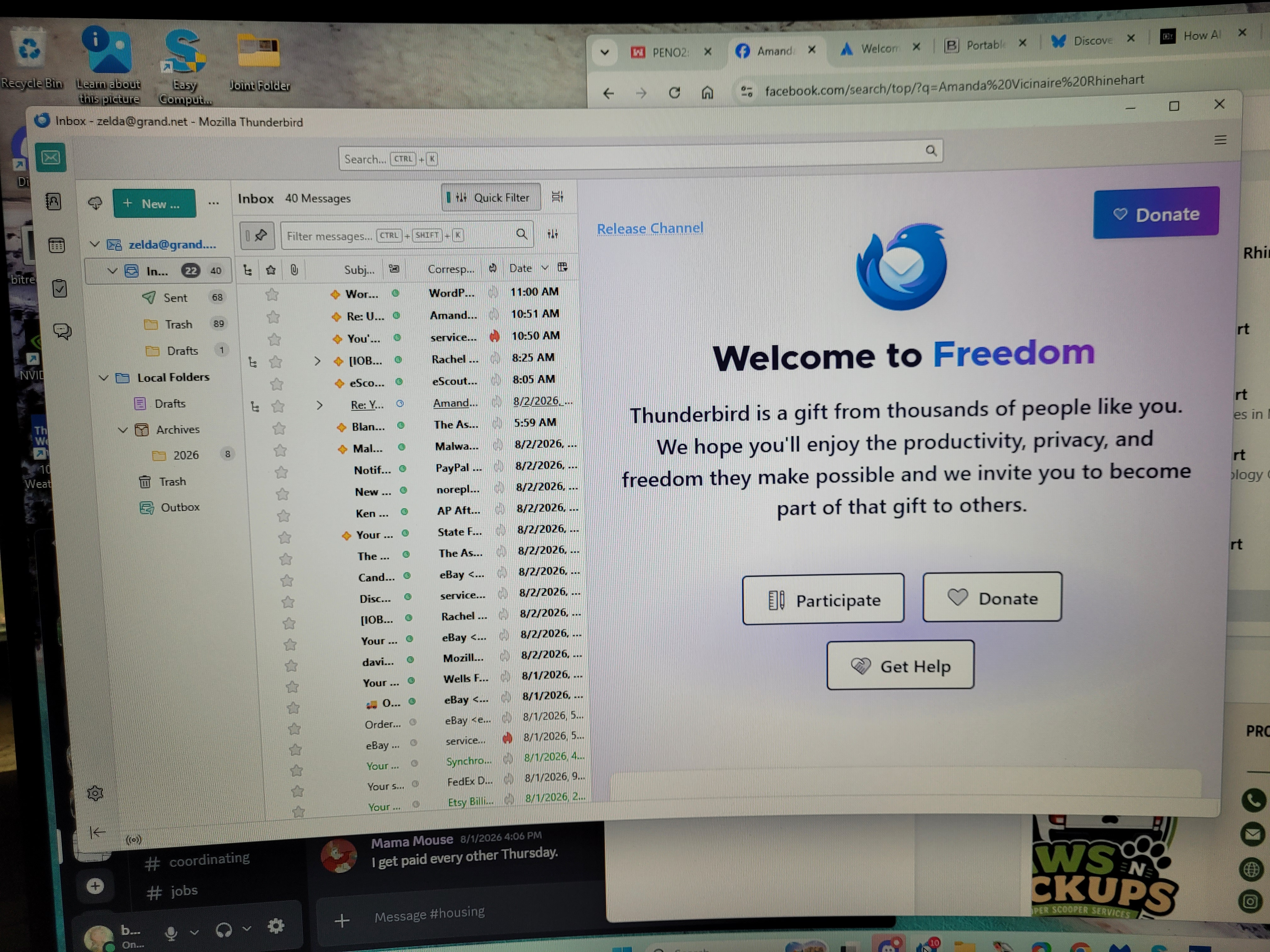
Image on the left shows my screen with all the files showing on the left edge, shortcuts above - TMI... Old Computer. Image on the right is the new computer. Column on the left is bare naked, even after the procedure with the USB drive. I need to find out how to transfer all these stored files and be able to access them. It is the foundation of my online business. Thanks
Wót zelda9 změnjony
having difficulty with the second image. trying again
Wót zelda9 změnjony
new computer, left column missing after usb file transfer
Let's start over:
- on old computer, be sure thunderbird is not running
- enter %appdata% in the search box on task bar
- that should open to appdata\roaming folder
- COPY the thunderbird folder to a USB stick
- on new computer, start thunderbird and then exit
- enter %appdata% in the search box on task bar
- DELETE the thunderbird folder
- PASTE your copied thunderbird folder there
- start thunderbird
The above steps are numbered. If you encounter problem, let me know at what number you had the problem.
What is missing? It all looks there. Please be specific. thank you
What was missing was all the files visible down the left edge of the Thunderbird screen in the original computer - my contacts and comminication history. many stored files. NONE of those files transferred the first time I tried it,not in that window. I have not had a chance to go through the procedure again.. I will do this again following your step-by-step list. Those files on the left are the ONLY thing I am concerned about. And the thing that would make it impossible to operate my business on the new computer if they are missing. This is the main reason I have not thought about a new computer. Transferring the stored files in Thunderbird. in the second image - they are not present. the first attempt was not successful. I have not yet tried it again yet using your most recent step by step guide. Please give me a day. left image: Old screen with many files going down the left side of the screen right image: new screen- which we will be deleting when I impliment your instructions, with NO files on the left.
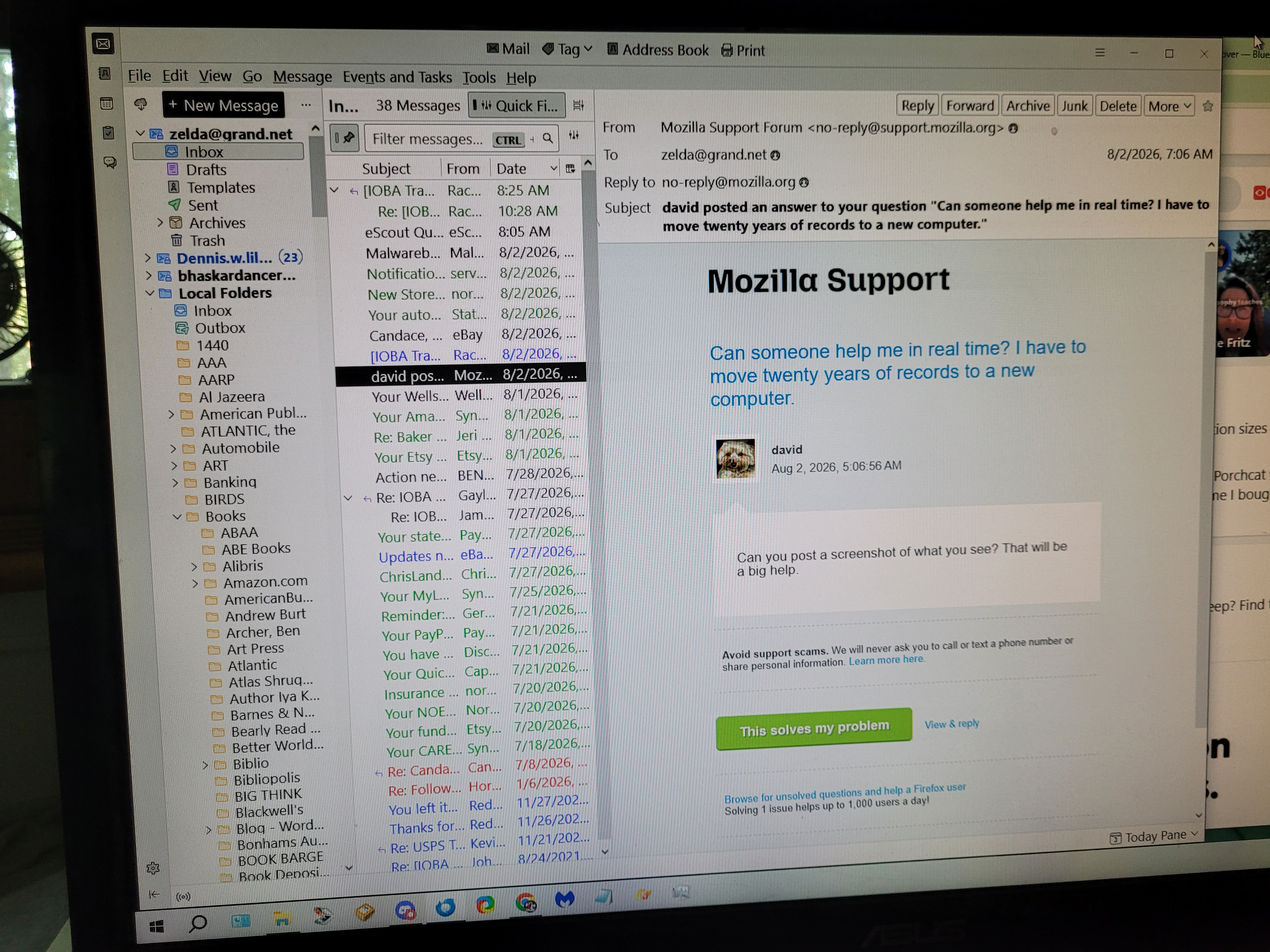
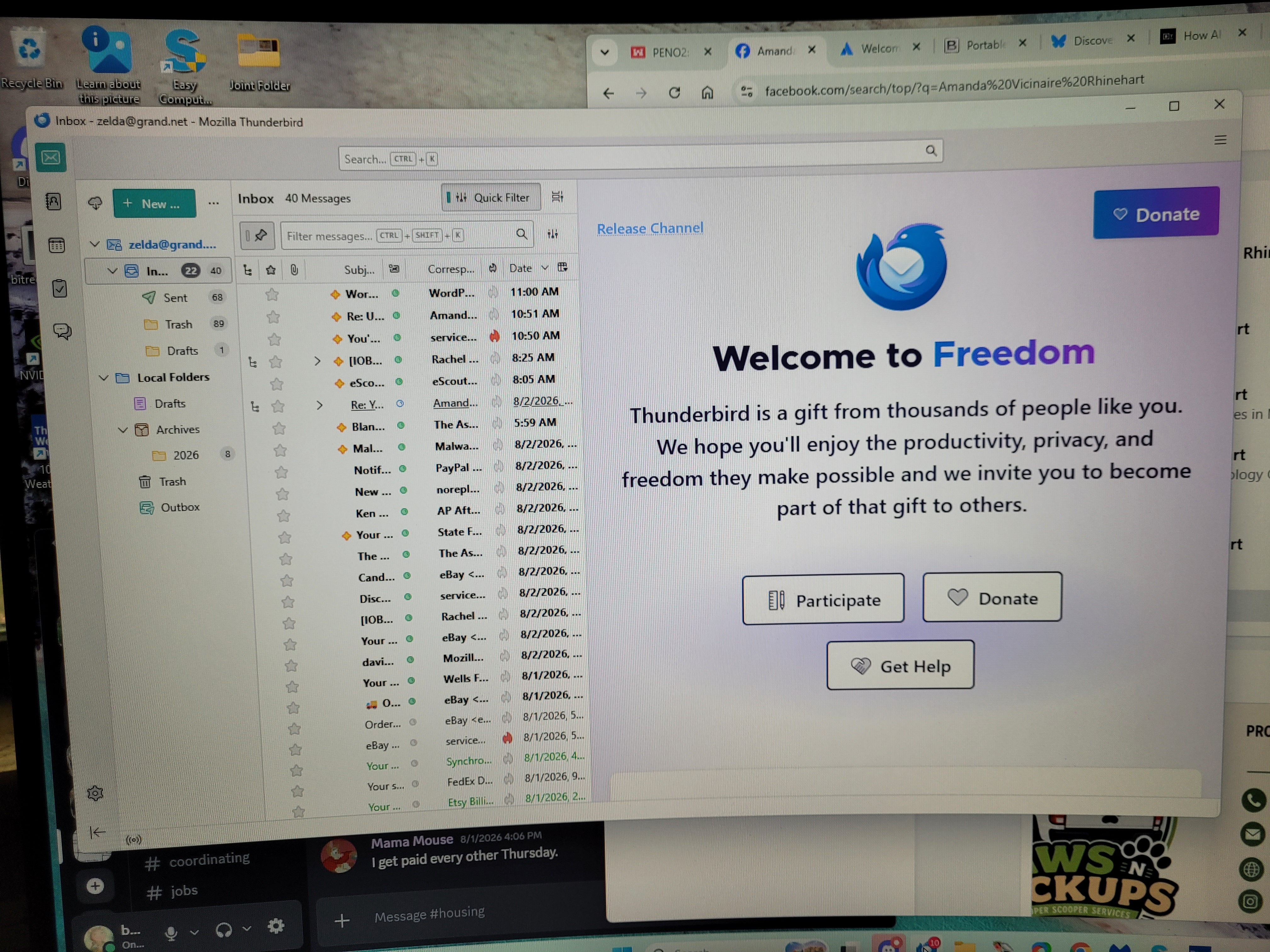
It appears that you somehow copied everything except Local Folders. If all else fails, that can be imported separately. When the steps are carefully followed, everything is copied. Let me know how it goes.
I am doing it now. The process of file transfer is very stressful for me. I had to have a quiet house and some uninterrupted time, but in a ... nope I did not get the copy paste right at the other end. i DO have the thunderbird on a USB now, but it did not paste correctly into the new computer it did not appear in the roaming folder it pasted to the wrong place. I will try steps 6, 7, and 8 again
OK, second attempt put a file name in the roaming window. waiting for the transfer to finish